How MSPs use domain security reports to win new clients
 ChatGPT
 Claude
 Gemini
 Perplexity
 Grok
In brief
Domain security reports to win MSP clients: turn public DNS findings into a scoped prospect conversation without overstating what a score proves.
Domain security reports help MSPs begin a prospect conversation with evidence from the prospect's public email-security DNS records. Run a public assessment, separate verified findings from unknowns, and use the report to agree on the next scoped assessment instead of claiming that a score proves compromise, compliance, or inbox placement.
At a glance
Quick takeaways
- A public domain security score is a point-in-time assessment of published DNS controls, not an audit of a prospect's whole environment.
- Palisade's Email Security Score checks DMARC, SPF, DKIM, MX, MTA-STS, TLS-RPT, and BIMI records.
- Palisade uses score bands of
80 to 100 Great,60 to 79 Good,35 to 59 Needs work, and0 to 34 Criticalto prioritize findings. - A prospect report should distinguish public evidence, client-confirmed facts, and questions that require access or message evidence.
- An MSP can create a prospecting report in Palisade from
Reports,Prospecting, andNew Report. - A useful first report leads to a defined next assessment, not an unsupported remediation promise.
Operating context and ownership
A domain report is most useful when it is part of an MSP sales workflow rather than a standalone score sent without context. The MSP owns the assessment process, evidence record, report review, and follow-up proposal. The prospect owns confirmation of its business systems, access decisions, and approval for any later change.
The MSP learning hub covers broader multi-client operations. This workflow focuses on a narrower task: using public DNS evidence to qualify a prospect conversation while retaining a clear boundary around what public DNS can establish.
Palisade's Email Security Score is a free, no-signup, read-only public DNS check that returns results in seconds. It assesses published records, not private tenant settings or live mail flow. It cannot inspect mailbox passwords, message content, private reputation data, or inbox placement.
Keep responsibility separate:
- The MSP collects public evidence, identifies questions, and prepares the meeting agenda.
- The prospect confirms which platforms, domains, and sending paths are business-critical.
- The DNS host controls publication of DNS changes.
- Sending-platform owners control settings such as configured SPF, DKIM, and custom domains.
- Receiving mailbox providers make their own message-handling decisions.
- A later technical assessment needs delivered-message headers, platform evidence, and DMARC reporting where applicable.
Evidence to collect
Create one intake record for each prospect before generating a report. This is a Palisade operating framework, not an external requirement. It stops public findings from being mixed with sales assumptions or client-confirmed facts.
Use the public domain as the initial evidence input. Record the assessment date because DNS records can change. Include the score and individual findings, but keep the original report available so the team can revisit the details during the meeting.
client: example company
domain: yourdomain.com
evidence: public DNS score and report generated 2026-11-05
owner: MSP business-development owner
next_action: confirm sending platforms and request a delivered-message sample
review_on: 2026-11-12
Add these fields to the working record:
- Prospect company name and primary contact.
- Domain or domains assessed.
- Public controls checked: DMARC, SPF, DKIM, MX, MTA-STS, TLS-RPT, and BIMI.
- Score band and the specific DNS findings behind it.
- Observations that are verified from public DNS.
- Questions for the prospect, such as which platforms send mail for the domain.
- Business owner for the next conversation.
- Proposed scope for a follow-up assessment.
- Date to review whether the prospect accepted, declined, or deferred the next step.
0 to 100 assessment of public DNS controls. Its bands are prioritization labels, not universal risk classifications. A report in the 0 to 34 Critical range may provide a useful meeting agenda, but it does not establish the reason a record is absent or whether a business system will fail when a record changes.
How to run the workflow
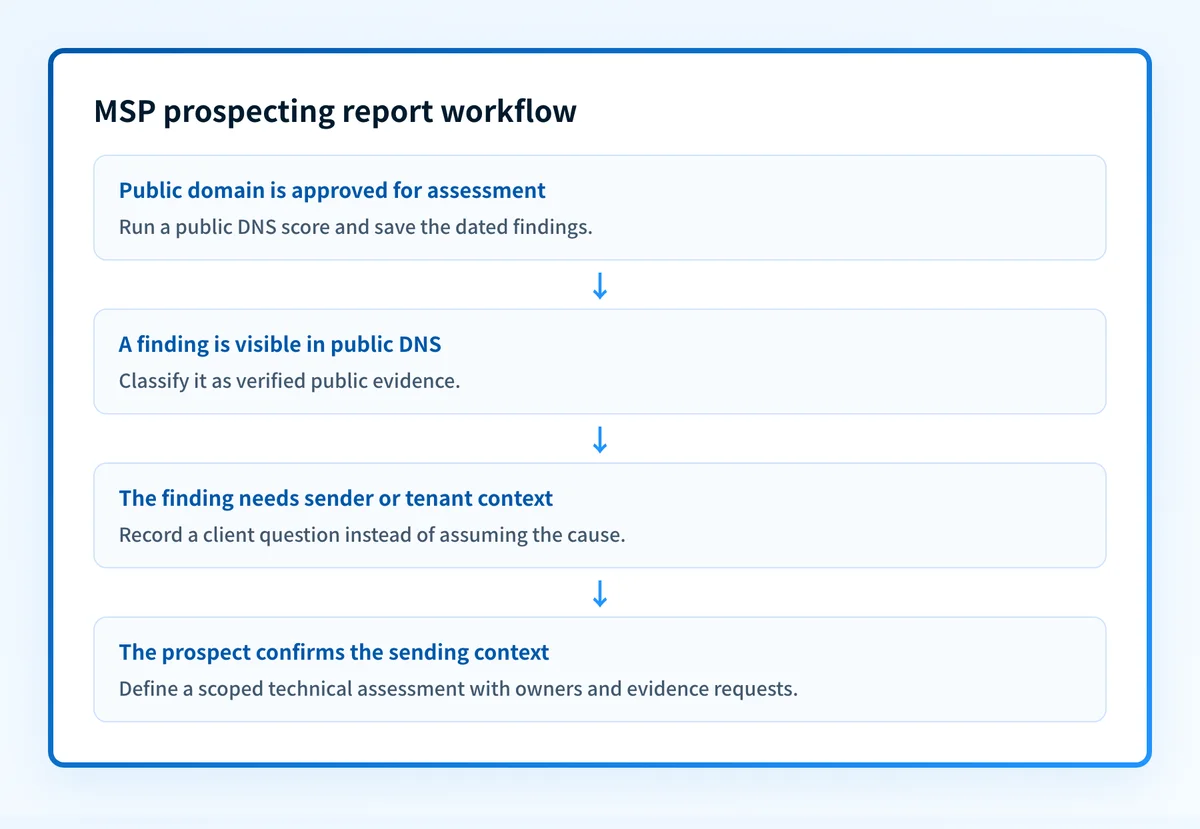
1. Select prospect domains
The MSP business-development owner collects the prospect's public domain names and confirms that the names are in scope for outreach. The input is a prospect list. The output is a dated domain list attached to an intake record.
Use only domains that the prospect publicly operates or has supplied. Do not infer ownership from a similar company name or an email address alone. If a group has multiple brands, record each domain separately because DNS posture can differ between them.
2. Run the public DNS assessment
The MSP assessment owner enters each domain into the Email Security Score tool. The input is a public domain. The output is a point-in-time score and findings for DMARC, SPF, DKIM, MX, MTA-STS, TLS-RPT, and BIMI.
Record the result as public evidence. Do not rewrite a missing record as a statement about the prospect's internal security program. Public DNS can show that a record is published, absent, or malformed from the checker's perspective. It cannot show whether a platform is actively sending, whether messages pass alignment, or how a receiving provider will place future mail.
Do not recommend a DMARC enforcement change from a prospect score alone. A safe decision requires evidence from the sending path, including delivered-message authentication results and DMARC reporting after data accumulates.
3. Classify the findings for the sales conversation
The MSP technical reviewer converts the assessment into three categories. The input is the public score report. The output is a short, defensible meeting agenda.
- Verified public finding: A published DNS control was observed or was not observed in the assessment.
- Client-confirmed fact: The prospect confirms a sender, domain owner, business requirement, or maintenance window.
- Open question: The finding needs platform access, a message header, DNS-host access, or a recipient-side signal to investigate.
4. Generate a prospecting report
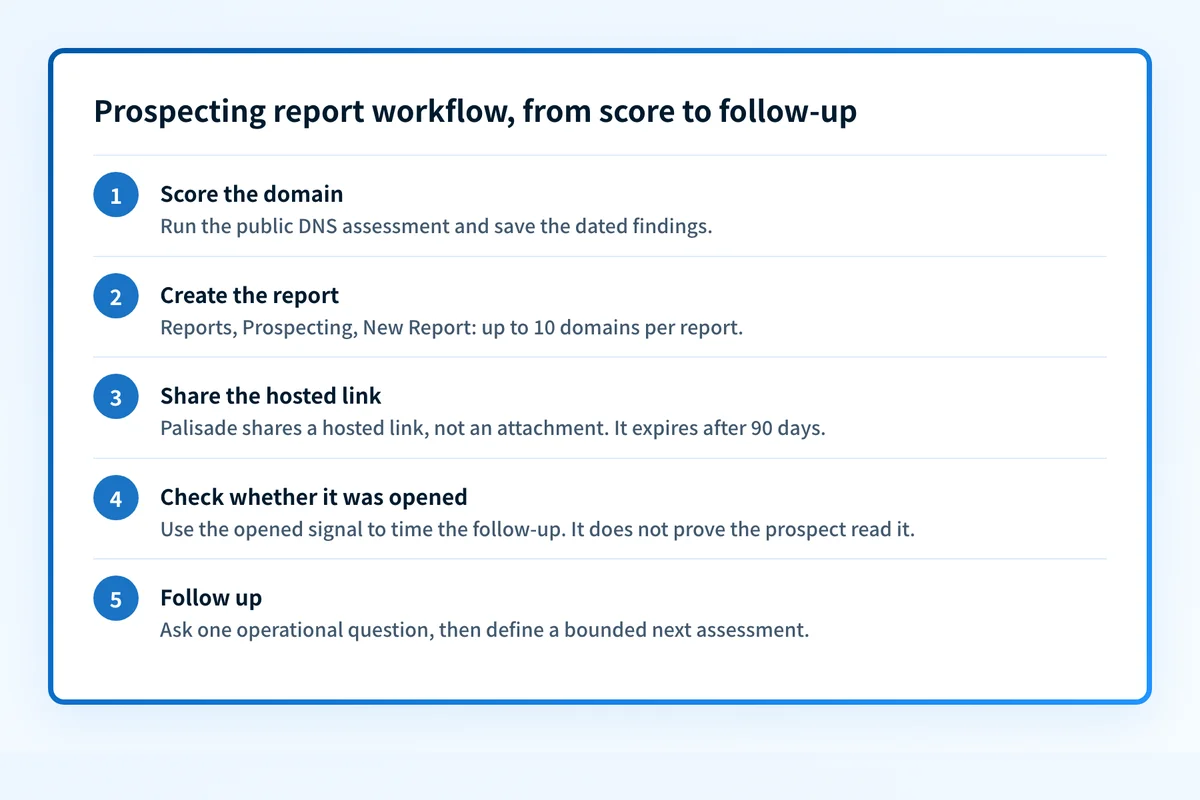
The MSP report owner opens Reports, then Prospecting, then selects New Report in Palisade. The input is the prepared domain list and prospect intake record. The output is a prospecting report, shared as a hosted Palisade link, for the review conversation.
Palisade supports adding domains manually or pasting multiple domains, one per line. A single report can cover up to 10 domains. The report opens on a verdict, such as "Anyone can send fake emails from" the domain, and then grades each domain, worst first. It can include the prospect company name, an English (EN) or French (FR) language selection, and configurable report sections, and you set a deadline of 1 to 52 weeks for the steps it recommends. The report includes an overall score, risk summary, spoofing-risk analysis, financial-loss estimate, brand-and-trust impact, and glossary.
Use the report sections that support the planned conversation. Do not present an estimate in the report as a guaranteed loss prediction. It is a discussion aid within the report, not evidence of an actual financial event.
Palisade says its white-label reports render under the MSP's name and logo. The published documentation does not establish the branding-settings path or whether prospecting reports are included with every plan. Avoid making either claim in a sales promise.
5. Review the report with the prospect
The MSP account owner shares the report and asks the prospect to validate the context. The input is the hosted report link and the evidence record. Palisade shares the report as a hosted link that expires after 90 days, rather than as an attachment, and the MSP can see whether the prospect opened it. Use that signal to time the follow-up, not as proof the prospect read or agreed with the findings. The output is a confirmed next assessment or a documented reason to pause.
Start with the public finding, then ask one operational question:
- A DMARC finding: "Which platforms send mail using this domain, and can you provide a redacted delivered-message header?"
- An SPF finding: "Which provider owns the sending path, and who can confirm its published authorization?"
- A DKIM finding: "Which sender controls DKIM configuration, and can it provide evidence from a real delivered message?"
- An MTA-STS or TLS-RPT finding: "Who owns inbound mail transport policy and its reporting destination?"
6. Define the next assessment
The MSP service owner documents a bounded follow-up. The input is the prospect's confirmed systems and unanswered questions. The output is a proposed scope, owner, evidence request, and review date.
A useful scope might include sender inventory, DNS review, one delivered-message header per important sending path, and a review of DMARC aggregate reports after they accumulate. Do not promise inbox-placement improvement or full compliance based on a public score.
Existing prospecting reports can be edited to change domains, company name, language, and enabled sections before regenerating the report. Update the evidence date when doing so. An older report should not be treated as current evidence after the public DNS records change.
Exceptions and escalation
Treat an assessment as blocked when the MSP cannot establish the domain owner, the prospect disputes domain ownership, or a public finding has no authorized contact who can explain the sending path. Record the evidence, question, owner requested, and next review date rather than trying to fill the gap with assumptions.
Escalate to the prospect's technical owner when:
- A domain may be business-critical but no sender inventory is available.
- The prospect wants a remediation recommendation without message headers or platform confirmation.
- A DNS change requires a client-controlled approval path.
- A finding may affect an active sending program, such as billing, payroll, support, or marketing.
- A public score conflicts with the prospect's claimed configuration.
Reporting and success measures
Use a weekly prospecting queue and a monthly review of report quality. The operational artifact is the intake record plus the report link, questions asked, follow-up scope, and disposition.
Track process measures without claiming that they prove sales performance:
- Number of prospect domains assessed.
- Reports with a complete evidence date and reviewer.
- Findings classified as public evidence, client-confirmed fact, or open question.
- Prospects that accepted a scoped technical assessment.
- Follow-up assessments awaiting client evidence.
- Reports regenerated because the public DNS posture changed.
Turn public findings into a scoped prospect conversation
A recurring prospecting workflow needs more than a one-time public check. Palisade can generate prospecting reports with configurable sections and white-label presentation, while the MSP retains responsibility for interpreting findings, confirming senders, and agreeing on the next assessment.
Explore Palisade white-label reports
A public-DNS report does not inspect private tenant settings, repair records, monitor ongoing production behavior, or predict inbox placement.
Evidence
Sources and further reading
Questions readers ask
Frequently asked questions
What is a domain security report?
A domain security report is a point-in-time assessment of public DNS controls that protect a domain's email identity. Palisade's Email Security Score can assess DMARC, SPF, DKIM, MX, MTA-STS, TLS-RPT, and BIMI, but it does not inspect private account controls, mailbox passwords, message content, reputation data, or inbox placement.
How do MSPs use security assessments in sales?
MSPs use security assessments to begin a prospect discussion with documented public findings and a branded report. The MSP should present the assessment as public-DNS evidence, then ask for sender inventory, delivered-message evidence, and ownership confirmation before recommending technical changes.
Can I put my logo on a DMARC report?
Yes. Palisade says its white-label reports render under the MSP's name and logo. The published material does not document the exact branding-settings path, so confirm the current configuration process before promising a specific setup.
Does a low domain security score prove that a prospect is compromised?
No. A low domain security score identifies public DNS controls that need review under Palisade's assessment model. It does not prove a compromise, private configuration problem, compliance failure, or future inbox-placement result.
Can an MSP send a prospecting report without a prospect login?
Yes. After you create a report in Reports, Prospecting, and New Report, Palisade shares it as a hosted link instead of an attachment. The link expires after 90 days, and the MSP can see whether the prospect opened it. The published material does not establish automated email delivery or scheduling, so you send the link yourself.

Written by
Samuel ChenardCEO & Co-Founder, Palisade
Samuel Chenard is the CEO and co-founder of Palisade, agentic DMARC software for IT teams and MSPs, from one domain to thousands.
More from Samuel →