How to keep email authentication strong through multiple acquisitions
 ChatGPT
 Claude
 Gemini
 Perplexity
 Grok
GrokIn brief
Email authentication stays strong through acquisitions when teams inventory domains and senders, assign ownership, validate mail, and phase DMARC.
This is a general post-acquisition operating framework, not a substantiated Dormakaba case study. Keep email authentication strong by treating every acquired domain and sending service as an evidence-backed onboarding task: inventory it, assign an owner, validate SPF, DKIM, and DMARC on real mail, then move toward DMARC enforcement only after legitimate sources are known and aligned.
At a glance
Quick takeaways
- An acquisition can introduce domains, mail platforms, and third-party senders that the central team does not yet control.
- SPF evaluation has a limit of 10 DNS-triggering lookups, so inherited include chains need review before more services are added.
- DKIM proves that a message carries a valid signature for the signing domain, but DMARC also requires alignment with the visible From domain.
- A published DNS record does not prove that the production application is signing mail or using the intended return path.
- DMARC aggregate reports help identify sources after mail begins flowing, but they do not replace delivered-message header checks.
- Move to
quarantineorrejectonly after the affected domain's legitimate mail paths have evidence of alignment.
How post-acquisition email authentication works
A newly acquired business can bring domains, subdomains, Microsoft 365 or Google Workspace tenants, transactional platforms, marketing services, support systems, and devices that send email. Each path can use different envelope domains, DKIM signing domains, and visible From domains.
SPF authorizes hosts through a DNS TXT record evaluated against the SMTP envelope sender or, when applicable, the HELO identity. SPF is not an unlimited list of services. RFC 7208 requires evaluators to stop after more than 10 terms that cause DNS lookups, producing a permanent error.
DKIM adds a cryptographic signature to a message. A receiver retrieves the public key from DNS using the selector and signing domain in the signature, then verifies the signed content. A valid DKIM signature can still be insufficient for DMARC if its d= domain does not align with the visible From domain.
DMARC evaluates SPF and DKIM results against that visible From domain. A message can pass DMARC when either SPF or DKIM passes with the required alignment. The domain's DMARC record also asks receivers to apply none, quarantine, or reject when DMARC fails. Receivers retain their own handling decisions.
For broader context on spoofing controls and email threats, use Palisade's email security learning hub.
When the answer changes
The workflow changes according to the evidence available for each acquired domain.
- If the domain does not send mail, record that decision and protect it deliberately. Do not assume an unused-looking domain has no legacy application or forwarding path.
- If a domain sends through one managed tenant, start with the tenant's current authentication evidence and the actual messages it produces.
- If multiple providers send with the same visible From domain, each provider needs its own aligned SPF or DKIM path. Passing mail from one platform does not validate another.
- If an acquired brand must remain separate, maintain a distinct domain inventory, business owner, technical owner, and change record. A shared parent company does not create DMARC alignment between unrelated domains.
- If a domain has a DMARC policy of
none, it is requesting monitoring treatment after failure, not proving that all legitimate mail is configured correctly.
CISA's DMARC implementation guidance supports a staged approach: begin by gaining visibility, correct legitimate sources, then move toward stronger policy as the evidence supports it.
A worked acquisition onboarding record
Use one working record per domain, including subdomains that have their own visible From addresses. The following is illustrative only. Do not publish real selectors, provider targets, report addresses, or customer data in a shared tracker.
Domain: acquired-example.com
Business owner: Acquired brand communications lead
Technical owner: Central email security team
Known sending paths: Workspace mail, billing platform, support platform
SPF evidence: Public TXT lookup and evaluated lookup count
DKIM evidence: Selector, signing domain, and delivered-message verification
DMARC evidence: Published policy, aggregate-report destination, alignment results
Message evidence: Redacted Authentication-Results header for each path
Policy decision: Keep p=none until every important path is aligned
Rollback record: Previous DNS value and approved change owner
This record separates configuration from proof. For example, an SPF record can look correct in DNS while a billing provider uses an envelope sender that the record does not cover. Likewise, a provider console can report DKIM configured while a delivered message has no valid signature.
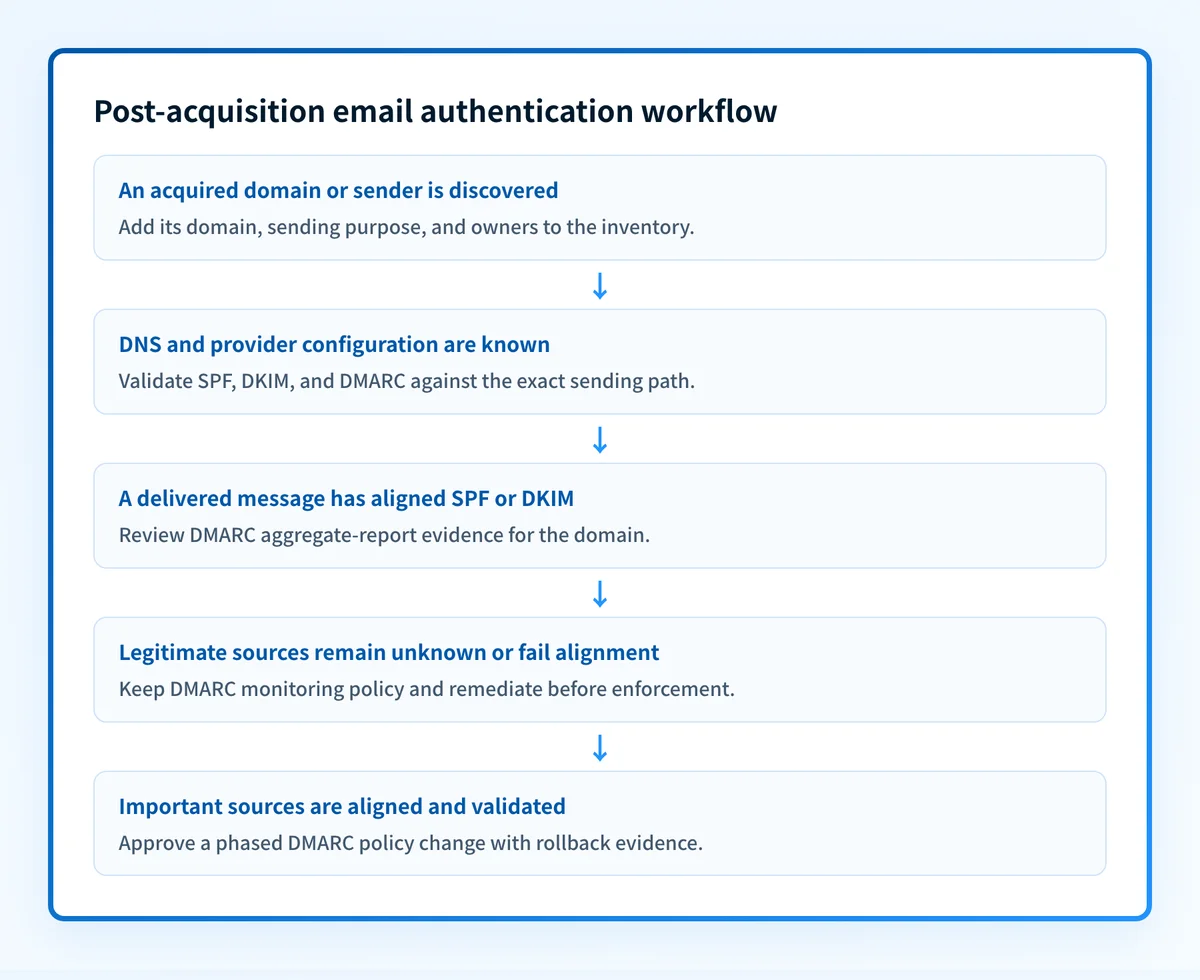
Practical next steps for acquired domains
Start with the evidence that is easiest to obtain, then move toward production evidence.
1. Build the domain and sender inventory
List every acquired root domain, active sending subdomain, and visible From domain. For each, record the business purpose, known sending applications, DNS zone owner, and an accountable owner who can approve mail-flow changes.
Include dormant domains and regional brands. The aim is not to change every domain immediately. It is to make unknown sending paths visible before policy changes affect them.
2. Inspect the public DNS records
Check the exact domain that appears in the message's visible From field. Review the DMARC record at _dmarc.yourdomain.com, the SPF TXT record for the envelope-sending domain, and DKIM selector records supplied by the sending provider.
Use the DMARC checker and DNS lookup tool to inspect public records before comparing them with the intended policy. A public lookup cannot prove the production sending path, continuous state, a receiver's private decision, or future placement.
Do not replace a crowded SPF record with a guessed include chain. A syntax-valid record can still remove authorization for a live sender and interrupt mail.
3. Validate real delivered messages
Send a controlled message through every important production path. Retain redacted headers and inspect the receiver's Authentication-Results field. RFC 8601 defines this field as a receiver's authentication assessment, so record which receiver supplied it and the exact message path it observed.
Confirm four layers independently:
- DNS: query authoritative DNS and at least one public resolver after a change.
- Vendor: confirm the provider's current authentication or domain-verification status.
- Message: inspect a delivered message from the exact production path.
- DMARC: review aggregate-report data after sufficient mail has accumulated.
4. Phase enforcement by domain
Keep a domain at p=none while unresolved sources remain. Once legitimate senders are identified and aligned, establish a documented change, a rollback value, and an observation period before moving to quarantine or reject.
RFC 9989 defines the DMARC policy values, while the receiving system determines final treatment. Stronger policy requests help control spoofed use of the domain, but they do not guarantee inbox placement for legitimate mail.
Continue the acquisition inventory with Palisade
After you have checked the public record, the remaining problem is knowing which production sources across acquired domains still fail alignment as mail changes over time. Palisade is DMARC software that analyzes DMARC aggregate-report data, identifies sending sources and authentication or alignment issues, and creates prioritized remediation tickets for human review.
Palisade does not autonomously change a DMARC policy, prove every future message will authenticate, or control a receiver's delivery decision. A human reviews the evidence and applies any DNS or policy change.
Evidence
Sources and further reading
Questions readers ask
Frequently asked questions
Should an acquired domain receive p=reject immediately?
No. First identify legitimate sending paths and validate aligned SPF or DKIM on real delivered messages. A premature rejection policy can disrupt legitimate mail that has not yet been inventoried or configured.
Can DKIM alone protect every acquired brand domain?
Only when the valid DKIM signing domain aligns with the message's visible From domain for DMARC. DKIM can verify a signature, but DMARC evaluates both authentication and identifier alignment.
Are DMARC aggregate reports enough to validate a migration?
No. Aggregate reports identify reported authentication activity over time, but they do not replace a real delivered-message check from each important production path. Use both forms of evidence.
Can a public DMARC lookup show why a receiver placed mail in spam?
No. A public lookup shows the published DNS record. It cannot reveal a receiver's private reputation assessment, message content analysis, or final placement decision.

Written by
Samuel ChenardCEO & Co-Founder, Palisade
Samuel Chenard is the CEO and co-founder of Palisade, agentic DMARC software for IT teams and MSPs, from one domain to thousands.
More from Samuel →