Google one-click unsubscribe requirements
 ChatGPT
 Claude
 Gemini
 Perplexity
 Grok
GrokIn brief
Google one-click unsubscribe requires bulk senders to support RFC 8058 headers and a visible unsubscribe link for marketing and subscribed Gmail messages.
Google one-click unsubscribe applies to senders that send more than 5,000 messages per day to Gmail accounts. Google requires marketing and subscribed messages from those senders to support one-click unsubscribe, use the required List-Unsubscribe headers, and include a clearly visible body unsubscribe link. The requirement began on February 1, 2024, with an implementation deadline of June 1, 2024 for senders that already had an unsubscribe link.
At a glance
Quick takeaways
- Google requires one-click unsubscribe for marketing and subscribed messages from senders that send more than 5,000 messages per day to Gmail accounts.
- Transactional messages, such as password resets and reservation confirmations, are excluded from Google's one-click unsubscribe requirement.
- A compliant message includes both
List-UnsubscribeandList-Unsubscribe-Postheaders. - The
List-Unsubscribeheader must contain an HTTPS URL for Google's requirement. - A visible unsubscribe link in the message body is still required for affected marketing and subscribed messages.
- Gmail decides whether to show an unsubscribe control after its automated eligibility checks.
Who is affected?
Google's Email sender guidelines apply the one-click unsubscribe requirement to senders that send more than 5,000 messages per day to Gmail accounts. The threshold concerns messages sent to Gmail accounts, not an organization's total mail volume across all recipients.
The affected traffic is marketing and subscribed email. Google's sender-guidelines FAQ says transactional messages are excluded. Its examples include password reset messages, reservation confirmations, and form submission confirmations.
A sender can have both types of mail. A password-reset system and a newsletter platform should not be treated as one stream merely because they use the same organizational domain. Classify messages by their recipient-facing purpose, then ensure commercial and promotional traffic has the required headers and body link.
Google says recipients, rather than Google, determine whether they regard a message as promotional or transactional. When a message mixes an operational notice with promotional content, avoid assuming that its technical purpose alone makes it exempt. The broader sender requirements guide is the better place to track changing provider rules across message types and mailbox providers.
What are the requirements?
Marketing and subscribed messages must support one-click unsubscribe
Google says affected bulk senders' marketing and subscribed messages must support one-click unsubscribe. The message must also include a clearly visible unsubscribe link in its body.
Google's requirement is separate from a recipient's ability to mark a message as spam. Its FAQ says messages that do not meet the one-click unsubscribe requirement are not automatically rejected or marked as spam for that reason. Unwanted mail without an easy unsubscribe path is more likely to be reported as spam, which can affect delivery.
A visible footer link alone does not satisfy the one-click requirement. Google permits a preference-center link in the message body, but says it does not comply with RFC 8058 when used without the required message headers.
Outgoing messages need two List-Unsubscribe headers
Google's sender guidelines specify these two headers for Gmail one-click unsubscribe:
List-Unsubscribe: <https://yourdomain.com/unsubscribe/opaque-recipient-token>
List-Unsubscribe-Post: List-Unsubscribe=One-Click
The URL is illustrative only. Generate the real recipient-specific URL in the sending platform or list-management system. Do not publish a live subscriber token in documentation, tickets, or test messages.
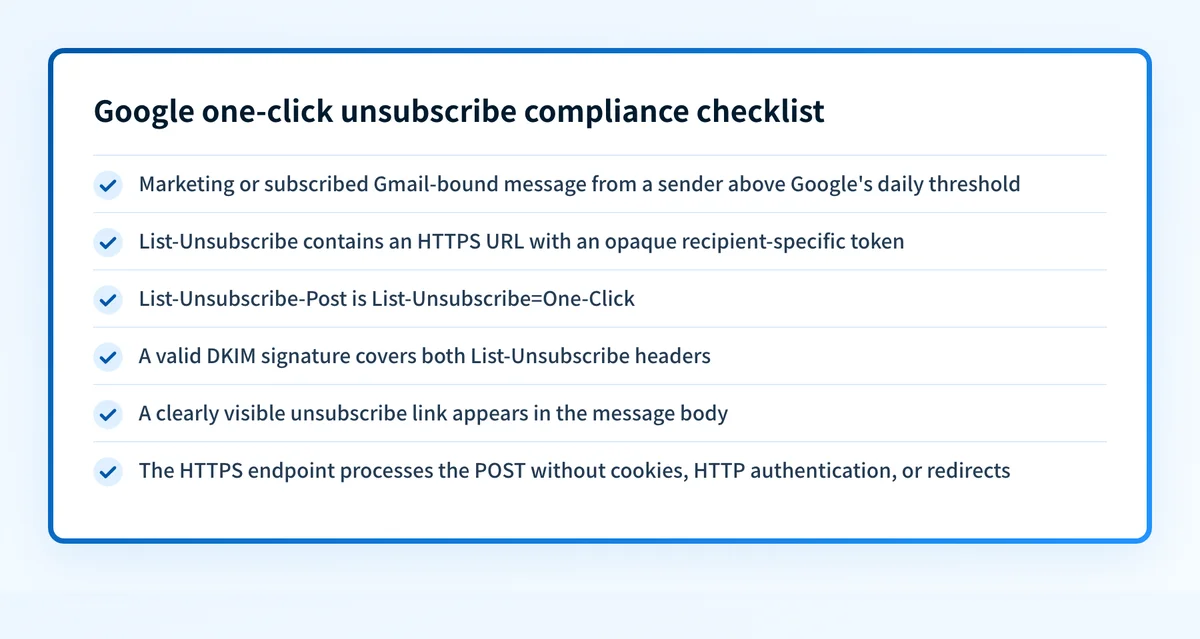
Google's FAQ says a mailto link can still be supported, but it does not meet Google's one-click unsubscribe requirement. The List-Unsubscribe header must include one HTTPS URL.
RFC 8058 is the controlling IETF standard for the one-click mechanism. It is a Standards Track RFC published in January 2017. The RFC defines the signal a sender places in the message and the HTTPS POST a receiver can send after obtaining the user's consent. It does not require Gmail, or any other mailbox provider, to render an unsubscribe control for every message.
The one-click request is an HTTPS POST
Google documents the POST body it sends when a recipient uses one-click unsubscribe:
POST /unsubscribe/opaque-recipient-token HTTP/1.1
Host: yourdomain.com
Content-Type: application/x-www-form-urlencoded
List-Unsubscribe=One-Click
RFC 8058 says the receiver should use multipart/form-data and may use application/x-www-form-urlencoded. An interoperable endpoint accepts either format.
The unsubscribe endpoint needs to process the request at the HTTPS URL in the message header. RFC 8058 says the request must not depend on browser cookies, HTTP authentication, or an HTTPS redirect. A preference center can still exist for a body link, but a receiver's background POST must be able to remove the recipient from the relevant list without a browser session.
DKIM must protect the one-click headers
RFC 8058 requires at least one valid DKIM signature to cover both List-Unsubscribe and List-Unsubscribe-Post. This helps a receiver determine that an authorized sender supplied the one-click instructions.
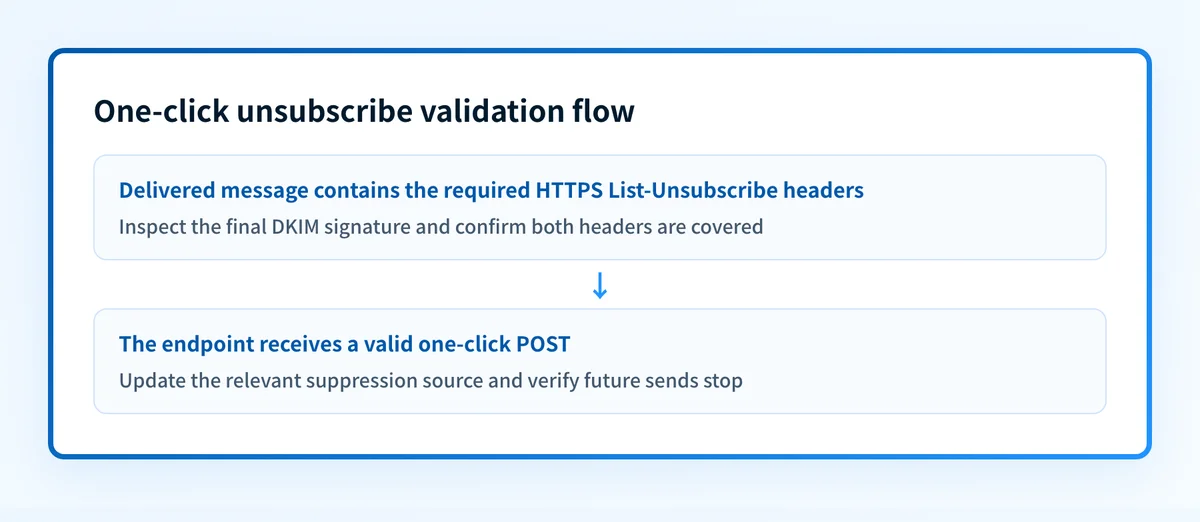
A sending platform's "DKIM enabled" indicator does not prove these header fields are signed. Inspect a delivered marketing message's raw headers and confirm that the h= list in a valid DKIM signature includes both field names. The adjacent Gmail one-click unsubscribe guide can help with the Gmail-specific implementation context.
When does the requirement take effect?
Google's bulk-sender requirements took effect on February 1, 2024. The sender-guidelines FAQ states that senders who already included an unsubscribe link had until June 1, 2024 to implement one-click unsubscribe in all commercial and promotional messages.
RFC 8058 itself is not a new Google policy. It has been a final IETF Standards Track RFC since January 2017. Google uses the RFC 8058 mechanism in its current sender requirements.
Google previously referred to these as Bulk sender guidelines. Its current Email sender guidelines FAQ describes the policy as requirements for sending mail to personal Gmail accounts. Check the current guidance when changing a sending platform, adding a new message stream, or reviewing a high-volume campaign.
How do I implement the requirement?
1. Identify Gmail-bound marketing and subscribed traffic
Inventory every production system that sends marketing, newsletter, subscription, or promotional mail to Gmail accounts. Include ESPs, CRM campaigns, product-notification systems, and custom mail services where they send this type of traffic.
Separate transactional templates from promotional templates, but keep the classification review documented. A sender that crosses Google's threshold cannot solve the requirement by adding headers only to its largest newsletter.
2. Generate a recipient-specific HTTPS unsubscribe URL
Configure the sending platform or list system to create an HTTPS URL that identifies the recipient and relevant mailing list without exposing a plain email address. The endpoint must have enough information to process the removal when Gmail submits the POST.
Use an opaque token that is difficult to guess. Treat a repeated valid POST as idempotent, so a recipient who is already removed remains removed without creating duplicate work.
Do not make the endpoint redirect to a login page, confirmation page, consent screen, or preferences page. RFC 8058 says an HTTPS redirect is not part of the one-click transaction.
3. Add the two headers before DKIM signing
Add List-Unsubscribe with the HTTPS URL and List-Unsubscribe-Post: List-Unsubscribe=One-Click to each affected outbound message. Ensure the final DKIM signing stage covers both fields.
If an ESP inserts or modifies headers after another system signs the message, inspect the final delivered copy. The right configuration in an upstream service can still fail if a later mail hop changes the signed header set.
4. Keep a visible unsubscribe link in the message body
Add a clearly visible unsubscribe link to the body of every affected marketing and subscribed message. This link may lead to a preference center, but it does not replace the header-based one-click implementation.
For platform-specific implementation and validation patterns, see Mailchimp one-click unsubscribe if Mailchimp is part of the sending path.
5. Update suppression at the source of truth
When the one-click endpoint receives a valid request, remove the recipient from the mailing list covered by that message. Ensure the suppression update reaches every production sender that can send that list's traffic.
The one-click endpoint is not a substitute for consent records, list governance, or a process for handling recipient requests across separate brands and systems.
How do I validate compliance?
Start with a real delivered marketing message sent through the same production route used for Gmail recipients. Inspect its raw headers for the HTTPS List-Unsubscribe value and List-Unsubscribe-Post: List-Unsubscribe=One-Click. Then confirm a valid DKIM signature covers both header names.
Next, use a safe test recipient and submit the fixed POST payload to a test unsubscribe URL in both application/x-www-form-urlencoded and multipart/form-data formats. Confirm the endpoint completes without cookies, credentials, browser JavaScript, or redirects. Verify the recipient's suppression state in the list-management source of truth, then test that the same sending path no longer sends covered marketing traffic to that recipient.
Use Gmail's view as an additional check. Gmail's unsubscribe help tells recipients to open a message and select Unsubscribe next to the sender's name when the option is available. Google says the top-of-message control is displayed only for messages that pass its automated eligibility checks. Its absence does not by itself prove that the headers are absent or that the sender is noncompliant.
Validation needs four layers:
- DNS: confirm the sending domain's required authentication records are published through authoritative DNS and a public resolver.
- Vendor: confirm the platform that sends the message shows the intended authentication and header configuration.
- Message: inspect the delivered message from the exact production route.
- DMARC: review aggregate-report data after messages have accumulated to identify sending sources and authentication outcomes.
Check the broader Gmail sender requirements
One-click unsubscribe is one part of Google's sender policy. The same affected sending stream also needs authentication, alignment, transport, and spam-rate controls described in Google's current guidance.
Review the current sender requirements
That requirements guide can help you compare the policy with the rest of your sending program. It does not prove that a particular message has the correct headers, that an unsubscribe endpoint updates every suppression system, or that Gmail will display the control.
Evidence
Sources and further reading
Questions readers ask
Frequently asked questions

Written by
Samuel ChenardCEO & Co-Founder, Palisade
Samuel Chenard is the CEO and co-founder of Palisade, AI-first DMARC software for IT teams and MSPs, from one domain to thousands.
More from Samuel →