Gmail one-click unsubscribe requirements
 ChatGPT
 Claude
 Gemini
 Perplexity
 Grok
GrokIn brief
Gmail one-click unsubscribe requires bulk senders to add signed headers, an HTTPS POST endpoint, and a visible body link for eligible Gmail messages.
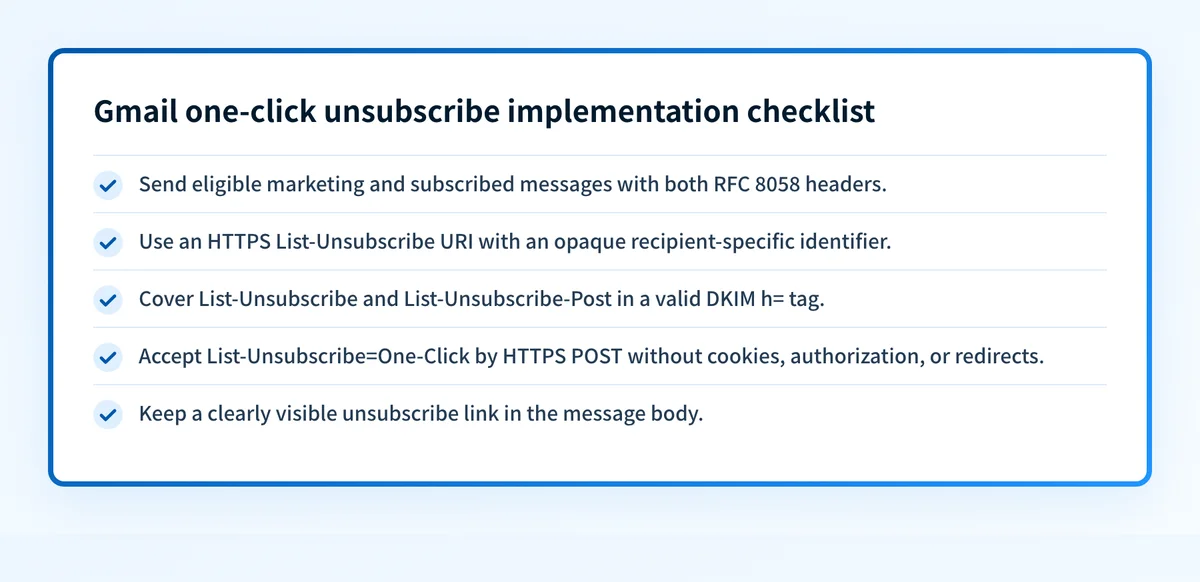
Gmail one-click unsubscribe is required for senders that send more than 5,000 messages a day to personal Gmail accounts when those messages are marketing or subscribed messages. Since February 1, 2024, eligible mail needs RFC 8058 one-click headers, DKIM coverage for those headers, an HTTPS endpoint that accepts the unsubscribe POST, and a clearly visible unsubscribe link in the message body. It is one part of Gmail deliverability expectations, alongside authentication requirements.
At a glance
Quick takeaways
- Gmail applies this bulk-sender requirement to personal Gmail accounts, not Google Workspace accounts.
- Google says marketing and subscribed messages from affected senders must support one-click unsubscribe and include a visible body link.
- RFC 8058 requires both
List-UnsubscribeandList-Unsubscribe-Postfor one-click behavior. - A valid DKIM signature must cover both one-click headers in its
h=tag. - The unsubscribe endpoint must accept an HTTPS POST without cookies, HTTP authorization, or redirects.
- Gmail began ramping up enforcement on non-compliant traffic in November 2025.
Who is affected?
Google defines a bulk sender as a sender that sends close to 5,000 messages or more to personal Gmail accounts within 24 hours. Messages from the same primary domain count toward that limit, according to Google's bulk-sender FAQ.
For that sender tier, Gmail's email sender guidelines say that marketing messages and subscribed messages must support one-click unsubscribe and include a clearly visible unsubscribe link in the message body. The header-based action and the visible body link are separate requirements. A List-Unsubscribe header does not replace the visible link.
Google also states that its email sender guidelines and enforcement apply only to mail sent to personal Gmail accounts. They do not apply to messages sent to Google Workspace accounts. Google identifies the included categories as marketing messages and subscribed messages, but the cited guidance does not publish a complete list of other message categories that are excluded. Do not assume a message is outside scope without checking its purpose and the current Google guidance.
One-click unsubscribe is distinct from Gmail authentication. A message can have valid SPF, DKIM, and DMARC results yet still lack the required unsubscribe mechanism. Review how to authenticate email for Gmail separately when the sending domain also needs authentication work.
What are the requirements?
The message includes the RFC 8058 header pair
RFC 2369 defines List-Unsubscribe as a header field containing one or more angle-bracket-enclosed URLs for list commands. RFC 8058 adds the fixed List-Unsubscribe-Post value that tells a receiver it can perform a one-click unsubscribe action.
RFC 8058, a Standards Track RFC published in January 2017, requires the List-Unsubscribe header to contain one HTTPS URI. Its Section 5 defines the one-click header value as a fixed value, not a free-text field.
List-Unsubscribe: <https://example.com/unsubscribe/opaquepart>
List-Unsubscribe-Post: List-Unsubscribe=One-Click
The HTTPS URI should contain an opaque or hard-to-forge identifier rather than a plain recipient address or list name. RFC 8058 does not prescribe the token format. The sender remains responsible for making it difficult to guess and limiting it to the intended unsubscribe operation.
A mailto: link can still appear as an additional RFC 2369 list command, but it does not provide RFC 8058 one-click behavior. For the protocol-level distinction, see one-click unsubscribe and the RFC 8058 header pair.
Both headers are covered by a valid DKIM signature
RFC 8058 requires at least one valid DKIM signature on the message. The List-Unsubscribe and List-Unsubscribe-Post headers MUST be covered by that signature and included in the DKIM-Signature header's h= tag.
DKIM-Signature: v=1; a=rsa-sha256; d=yourdomain.com;
 h=from:to:subject:list-unsubscribe:list-unsubscribe-post;
 ...
This is an illustrative header shape only. Inspect the raw headers of a delivered message to confirm the actual production signature covers both fields. A platform status that says DKIM is enabled does not prove that its signing configuration includes these two headers.
The endpoint completes an HTTPS POST without session context
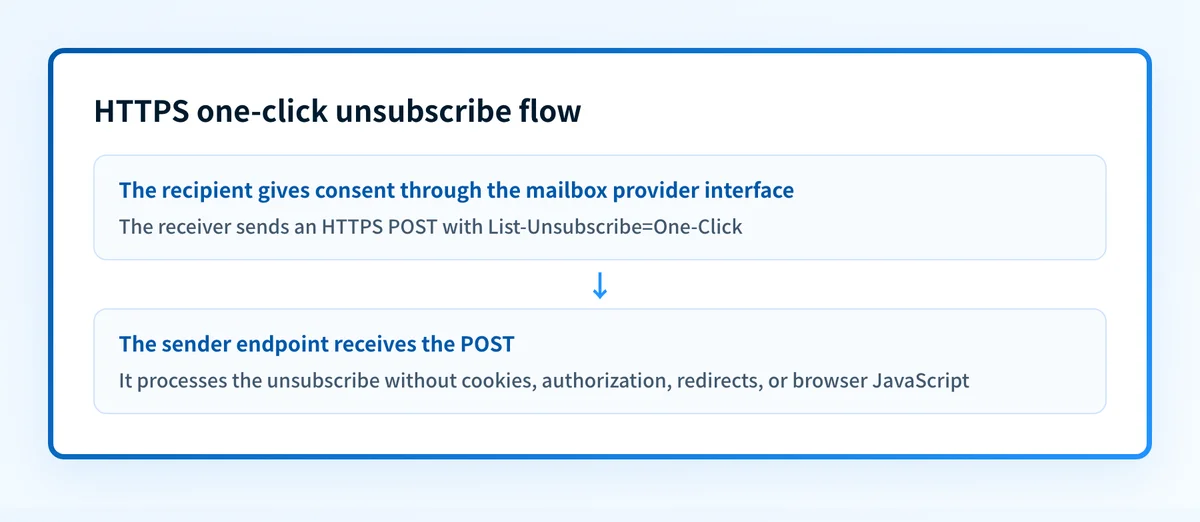
RFC 8058 says a receiving system can perform an HTTPS POST to the URI in List-Unsubscribe and send the key and value from List-Unsubscribe-Post as the request body. Google publishes this example request shape in its sender guidelines:
POST /unsubscribe/example HTTP/1.1
Host: solarmora.com
Content-Type: application/x-www-form-urlencoded
Content-Length: 26
List-Unsubscribe=One-Click
RFC 8058 says the receiver SHOULD send multipart/form-data and MAY send application/x-www-form-urlencoded. An interoperable endpoint accepts both permitted encodings.
The endpoint cannot depend on browser state. RFC 8058 says the POST request MUST NOT include cookies, HTTP authorization, or other context information. The sender MUST NOT return an HTTPS redirect because redirected POST actions have not worked reliably. A preference center, login flow, or confirmation page may be appropriate for a body link, but it cannot be required to complete the RFC 8058 transaction.
The receiver also MUST NOT make the POST without user consent. The mailbox provider obtains that consent through its own interface. RFC 8058 does not require Gmail to display a particular control in every client or for every message.
The message body includes a visible unsubscribe link
Google's requirement includes a clearly visible unsubscribe link in the message body in addition to one-click support. That link gives the recipient a direct, human-operated way to unsubscribe or manage preferences.
The visible link may lead to a broader subscription-management experience. The RFC 8058 endpoint has a narrower job: it must process the one-click POST without a web session or redirect. Keep these paths separate when testing. A working body link does not establish that a background POST can complete, and a working endpoint does not establish that the body link is visible in the delivered template.
When does the requirement take effect?
Google states that, starting February 1, 2024, all senders to Gmail accounts must meet the requirements in its sender-guidelines section. The one-click unsubscribe requirement appears in the tier for senders of more than 5,000 messages a day to personal Gmail accounts.
The current enforcement notice in Google's bulk-sender FAQ says Gmail began ramping up enforcement on non-compliant traffic in November 2025. Google says affected messages can experience disruptions, including temporary and permanent rejections. This is provider enforcement, not a change to RFC 8058 itself.
RFC 8058 remains the controlling one-click protocol standard. It builds on RFC 2369's older List-Unsubscribe URL syntax. RFC 2369 alone describes list-command links. RFC 8058 adds the signed header signal and constrained POST flow that make the action one-click.
How do I implement the requirement?
1. Identify eligible Gmail-bound campaign traffic
Measure messages sent to personal Gmail accounts by primary domain over a 24-hour period. Identify marketing and subscribed message streams that fall under Google's bulk-sender requirement.
Do not combine Google Workspace mailbox traffic with personal Gmail traffic when assessing this scope. Keep the recipient classification and sending-domain evidence available for review.
2. Generate an opaque HTTPS unsubscribe URI
Create a recipient-specific, hard-to-forge URI for the HTTPS endpoint. The endpoint needs enough information to identify the applicable subscription without asking the receiver to sign in, accept cookies, or submit another form.
Do not use a raw recipient address or reusable account identifier in the unsubscribe URI. Treat the URI as sensitive operational data and avoid exposing full values in routine logs or support tickets.
3. Add the headers before DKIM signing
Add List-Unsubscribe with the HTTPS URI and List-Unsubscribe-Post: List-Unsubscribe=One-Click to the message before its DKIM signature is generated.
Inspect the generated DKIM-Signature header to confirm its h= list includes both one-click header names. If another mail relay modifies or adds headers after signing, test the message after the final production sending path.
4. Accept the one-click POST directly
Configure the endpoint to accept the exact List-Unsubscribe=One-Click body with either permitted form encoding. Process a valid request without a redirect, cookie, authorization challenge, or browser JavaScript.
Make repeated valid requests safe to handle. The recipient should remain unsubscribed after the first successful request, rather than creating a second removal event or an error that obscures the result.
5. Keep the visible body link in the template
Place a clearly visible unsubscribe link in the message body for every applicable template. Check the rendered message, not only the template editor, because layout or content conditions can hide a link in a specific campaign.
For platform-specific implementation considerations, see Mailchimp one-click unsubscribe: headers, body links, and validation.
How do I validate compliance?
Validate the requirement at the message and endpoint layers.
Send a controlled message through the exact production path to a test mailbox. In the delivered raw headers, confirm that List-Unsubscribe contains an HTTPS URI, List-Unsubscribe-Post contains the exact fixed value, and a valid DKIM signature includes both header fields in its h= list.
Then test the endpoint with a safe test recipient. Send the fixed POST using both multipart/form-data and application/x-www-form-urlencoded. Confirm that the endpoint completes the suppression action without a cookie, login, authorization header, redirect, or browser-only dependency.
Check the rendered body for the visible unsubscribe link. Finally, verify the recipient's suppression status in the source-of-truth list system and ensure another applicable send does not include that recipient.
A public posture check such as the email security score can help inspect broader email-authentication configuration. It does not prove that an unsubscribe endpoint accepts the POST, that the DKIM h= list covers the headers, or that Gmail will make a particular receiver-side enforcement decision.
Check the current Gmail sender rules
The protocol check above establishes whether a message and endpoint follow RFC 8058. Google's sender guidance determines the affected Gmail traffic and its enforcement posture.
Review Gmail's current email sender guidelines
Google's public guidance cannot prove that every production template has the correct headers or that a particular recipient interface will display an unsubscribe control. Validate with a delivered message and a safe endpoint test.
Evidence
Sources and further reading
Questions readers ask
Frequently asked questions

Written by
Samuel ChenardCEO & Co-Founder, Palisade
Samuel Chenard is the CEO and co-founder of Palisade, AI-first DMARC software for IT teams and MSPs, from one domain to thousands.
More from Samuel →