End to End Encryption Email Services: How to Choose
 ChatGPT
 Claude
 Gemini
 Perplexity
 Grok
GrokIn brief
Compare end to end encryption email services by recipient workflow, metadata exposure, interoperability, and operational fit.
End to end encryption email services are best chosen by the path a recipient can actually use to decrypt and reply. Proton Mail is a fit for Proton contacts, PGP users, or password-protected external messages. Gmail client-side encryption can fit a Google Workspace deployment that meets Google's documented edition and external-recipient requirements, including beta access for its Assured Controls path. S/MIME is a standards-based option for a managed, compatible group. None of these choices replaces sender authentication.
At a glance
Quick takeaways
- Confirm whether the recipient can use the same encrypted service, PGP, a password-protected portal, or S/MIME before choosing a provider.
- Proton Mail and Gmail client-side encryption document distinct external-recipient paths, but Gmail's external end to end encryption depends on the documented Workspace configuration and, for the Assured Controls path, beta access.
- A password-protected secure-message workflow requires a safe method to share the password and support the recipient.
- S/MIME is an interoperable encrypted-message format. Confirm certificate handling and mail-client support in the deployment you plan to use.
- Encryption protects message confidentiality. SPF, DKIM, and DMARC address whether mail claiming to be from a domain is authenticated.
Who this comparison is for
This comparison is for privacy-conscious teams, regulated professional groups, and individuals selecting a primary encrypted email service or a controlled encrypted-email workflow. It is not a buying guide for bulk senders, marketing platforms, or transactional email. Those senders need a deliverability and authentication program, including SPF, DKIM, and DMARC, alongside any confidentiality control.
How the options were evaluated
The criteria come before the recommendation because encrypted email fails in practice when the recipient path is unclear. Checked on 2026-07-28, the comparison evaluates each option on four questions:
- Recipient workflow: Can the recipient decrypt in their ordinary mailbox, or must they use an account, PGP key, password, portal, or certificate?
- What is protected: What does the provider document as end to end encrypted, and what metadata remains outside that protection?
- Interoperability: Does the service document a way to exchange encrypted email with someone outside its own service?
- Operating model: Who provisions keys, shares passwords, recovers access, and supports recipients when a message cannot be opened?
Proton Mail
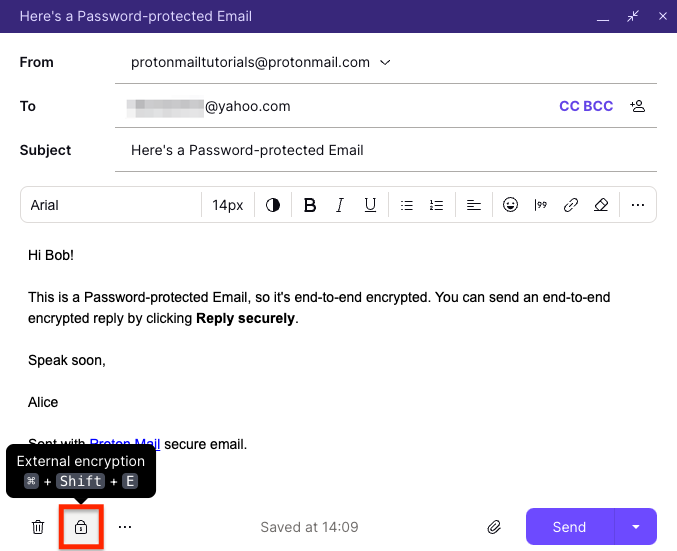
- Best fit: Teams or correspondents who can use Proton Mail together, or who can use PGP or a password-protected external-message workflow.
- Relevant evidence: Proton's encryption documentation says messages between Proton Mail addresses are end to end encrypted. For non-Proton recipients, it documents password-protected email and PGP options; otherwise, the message uses TLS in transit rather than default end to end encryption.
- Tradeoff: Proton's metadata explanation says subject lines and sender and recipient addresses are not end to end encrypted. An external recipient path still requires coordination.
Gmail client-side encryption
- Best fit: Google Workspace organizations that have the documented client-side encryption entitlement and want a managed deployment.
- Relevant evidence: Google's Gmail client-side encryption documentation says encryption is handled in the browser before data is transmitted to or stored in Google's cloud. It lists the Workspace editions that can use client-side encryption. Its documented path for sending end to end encrypted messages to anyone without S/MIME requires Gmail with Assured Controls and access to the beta.
- Tradeoff: External end to end encryption is not the default path for every Gmail account or Workspace edition. Without Assured Controls, Google's documented external CSE path uses S/MIME and a prior exchange of digital signatures.
S/MIME as a managed alternative
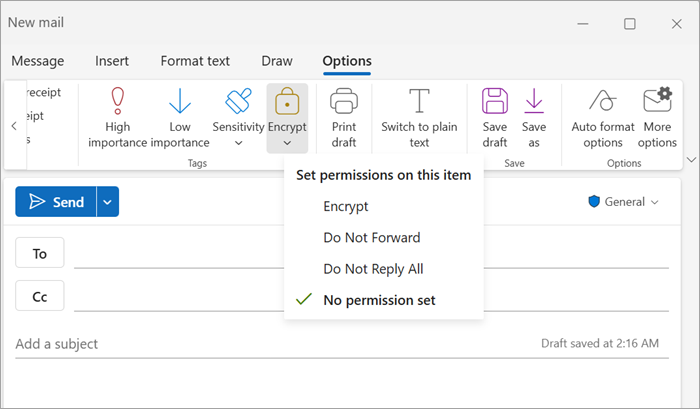
- Best fit: A group that has selected an S/MIME-capable mail deployment and can confirm that its recipients can use that deployment.
- Relevant evidence: RFC 8551 defines the S/MIME 4.0 message format for encrypted and signed MIME messages, while RFC 8550 defines S/MIME certificate handling.
- Tradeoff: S/MIME is a standard rather than a hosted encrypted-email service. Microsoft's email-encryption comparison says S/MIME uses unique digital certificates and recipient public keys, while recipients maintain their own private keys. Certificate issuance, discovery, revocation, device deployment, and recovery depend on the mail deployment and policy you choose. This is an implementation inference, not a feature claim about every S/MIME service.
How to choose
Use these decisions in order. The recommendation is conditional because the recipient workflow is more important than a provider's marketing label.
1. Map the recipient population
List the parties who must exchange sensitive messages and sort them by their available path: same provider, OpenPGP, S/MIME certificate, password-protected secure message, or no supported path. Do not assume that ordinary SMTP delivery is end to end encrypted. Proton's encryption documentation says external delivery without its encrypted options is protected by TLS in transit, which is a different boundary than end to end encryption.
2. Choose the lowest-friction secure path you can support
If most correspondents can use the same provider, provider-to-provider encryption can be the simplest path. If they cannot, compare Proton Mail's password workflow with Gmail client-side encryption's documented external-recipient path, then decide whether your organization can manage an S/MIME deployment. Test with a real recipient group before moving sensitive workflows.
3. Keep confidentiality separate from domain authentication
Encrypted email does not prove that a message claiming to be from your domain was authorized to send. Review your domain with a DMARC check and use email authentication guidance for SPF, DKIM, and DMARC. This is a separate control plane from encryption and does not inspect or decrypt the message body.
encrypted_email_service_decision:
  checked_on: "2026-07-28"
  recipient_path: "same provider | PGP | password workflow | S/MIME"
  protected_content: "documented and reviewed"
  metadata_boundary: "documented and accepted"
  key_or_password_owner: "named person or team"
  support_test: "completed with representative recipient"
  open_question: "Can every required recipient decrypt and reply safely?"
Use the record to capture evidence rather than assuming that an encryption label covers every message, recipient, and metadata field.
For a provider-specific implementation of these authentication checks, see How do I send a secure email in Gmail?.
Evidence
Sources and further reading
Questions readers ask
Frequently asked questions
Is TLS the same as end to end encryption?
No. TLS protects a connection in transit. End to end encryption is a message-access model in which the intended endpoints can decrypt the protected content. A provider may document TLS for ordinary external delivery and a separate workflow for end to end encrypted messages.
Can I send encrypted email to a Gmail or Outlook address?
Yes, if the service and recipient path support it. Proton documents password-protected messages and PGP for external recipients. Gmail client-side encryption can support external end to end encryption with Assured Controls and beta access, or an S/MIME path after signature exchange. Test the recipient experience before relying on it.
Does end to end encryption hide email metadata?
Not always. Providers document different boundaries for subjects, addresses, and routing data. Proton documents that message subjects and sender and recipient addresses are not end to end encrypted. Review the provider's current documentation for the fields that matter to your use case.
Is S/MIME better than an encrypted email service?
Only when its certificate and client requirements fit the recipient group. S/MIME can suit a managed, compatible community. Proton Mail or qualifying Gmail client-side encryption can be easier when recipients need a documented password-protected or Workspace-managed workflow instead of an organization-managed S/MIME deployment.
Does encrypted email stop phishing or domain spoofing?
No. Encryption protects the confidentiality of a message you send through its supported path. It does not stop someone else from sending mail that impersonates your domain. SPF, DKIM, and DMARC provide the authentication evidence used to address that separate problem.

Written by
Ian BussieresCTO & Co-Founder, Palisade
Ian Bussieres is the CTO and co-founder of Palisade, agentic DMARC software for IT teams and MSPs.
More from Ian →