Email rejected per DMARC policy for yahoo.com
 ChatGPT
 Claude
 Gemini
 Perplexity
 Grok
In brief
Email rejected per DMARC policy for yahoo.com: inspect Yahoo raw-message indicators, identify forwarding, and check the published DMARC record.

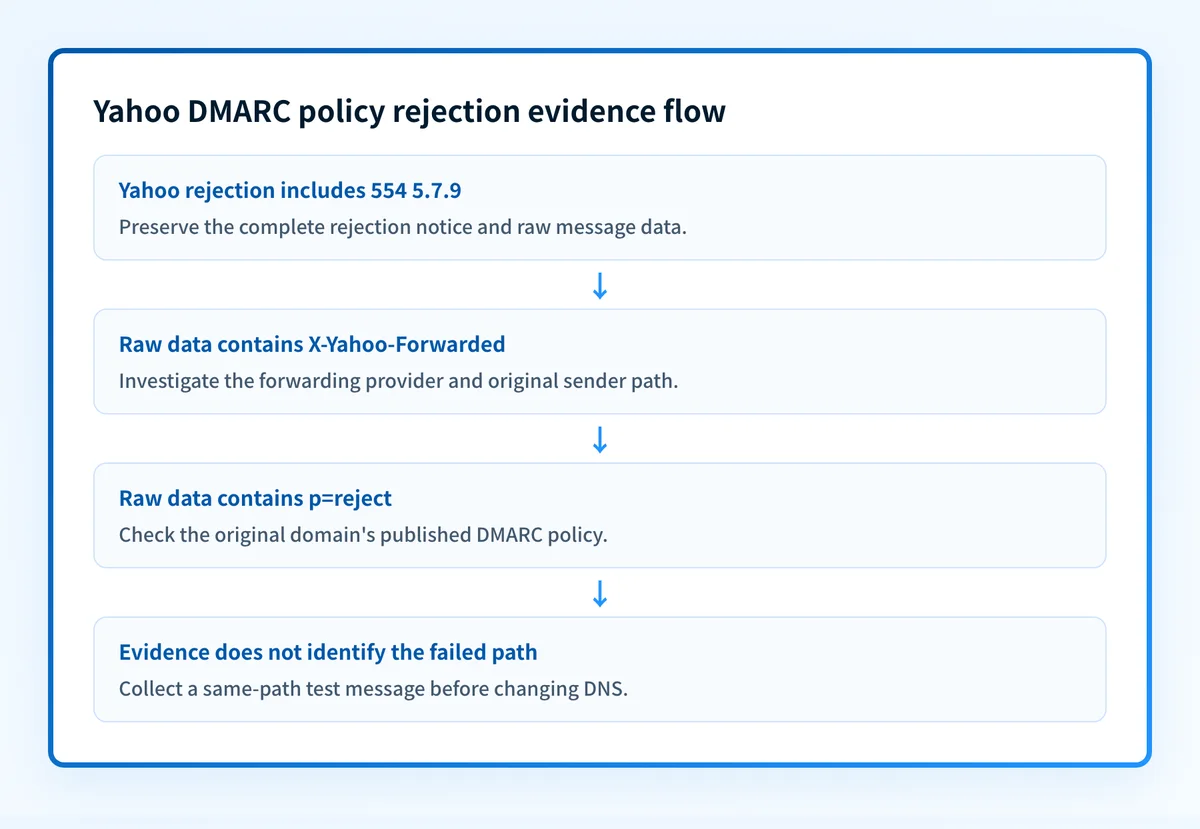
An email rejected per DMARC policy for yahoo.com needs message evidence before a DNS change. Yahoo documents "554 5.7.9 Message not accepted for policy reasons" as an error that may involve a sender not using DMARC, and it directs recipients to inspect the raw message for forwarding and DMARC-policy indicators. The rejection text alone does not identify the failing sender, authentication result, or repair.
At a glance
Quick takeaways
- Yahoo documents
"554 5.7.9 Message not accepted for policy reasons"as an error that may involve a sender not using DMARC. "X-Yahoo-Forwarded"in Yahoo raw-message data identifies a forwarded message."p=reject"identifies an original domain with a DMARC policy that directs rejection.- A forwarded message can appear to originate from an unauthorized server when the forwarding provider does not use DMARC.
- A public DMARC lookup checks the published record, but cannot prove why Yahoo rejected one message.
- Yahoo strongly urges senders to publish a DMARC policy for every sending domain.
What should I check before configuring Yahoo?
Before configuring Yahoo for an email rejected per DMARC policy, confirm which message path produced the rejection. The affected path might be mail sent directly by an organization, mail relayed through a forwarding service, or mail sent by a separate platform using the visible From domain.
Yahoo's policy-reasons error documentation says automatic forwarding can make a message appear to come from an unauthorized server when the forwarding provider is not using DMARC. That explanation applies to a forwarding case. It does not establish forwarding as the cause of every Yahoo rejection.
Collect the rejection notice and preserve a redacted copy of the raw message. Record the visible From domain, recipient domain, date, and the service that originally sent or forwarded the message. Do not change a DMARC record until the original domain and path are identified.
Copy DNS values from the account and domain you are configuring. Do not publish selectors, targets, tokens, or hostnames from another account or from an online example.
Which setup method should I use?
Use a message-evidence method first when Yahoo rejected a specific message. Yahoo's published guidance for this error is to inspect raw message data for "X-Yahoo-Forwarded" and "p=reject". The Yahoo documentation does not establish a current Yahoo Mail user-interface path for opening raw source, so use the raw-message or message-source function available in the affected mailbox without assuming a particular menu label.
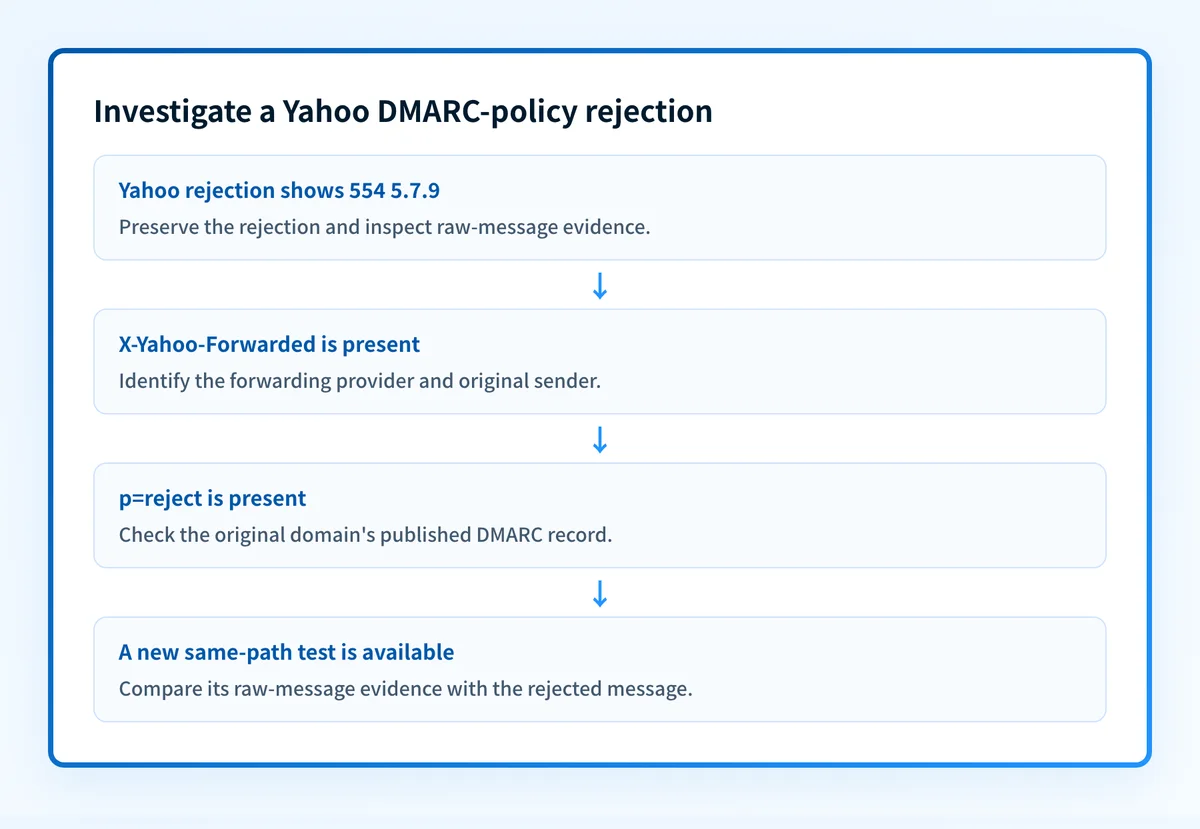
If the message was forwarded and the original domain publishes p=reject, investigate the forwarding path and original sender's authentication before changing recipient-side Yahoo settings. This is an inference from Yahoo's two documented indicators. Yahoo does not publish a complete repair workflow for every instance of this rejection.
How do I set up a raw-message check for a Yahoo rejection?
Yahoo's documentation for this error does not identify a Yahoo console setting, SPF record, DKIM selector, or DNS value that universally fixes it, so this section is a checking procedure and not a configuration of Yahoo itself. Use it to identify the responsible sending path before changing the sending provider's configuration.
1. Open the rejection evidence
Open the delivery failure notice and locate the exact error text:
554 5.7.9 Message not accepted for policy reasonsYahoo says this error may be due to an issue with a sender not using DMARC. Keep the full failure context because the same error text does not identify a specific DNS record or authentication failure.
2. Identify the visible From domain
Record the domain displayed in the message's From address. That domain is the starting point for a DMARC policy check because DMARC lets a domain owner publish handling guidance for messages that fail authentication checks.
Do not assume that the visible From domain identifies the system that transmitted the message. A forwarding provider or sending platform may be part of the path.
3. Inspect the raw message for Yahoo indicators
Search the raw message for these Yahoo-documented strings:
X-Yahoo-Forwarded
p=reject
Yahoo says "X-Yahoo-Forwarded" means the message was forwarded and should include the destination address. Yahoo also says "p=reject" means the original domain uses DMARC and the email is rejected under that policy.
4. Route the issue to the sending or forwarding owner
If "X-Yahoo-Forwarded" is present, identify the forwarding provider and the original sender. Ask the owner of that path for the redacted message headers and its authentication configuration.
If no forwarding indicator is present, identify the platform that sent the message using the visible From domain. The broader ESP setup guides cover how to establish which provider controls a sending path.
5. Send a new same-path test message
After the responsible owner makes a documented configuration change, send a new message through the same production path. A different mailbox, different sender, or direct route does not test the rejected route.
Do not treat a successful resend as proof that every sending path using the domain is authenticated. Preserve redacted raw-message evidence from the new message for comparison.
How does this setup affect DMARC?
A DMARC policy can direct a receiver to apply stricter handling, including rejection, when messages fail authentication checks, as defined in RFC 9989, the current DMARC specification (May 2026). RFC 9989 obsoletes RFC 7489, which is kept here only as a historical note.
For this Yahoo error, the useful question is whether the original domain identified in the message publishes a DMARC policy, not whether a recipient can override that policy. Use Palisade's DMARC checker after identifying the original domain to inspect its currently published record.
A record lookup cannot establish why Yahoo rejected an individual message, prove the production sending path, or reveal Yahoo's private receiver decision.
How do I validate the setup?
Check public DNS
Look up the DMARC record for the original sending domain identified in the message evidence. The record owner has this structural shape:
_dmarc.yourdomain.comCompare the published policy with the "p=reject" evidence where applicable. A DNS result shows the record visible at lookup time. It does not prove that the rejected message passed or failed authentication.
Check the vendor status
Check the sending or forwarding provider's status only after identifying the provider that owns the affected path. The Yahoo material for this error does not document a vendor-status screen or Yahoo Sender Hub remediation status.
A green status from another provider is useful configuration evidence, but it is not a delivered-message check.
Inspect a delivered message
Send a new message through the same path and inspect its raw source in the receiving mailbox. Compare the new evidence with the rejected-message evidence, including whether forwarding occurred and which original domain was involved.
The rejection string alone cannot diagnose SPF, DKIM, or alignment. Keep the raw message redacted because it can contain addresses and operational identifiers.
Review DMARC reports
Review DMARC aggregate-report data after it accumulates for the sending domain. Separate the source associated with this rejection from other legitimate sources that use the domain. The DMARC learning hub explains the wider DMARC operating model without treating one Yahoo rejection as proof of every domain's status.
Troubleshooting
The message contains "X-Yahoo-Forwarded"
Yahoo says this means the message was forwarded. Identify the forwarding provider and original sender, then investigate that path before changing recipient-side Yahoo settings. Yahoo's guidance says forwarding can make mail appear to originate from an unauthorized server when the forwarding provider is not using DMARC.
The message contains "p=reject"
Yahoo says this indicates that the original domain uses DMARC and the email is rejected. Confirm the original domain from the raw-message evidence, then inspect its published record. Do not alter a parent or subdomain policy based only on the error text. DMARC policy for subdomains is a separate configuration topic.
The error appears, but there is no forwarding indicator
The Yahoo error may involve a sender not using DMARC, but Yahoo does not document a complete mapping from this error to a specific SPF, DKIM, or DNS defect. Identify the actual sending platform, preserve the raw message, and inspect the platform's authentication configuration with its owner.
A DMARC checker shows a record, but Yahoo still rejected mail
A public checker can confirm the record returned by DNS. It cannot prove the rejected message's authentication result, the sender's production route, or Yahoo's receiver decision. Compare the record with raw-message evidence and a new same-path test.
Check the DMARC record behind the Yahoo rejection
After raw-message evidence identifies the original domain, use Palisade's DMARC checker to inspect the published DMARC record before requesting a policy change. Compare the lookup with the rejection evidence, especially any Yahoo-documented "p=reject" indicator.
Palisade is agentic DMARC software that analyzes DMARC aggregate-report data, identifies sending sources and authentication or alignment issues, and creates prioritized remediation tickets. It can propose a next policy step when the evidence supports it, while a human reviews the evidence and applies the change. A published-record check cannot prove why Yahoo rejected one message or repair the forwarding or sending path.
Evidence
Sources and further reading
- Yahoo Help: Error code "554 5.7.9 Message not accepted for policy reasons"
- Yahoo Sender Hub FAQs
- Yahoo sender best practices
- RFC 9989: Domain-Based Message Authentication, Reporting, and Conformance (DMARC)
- RFC 7489: Domain-based Message Authentication, Reporting, and Conformance (original DMARC specification, obsoleted)
Questions readers ask
Frequently asked questions
How to fix DMARC policy of reject?
Yahoo's published guidance gives no single repair for a DMARC p=reject policy. It directs readers to inspect raw-message evidence for forwarding and "p=reject", then identify the original domain and affected path before changing any DNS or sending configuration.
Why is Yahoo rejecting my email?
Yahoo says mail that does not meet its sender requirements may be sent to spam or rejected. For "554 5.7.9 Message not accepted for policy reasons", Yahoo says the error may involve a sender not using DMARC, and forwarding can make mail appear to come from an unauthorized server.
Does Yahoo require DMARC?
Yes, for bulk senders. Yahoo's sender best practices call for a valid DMARC policy of at least p=none that passes, with the From domain aligned to the SPF or DKIM domain. Yahoo also strongly urges every sender to publish a DMARC policy for each sending domain. The page does not define a volume threshold for bulk sending.
Why is my email failing at DMARC?
The Yahoo rejection text alone cannot diagnose a DMARC failure. Yahoo instructs readers to inspect raw-message data, where "X-Yahoo-Forwarded" identifies forwarding and "p=reject" identifies an original domain whose policy directs rejection.
Can a DMARC record check explain a Yahoo rejection?
Not by itself. A DMARC record check only shows the policy published in DNS at the time of lookup. It cannot prove a particular message's authentication results, its forwarding path, or Yahoo's private delivery decision.

Written by
Samuel ChenardCEO & Co-Founder, Palisade
Samuel Chenard is the CEO and co-founder of Palisade, agentic DMARC software for IT teams and MSPs, from one domain to thousands.
More from Samuel →