Email authentication in Mailchimp: what to verify first
 ChatGPT
 Claude
 Gemini
 Perplexity
 Grok
GrokIn brief
Email authentication Mailchimp requires current Mailchimp setup documentation and DNS evidence. Learn what to verify before changing a sending domain.
Email authentication in Mailchimp is an email-sending-domain task that must be confirmed against Mailchimp's current domain-authentication documentation and your domain's DNS. Mailchimp describes its service as an email and SMS marketing platform, but its public homepage does not document the current domain-authentication procedure, record values, verification states, or settings path. Do not publish or change DNS from an assumed setup flow.
At a glance
Quick takeaways
- Mailchimp's public homepage identifies Mailchimp as an email and SMS marketing platform.
- A Mailchimp-specific authentication procedure needs current official Mailchimp Help Center documentation.
- DNS records must come from the sending service's current account-generated instructions, not a generic example.
- A public DNS result does not prove that Mailchimp is using the configured sending path.
- A vendor verification indicator does not replace a delivered-message header check.
- Use the ESP setup hub to route a sending-domain task to the provider documentation that owns it.
What email authentication means for a Mailchimp sending domain
Email authentication is the process of establishing evidence that a sending domain is authorized for the message path in use. For a Mailchimp campaign, the operational question is narrower: which domain appears in the campaign's visible From address, and what current configuration does Mailchimp require for that domain?
That distinction matters because a marketing platform can send email, while the domain owner still controls the domain's DNS and the visible identity recipients see. A DNS record can exist without the application using it. An application can show a completed setup state while a later DNS change prevents the intended result. A delivered message provides separate evidence about the path that actually sent it.
For a protocol-level explanation of the terms involved, start with email authentication. The separate question of why authenticated sending matters is covered in what is email authentication and why does it matter.
The current Mailchimp public homepage is not enough evidence to state:
- The current Mailchimp menu path for domain authentication.
- Which DNS record types Mailchimp requests.
- The hostnames, values, selectors, or CNAME targets Mailchimp generates.
- The labels Mailchimp uses for pending, verified, failed, or authenticated states.
- Whether Mailchimp offers a contact-list verification feature, and what it checks.
- What "add an authenticator" means in a Mailchimp account.
When the answer changes
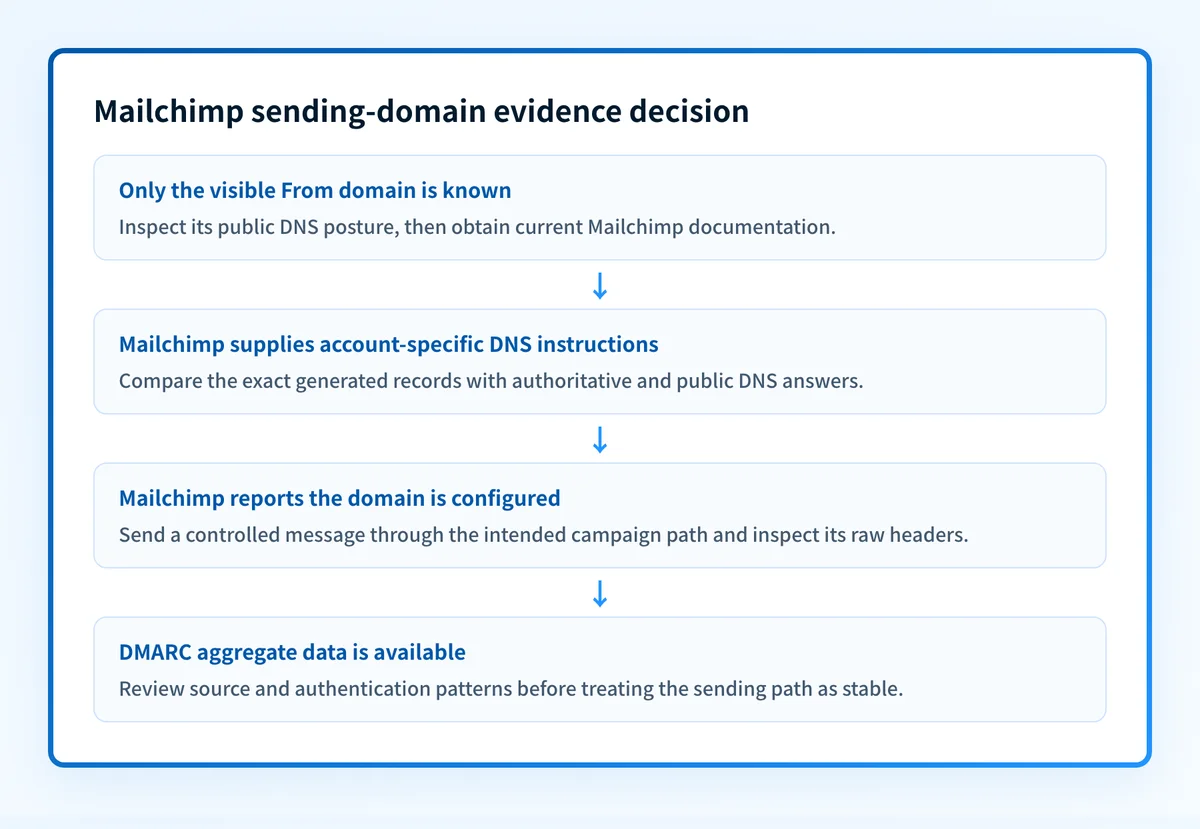
Use the evidence you have to choose the next action.
- If you only have the sending domain, inspect its current public authentication posture. This can reveal published DNS records, but it cannot confirm Mailchimp's account settings or a campaign's real sending path.
- If Mailchimp provides current official domain-authentication instructions, use the exact records generated for the account and domain. Do not substitute values from another account, a forum post, or an old guide.
- If DNS has already been changed, compare the authoritative DNS answer and a public resolver result with the approved values from Mailchimp.
- If Mailchimp shows a successful status, send a controlled message through the exact production campaign path and retain the delivered message's raw headers.
- If messages have been sending for long enough to produce reporting data, use DMARC aggregate reports to identify the sources and authentication outcomes associated with the domain.
Do not replace existing DNS records based on an assumed Mailchimp configuration. A misplaced or overwritten record can interrupt legitimate mail from another service.
The usable decision rule is: only treat a Mailchimp sending domain as configured when the vendor's current account instructions, DNS evidence, and a delivered message from that same path agree. Each layer answers a different question.
A worked evidence checklist for Mailchimp
Use this checklist before declaring Mailchimp email authentication complete. It is intentionally evidence-based because the Mailchimp-specific record shape and UI path must come from Mailchimp's current official documentation.
Mailchimp sending-domain evidence checklist
Visible From domain: yourdomain.com
Current Mailchimp documentation: official URL and access date
Mailchimp account instruction: record type, hostname, and value generated for this domain
Authoritative DNS result: matches the approved Mailchimp instruction
Public resolver result: matches the authoritative result after propagation
Mailchimp verification status: current status captured from the account
Delivered test message: sent through the intended Mailchimp campaign path
Raw message headers: retained and reviewed for authentication results
DMARC reporting: reviewed after aggregate data becomes available
The checklist separates four validation layers:
- DNS confirms what the domain publishes.
- Mailchimp confirms what the provider account reports for its configured domain.
- A delivered message confirms evidence from the exact sending path.
- DMARC aggregate reports can reveal patterns across sending sources after reporting data accumulates.
What to do next with the evidence you have
If you are preparing a Mailchimp domain for authenticated sending, obtain the current official Mailchimp Help Center page for that task from within Mailchimp's support documentation. Use the provider-generated values for your own domain, then preserve the existing DNS records before proposing a change.
If you have already completed a Mailchimp setup, inspect the public posture of the exact visible From domain with Palisade's Email Security Score. Use it as a DNS-oriented check, then compare the result with the Mailchimp account instructions and a raw header from a real campaign message.
If the domain publishes a DMARC record, a dedicated record lookup can help you inspect that public policy. It still cannot prove that Mailchimp signed a particular message, identify every production sender, or predict a receiver's inbox placement. Delivery questions belong with the message headers, the sending provider's status, and the receiving provider's own evidence.
Read the email authentication guide before changing Mailchimp DNS
Use Palisade's email authentication guide to understand the evidence each authentication layer provides before following Mailchimp's current provider instructions.
A general guide and a public DNS check cannot supply Mailchimp's account-generated record values, repair a provider configuration, confirm an individual campaign path, or guarantee future delivery.
Evidence
Sources and further reading
Questions readers ask
Frequently asked questions
How to authenticate an email domain on Mailchimp?
Open Mailchimp's current Help Center instructions for domain authentication and use the DNS records it generates for your own account and domain. Publish those exact records in your domain's DNS, leaving records that belong to other senders in place. Then check the published DNS answer, the status Mailchimp shows for the domain, and the headers of a real message sent through the campaign path you use in production.
Does Mailchimp do email verification?
Mailchimp does not say on its public homepage whether it verifies contact lists, what such a feature would check, or what limits apply to it. Look for the feature in the current Mailchimp Help Center before you rely on it. Address verification and domain authentication are separate jobs, so a list-cleaning feature would not authenticate your sending domain.
How do I enable email authentication?
For a Mailchimp sending configuration, use Mailchimp's current official instructions for the exact domain and account. Then confirm the published DNS records, review Mailchimp's current status, and inspect a real delivered message. A DNS lookup alone does not prove that the sending application is using the configuration.
How do I add an authenticator to Mailchimp?
Mailchimp does not use "add an authenticator" as the name of a domain-authentication task, so decide which job you mean first. If you want authenticated sending, follow Mailchimp's current domain-authentication instructions and publish the DNS records it generates for your domain. If you mean login security instead, that is an account setting rather than an email task, so look for it in Mailchimp's account documentation.
Can a public DNS check prove a Mailchimp campaign is authenticated?
No, because a DNS check shows what the domain publishes, not what a campaign did. It cannot confirm your Mailchimp account configuration, the path one campaign actually used, how a recipient evaluated the message, or where future mail will land.

Written by
Johanie DupontBrand & Ecommerce Email
Johanie Dupont works on brand and ecommerce email at Palisade: BIMI and verified marks, sender requirements, and getting marketing mail into the inbox.
More from Johanie →