What is two-factor authentication for email?
 ChatGPT
 Claude
 Gemini
 Perplexity
 Grok
GrokIn brief
Email two-factor authentication pairs your password with a second proof, like an authenticator app code, before sign-in succeeds. Here's how it works.
Email two-factor authentication (2FA) requires a second proof of identity, beyond a password, before someone can sign in to a mailbox. The National Institute of Standards and Technology defines three factor types: something you know, something you have, and something you are. Email 2FA combines two of them, usually a password with a possession-based code from an authenticator app, a hardware key, or a phone. It protects account login. It is a separate control from SPF, DKIM, and DMARC, which authenticate outbound mail rather than mailbox access.
At a glance
Quick takeaways
- NIST SP 800-63-3 defines three authentication factors: something you know, something you have, and something you are. Multi-factor authentication combines more than one.
- NIST SP 800-63B's AAL2 rule requires either one multi-factor authenticator or a Memorized Secret (password) paired with a separate possession-based authenticator, such as an authenticator app.
- NIST states that email "SHALL NOT be used for out-of-band authentication," yet Microsoft still lists an email address as a valid security-info method for its own two-step verification.
- CISA calls FIDO/WebAuthn passkeys and hardware security keys the only widely available phishing-resistant multi-factor option; SMS and email codes rank weaker.
- Email account 2FA protects mailbox login. It does not authenticate outbound mail the way SPF, DKIM, and DMARC do.
- Google and Microsoft both let account owners turn on two-step verification from account security settings, using an authenticator app, a passkey, or a text or voice code as the second step.
How email account 2FA works
NIST's authentication guidance describes three kinds of factor:
- "Something you know (e.g., a password)"
- "Something you have (e.g., an ID badge or a cryptographic key)"
- "Something you are (e.g., a fingerprint or other biometric data)"
That definition has no upper bound, which is why 2FA and MFA are not competing settings. Two factors is the ordinary case for a mailbox, but a password plus an authenticator app code plus a fingerprint is the same control at greater depth, and adding a third factor does not move an account into a different category. What counts is how many of the three factor types are involved, not how many screens a sign-in shows. A password followed by a security question is two steps drawn from the same type, so it is not multi-factor under NIST's definition.
Provider labels vary for the same setting. Microsoft calls it two-step verification, Google calls it 2-Step Verification, and CISA notes the option "may be called two-factor authentication, two-step authentication or similar" depending on the service. Read the factor types a provider actually offers rather than the name on the menu, and work from that provider's current documentation, because the enrollment path, the available methods, and the account-recovery process are all provider-specific.
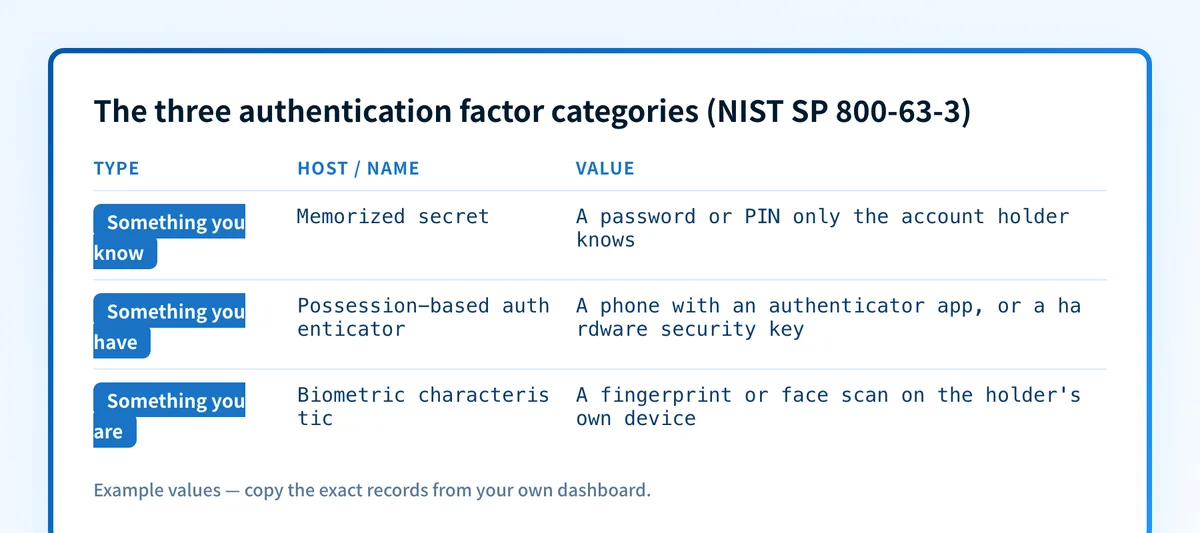
NIST SP 800-63B, Section 4.2.1 sets the pairing rule at Authenticator Assurance Level 2 (AAL2), the level most personal and business email accounts target: authentication "SHALL use either one multi-factor authenticator or a combination of two single-factor authenticators." When two single-factor authenticators are combined, one "SHALL be a Memorized Secret authenticator" (the password) and the other "SHALL be a possession-based authenticator."
Authenticator apps satisfy the possession requirement directly. NIST describes them as "software-based OTP generators installed on devices such as mobile phones," where typing the displayed code proves "possession and control of the device" (SP 800-63B, Section 5.1.4). A hardware security key or a passkey works the same way, through a cryptographic proof instead of a typed code.
When the second factor matters more than others
Not every second factor carries equal security. NIST's guidance ranks channels by how well they prove someone actually possesses a specific device, and it treats phone-network and email delivery differently:
NIST SP 800-63B, Section 5.1.3.3: "Methods that do not prove possession of a specific device, such as voice-over-IP (VOIP) or email, SHALL NOT be used for out-of-band authentication."
SMS and voice codes get a lighter restriction, not a ban: "Use of the PSTN for out-of-band verification is RESTRICTED," and verifiers "SHOULD consider risk indicators such as device swap, SIM change, number porting, or other abnormal behavior." Under NIST's terminology, RESTRICTED means the method carries extra conditions, not that it is prohibited.
That distinction matters because provider practice does not always match the guidance. Microsoft's own two-step verification setup lists an email address as a valid security-info method for personal Microsoft accounts, even though NIST advises against email for out-of-band authentication. The decision rule for a reader choosing a second factor: prefer an authenticator app, passkey, or hardware security key over SMS, voice, or email whenever the provider offers one, because those are the factors NIST and CISA both treat as stronger.
CISA's own framing supports that ordering: "Users who enable MFA are significantly less likely to get hacked," and "phishing-resistant MFA is the standard all industry leaders should strive for, but any MFA is better than no MFA." CISA adds that "the only widely available phishing-resistant authentication is FIDO/WebAuthn authentication," which covers passkeys and hardware security keys (CISA, Multi-factor Authentication).
Comparing second-factor options
The AAL2 pairing rule is the quotable version of the mechanism above:
NIST SP 800-63B, Section 4.2.1 (AAL2 pairing rule)
Authentication SHALL use either:
  - one multi-factor authenticator, or
  - a combination of two single-factor authenticators
When two single-factor authenticators are combined, one SHALL be
a Memorized Secret (password), and the other SHALL be a
possession-based authenticator (for example, an authenticator app
or a hardware security key).
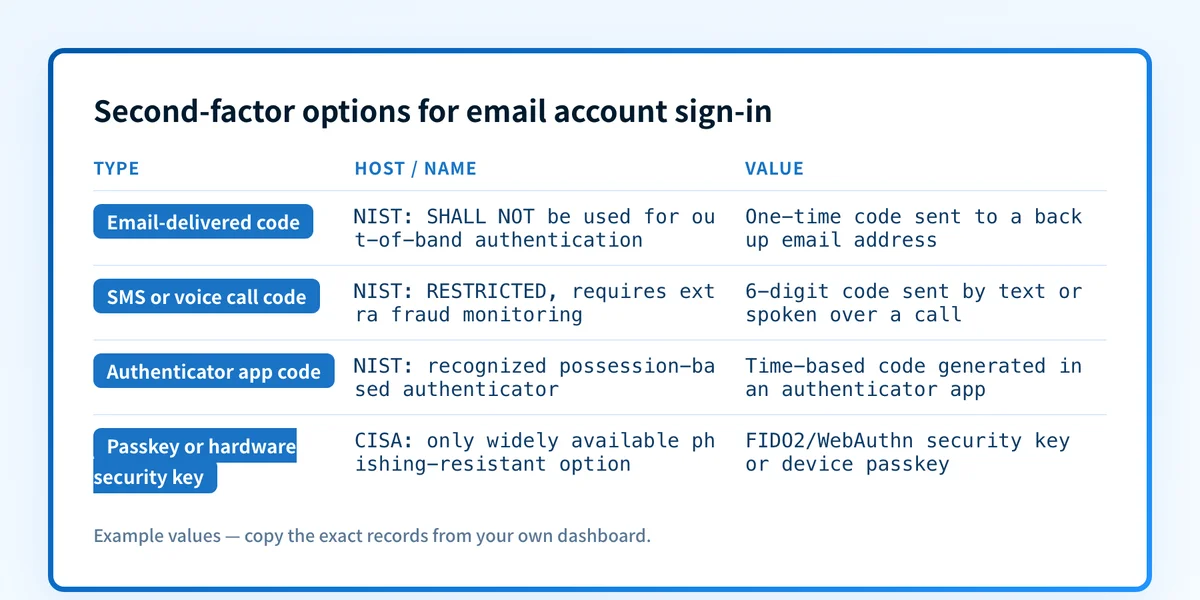
The ranking follows directly from the sources above: an emailed code is the option NIST says SHALL NOT be used for out-of-band authentication; an SMS or voice code is RESTRICTED and needs extra fraud monitoring; an authenticator app code is a recognized possession-based factor; and a passkey or hardware security key is CISA's only widely available phishing-resistant choice. A provider offering an option does not mean it meets NIST's or CISA's stronger recommendation, and readers choosing between the options Google or Microsoft present should default to the strongest one available on their account.
Where to turn on 2FA for your email account
The exact menu label and path vary by provider, so check the account's own security settings rather than a generic menu name.
Google accounts
In a Google Account, open Security & sign-in, then under "How you sign in to Google" select "Turn on 2-Step Verification" and follow the on-screen steps. Google's second-step options include Google prompts, passkeys, hardware security keys, Google Authenticator or another code app, text or voice call codes, and 8-digit backup codes. After setup, sign-in uses a password plus a second step, or a passkey alone. A phone number added for 2-Step Verification "may take up to 7 days" for Google to trust it fully (Google Account Help).
Microsoft accounts
For a personal Microsoft account, go to account.microsoft.com/security, select "Manage how I sign in," then under "Additional security" turn on "Two-step verification." Microsoft describes the control as using "two different forms of identity: your password, and a contact method," so that even if someone finds the password "they'll be stopped if they don't have access to your security info." Microsoft's documentation also lists two real costs: apps and devices that cannot process a security code, such as some mail apps and older consoles, need a generated app password, and resetting a lost password requires two working contact methods on file (Microsoft Support). This guidance covers personal Microsoft accounts, not Microsoft 365 work or school tenants managed by an organization's IT department.
Any other provider
CISA's generic path applies when a provider is not covered above: open the account's settings, then its security settings, then turn on the option, which "may be called two-factor authentication, two-step authentication or similar." CISA recommends turning it on for every account that offers it, and lists email accounts specifically among the accounts worth protecting this way (CISA, Turn on MFA).
For a closer look at one provider's specific settings, see 2-factor authentication on Yahoo email. Whichever provider runs the mailbox, follow its own current guidance rather than a workflow written for another service or an older screenshot, because a generic answer can send you to a retired setting or an unsupported recovery path.
Check the email authentication controls a password can't fix
Account 2FA stops someone from signing in to a mailbox without the second factor. It does nothing for the messages that mailbox sends. Whether a message from that domain is authenticated in transit is a separate question, answered by SPF, DKIM, and DMARC, not by the account's sign-in settings. DKIM is one of those controls: it lets a receiving mail system check that a message was authorized by the sending domain and unaltered in transit, which is a domain-level property, not a mailbox-login property.
Readers who came here looking for that domain-level protection, rather than account sign-in security, want email authentication instead. To check a domain's own authentication posture, run it through the email security score checker. That check inspects published DNS records for the domain; it does not check whether any mailbox on that domain has 2FA turned on, which is an account setting, not a DNS record.
Evidence
Sources and further reading
- NIST SP 800-63-3: Digital Identity Guidelines
- NIST SP 800-63B: Authentication and Lifecycle Management
- Google Account Help: Use 2-Step Verification
- Microsoft Support: Use two-step verification with your Microsoft account
- CISA: Turn on multi-factor authentication
- CISA: Multi-factor Authentication (MFA)
Questions readers ask
Frequently asked questions
How do I activate 2FA on my email?
Open the account's own settings, then its security settings, and turn on the option, which CISA notes "may be called two-factor authentication, two-step authentication or similar." For Google, go to Security & sign-in and select "Turn on 2-Step Verification." For a personal Microsoft account, go to account.microsoft.com/security, choose "Manage how I sign in," and turn on "Two-step verification" under Additional security. Other providers use the same general path even when the exact menu wording differs.
Can I use an email for two-factor authentication?
No. NIST's guidance states that "methods that do not prove possession of a specific device, such as voice-over-IP (VOIP) or email, SHALL NOT be used for out-of-band authentication." In practice, some providers offer it anyway: Microsoft's own two-step verification lists an email address as a valid security-info method for personal accounts. When a provider offers a choice, an authenticator app, passkey, or hardware security key meets NIST's and CISA's stronger recommendation better than an emailed code does.
What's the main disadvantage of two-factor authentication?
Losing access to every enrolled second factor is the disadvantage most provider documentation calls out directly. Microsoft's own support page notes that resetting a lost password requires two working contact methods on file, and that some apps and older devices cannot process a security code at all, so they need a separately generated app password instead. Not every second factor carries the same resistance to attack either: CISA notes that SMS and email-based codes are weaker than an authenticator app, and that phishing-resistant FIDO/WebAuthn passkeys or hardware keys are the strongest widely available option.
Where is 2 factor authentication in settings?
The exact label and location depend on the provider, but the general path is the account's settings, then its security settings. CISA describes it this way because the option "may be called two-factor authentication, two-step authentication or similar" depending on the service. For Google, it sits under Security & sign-in. For a personal Microsoft account, it sits under Manage how I sign in, in the Additional security section, labeled "Two-step verification".
Does turning on email account 2FA also fix SPF, DKIM, or DMARC problems?
No. Account 2FA protects who can sign in to a mailbox. SPF, DKIM, and DMARC are domain-level controls that let receiving mail systems verify whether an outbound message was actually authorized and unaltered. A domain can have strong account 2FA on every mailbox and still have no DMARC record, or the reverse. Checking one does not check the other.

Written by
Samuel ChenardCEO & Co-Founder, Palisade
Samuel Chenard is the CEO and co-founder of Palisade, agentic DMARC software for IT teams and MSPs, from one domain to thousands.
More from Samuel →