SPF checking tool: read the record before you change it
 ChatGPT
 Claude
 Gemini
 Perplexity
 Grok
Grok
An SPF checking tool reads the SPF policy published for a domain and evaluates the DNS-dependent mechanisms it can see. Use the exact MAIL FROM domain from a real message when possible. A record marked valid proves that public DNS can be interpreted at check time. It does not prove that a particular sending IP was authorized at delivery, that the visible From domain aligned for DMARC, or that every legitimate sender is listed.
Quick takeaways
- Check the envelope sender domain, not only the visible From domain.
- One domain should publish one SPF policy beginning with
v=spf1. - Count DNS work across nested
includeandredirectpaths. - Treat
fail,softfail,temperror, andpermerroras different results. - Retest DNS and a production message after every change.
What this tool checks
The Palisade SPF checker accepts a domain and reads its public SPF policy. A useful check exposes the record, mechanisms, modifiers, nested dependencies, and errors that can be determined from DNS.
SPF is an authorization check for an SMTP identity. RFC 7208 defines the MAIL FROM and HELO identities, the check_host() process, and the possible results. The tool cannot know which identity a receiver evaluated unless you supply the right domain from message evidence.
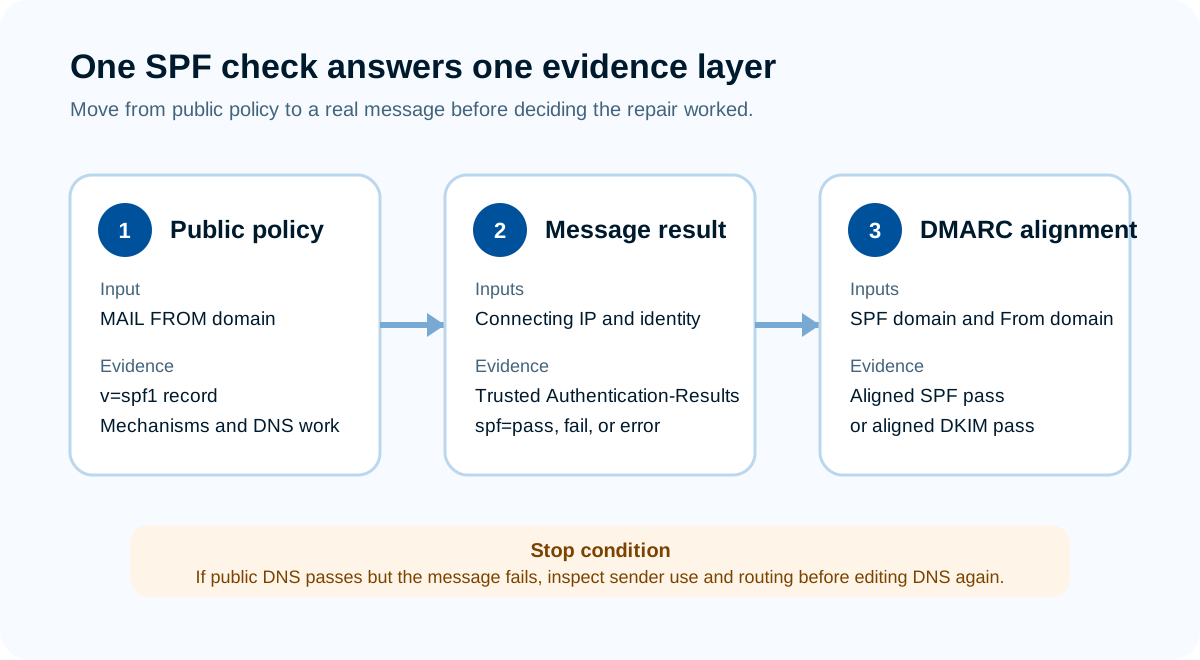
Source: Palisade protocol graphic based on RFC 7208 and RFC 9989.
The checker does not send email, control the sending service, access private traffic, or guarantee inbox placement. It is strongest at the public-policy layer. The SPF definition covers the protocol itself; this page focuses on using a check as operational evidence.
How to run the check
1. Identify the domain SPF actually used
Open the full headers of a message from the sending path under review. In a trusted Authentication-Results field, look for smtp.mailfrom= or the identity reported beside spf=. The return path may be a provider-controlled domain, a customer subdomain, or the organizational domain.
For Google Workspace, start with the organization's custom MAIL FROM domain from that same receiver-added header, not an individual consumer @gmail.com address. Google's current SPF setup guidance distinguishes Gmail users from Workspace senders and says Workspace SPF is published at the domain host rather than in the Google Admin console. If the header reports a provider-controlled return path, check that evaluated identity and assess DMARC alignment separately.
If no message exists yet, use the domain named in the sending provider's current setup instructions. Mark the result as a configuration check, not a production-message test.
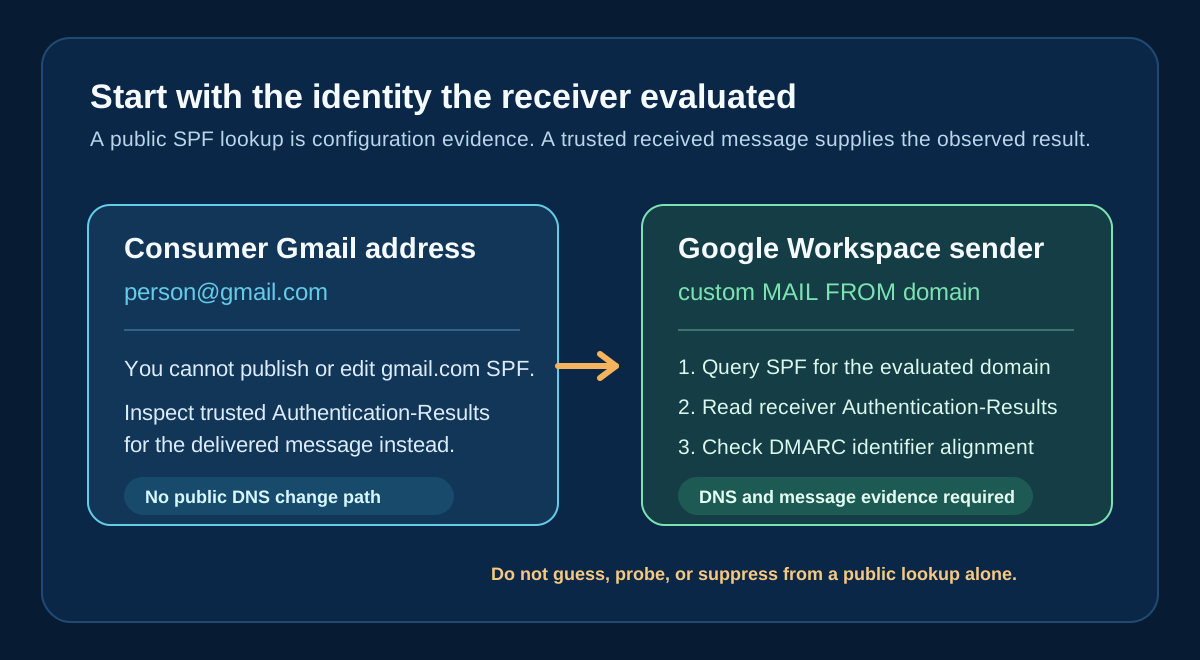
Source: Original Palisade diagnostic diagram based on Google Workspace SPF setup guidance, RFC 7208, and RFC 8601. Open the full-size Gmail SPF evidence path.
2. Submit that domain to the tool
Enter the domain without https://, a mailbox name, or a path. Run the check and save the returned record and timestamp. If the service uses a custom MAIL FROM subdomain, check that subdomain rather than assuming the root record applies.
The live tool result is shareable through its domain query. Record the returned SPF policy and DNS lookup count with the date and domain you checked, then keep customer domains out of public tickets or screenshots unless you have permission. The current public google.com result below shows a valid record, the returned policy, and one DNS lookup; it is configuration evidence only.
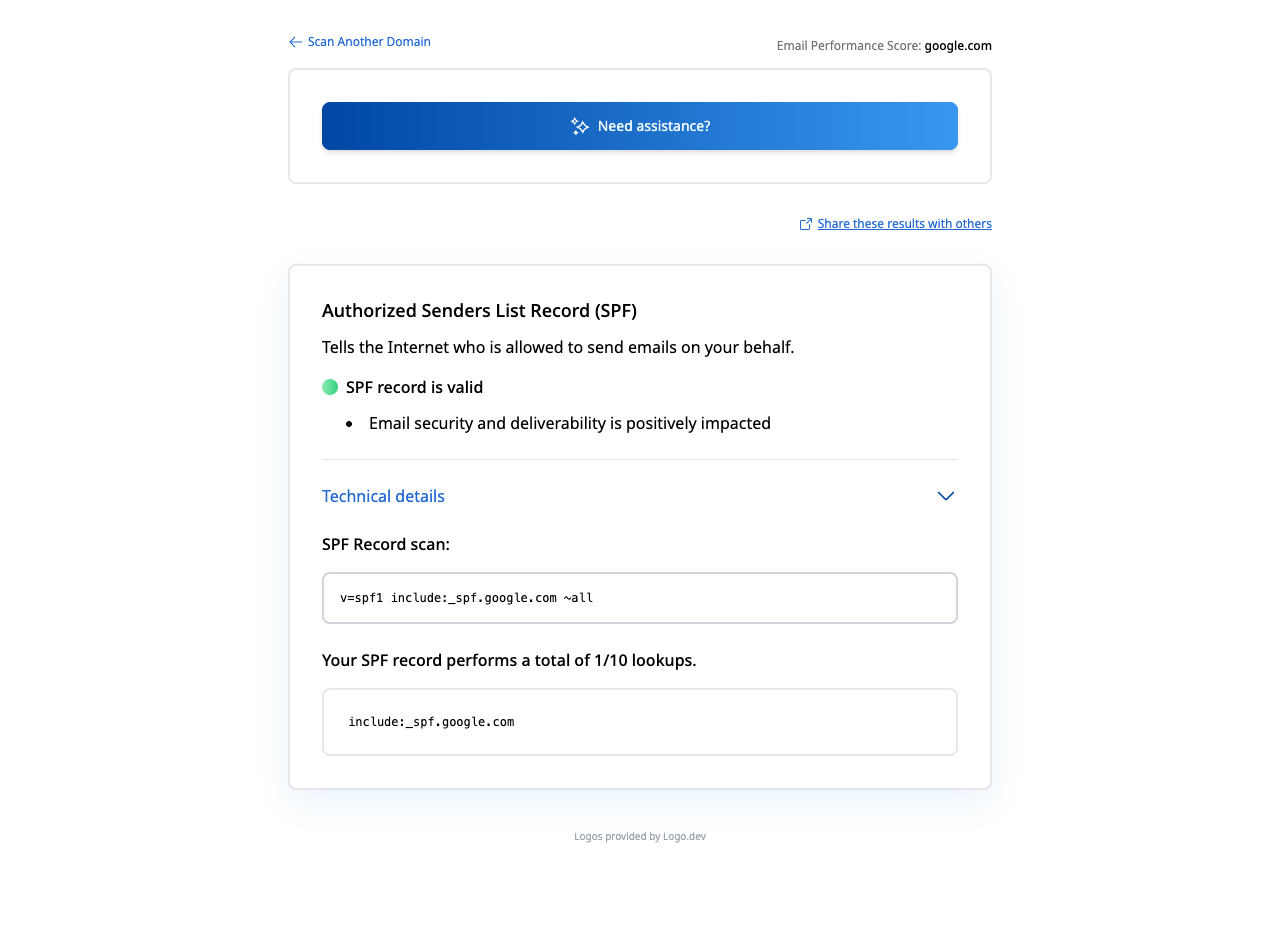
Source: Run the current Palisade SPF result for google.com. Captured July 27, 2026 with public DNS data only. Open the full-size SPF result capture.
3. Read mechanisms and modifiers in order
SPF is evaluated from left to right until a mechanism matches or processing returns an error. Identify ip4, ip6, a, mx, include, exists, all, and any redirect modifier. Note the qualifier attached to each mechanism.
Do not treat every listed domain as a sender. An include asks the evaluator to run another SPF policy and match only when that nested evaluation passes. A redirect transfers policy evaluation when no prior mechanism matched. The difference matters during consolidation.
4. Inspect recursive DNS work
RFC 7208 limits terms that cause DNS queries during evaluation to ten. This includes nested processing, so counting only the visible include words is not enough. Also note void lookups and broken dependencies that can produce permerror.
Google Admin Toolbox Check MX and the Palisade SPF checker answer related but separate public-DNS questions. Google's SPF troubleshooting guide points Workspace administrators to Check MX for the ten-lookup review. Palisade's checker focuses on the published SPF policy, its mechanisms, dependencies, and DNS work. A valid result from either tool is configuration evidence, not proof from a delivered message.
Use the tool output as a snapshot, then compare important third-party dependencies with their current official SPF instructions. Copying the IP addresses behind a provider's include can age badly when the provider changes infrastructure.
How to interpret the results
A record is present and syntactically usable
This means the tool found one interpretable SPF policy for the submitted name. Review whether the mechanisms represent active senders and whether the DNS work stays within protocol limits. "Valid" is not the same as "complete."
No SPF record was found
Confirm the domain first. The root domain may have no SPF record while a custom MAIL FROM subdomain does. If the domain is correct, obtain the record from the service that controls sending, publish one policy at authoritative DNS, and avoid guessing provider includes.
Multiple SPF records were found
Multiple policies beginning with v=spf1 at the same owner do not create a combined policy. Consolidate authorized sources into one record. Do not delete a record until each mechanism has an owner and the active mail paths have been mapped.
The result is permerror
A permanent error means the published policy could not be correctly interpreted. Common causes include multiple records, invalid syntax, broken nested policies, or exceeding processing limits. This requires an operator repair; repeated retries alone will not correct the policy.
The policy ends in softfail or fail
~all produces softfail for an unmatched client, while -all produces fail. RFC 7208 describes fail as an explicit statement that the client is not authorized and softfail as a weaker statement. The receiver chooses disposition. Before changing the qualifier, verify the actual sending inventory and message results.
How to act on the result
For a missing or malformed record, start with an inventory of every system that uses the domain in MAIL FROM or HELO. Separate corporate mail, marketing, transactional applications, ticketing, billing, and devices. Each source should have a named owner and current provider instruction.
For excess DNS work, remove retired sources first. Then consider dedicated return-path subdomains or provider-supported approaches. Flattening a provider include into copied IPs transfers the update burden to your team, so it needs monitoring and an explicit refresh owner.
For an unexpected hard fail, verify the connecting IP and evaluated identity from the receiver result. Adding an entire provider include may authorize much more infrastructure than the one source that failed. Prefer the narrowest configuration the provider supports.
If the SPF policy passes but DMARC fails, examine identifier alignment. DMARC can pass through aligned DKIM even when forwarding breaks SPF. The email authentication failure guide routes those mixed cases, and the softfail versus hardfail guide covers qualifier decisions.
How to retest
Run the SPF checker again after authoritative DNS serves the change. Confirm that one policy is returned, the intended mechanisms remain, and recursive processing completes without a permanent error.
Then send a new message through each changed production path. In the trusted receiver headers, confirm the evaluated smtp.mailfrom, connecting IP, SPF result, and visible From domain. RFC 8601 defines the receiver-added Authentication-Results field used for this evidence. Check DMARC separately because an SPF pass for an unaligned return path is not an aligned DMARC pass.
For a Google Workspace path, keep four validation layers separate:
- Query authoritative DNS for the exact custom MAIL FROM domain.
- Run that same domain through Palisade or Google Check MX and record the public result and lookup count.
- Send a new production message and inspect the trusted receiver-added
Authentication-Results; Google's Workspace troubleshooting guidance directs administrators to the message header for the actual SPF result. - Review DMARC aggregate data after enough messages arrive to see whether the production source passes and aligns over time.
Use the DKIM checker and DMARC checker when the same message path needs the other public layers inspected. Each tool answers a narrower DNS question. None can determine recipient consent, reputation, content quality, or future placement.
If repeated sender changes make one-time checks difficult to operate, Palisade's DMARC Agent turns DMARC report findings into source-specific SPF, DKIM, and alignment tickets with recommended actions. It cannot decide which unrecorded sender the business intended to authorize or guarantee delivery. Start with Palisade when the remaining need is ongoing monitoring rather than another isolated lookup.
Sources and further reading
Frequently asked questions
Keep going with AI
Ask AI how this applies to you
Take this guide to your assistant — each question opens pre-filled, with a link back to this page so it can read the details.
- Can an SPF checker test a specific email?


- How does this apply to my domain?
- What should I do about it, step by step?

Written by
Samuel ChenardCEO & Co-Founder, Palisade
Samuel Chenard is the CEO and co-founder of Palisade, AI-first DMARC software for IT teams and MSPs, from one domain to thousands.
More from Samuel →