Email authentication checker: use four evidence layers
 ChatGPT
 Claude
 Gemini
 Perplexity
 Grok
Grok
An email authentication checker should answer four separate questions: what the domain publishes, whether those records resolve correctly, whether a sender actually uses the configured identities, and what a receiver reported for a real message. Start with the domain-wide Email Security Score, then use focused SPF, DKIM, and DMARC checks for the weak layer. Finish with trusted message headers. A domain-only score cannot prove that an unseen message passed or that every sending service aligns.
Quick takeaways
- Start with the exact domain used in the visible From address.
- Treat an overall score as a routing signal, not a final verdict.
- Use focused checks for SPF, DKIM selectors, and the DMARC policy.
- Inspect a real production message before declaring success.
- Keep sender ownership and aggregate-report evidence beside technical results.
What this tool checks
Palisade's Email Security Score gives a domain-level view of public email authentication and branding signals. It is useful when the reader has a domain but does not yet know which protocol needs attention.
The protocols do different jobs. RFC 7208 defines SPF authorization for a MAIL FROM or HELO identity. RFC 6376 defines DKIM signatures and selector-scoped public keys. RFC 9989 defines DMARC alignment with the visible From domain.
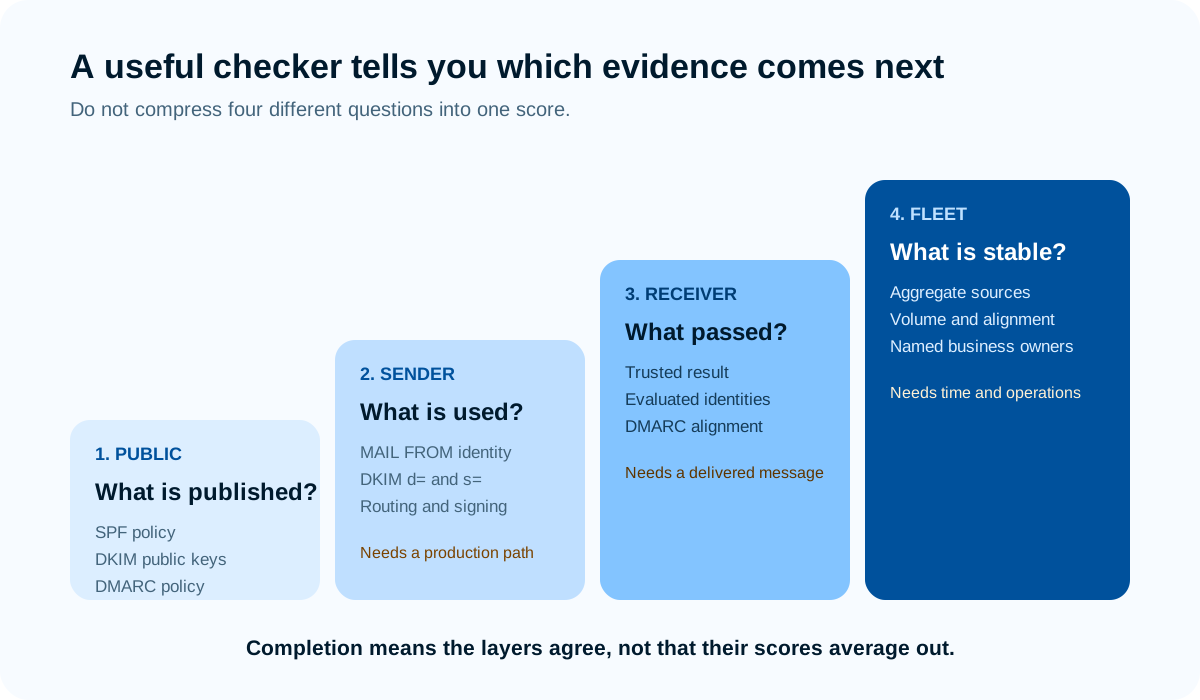
Source: Palisade evidence model based on RFC 7208, RFC 6376, RFC 8601, and RFC 9989.
The score cannot access private keys, enumerate every possible DKIM selector, know which SaaS applications the business approved, inspect private message traffic, or guarantee delivery. It should tell you where to collect the next piece of evidence.
How to run the check
1. Choose a domain and a production path
Use the domain from the visible From address of a message the organization actually sends. Record the application and purpose, such as corporate mail, invoices, password resets, marketing, or support. Different systems can use different return paths and DKIM domains even when people see the same From domain.
If you are checking a parked domain, write down that it is not expected to send. That changes the desired configuration and the meaning of a missing sender path.
2. Run the domain-wide score
Open the Email Security Score, enter the domain without a URL or mailbox, and save the dated result. Use the category findings to decide whether SPF, DKIM, DMARC, or another public control needs a focused check.
Do not compare scores across unrelated tools as if they were standardized units. Each product can weight controls, warnings, and recommendations differently. Compare the raw evidence and the stated test scope.
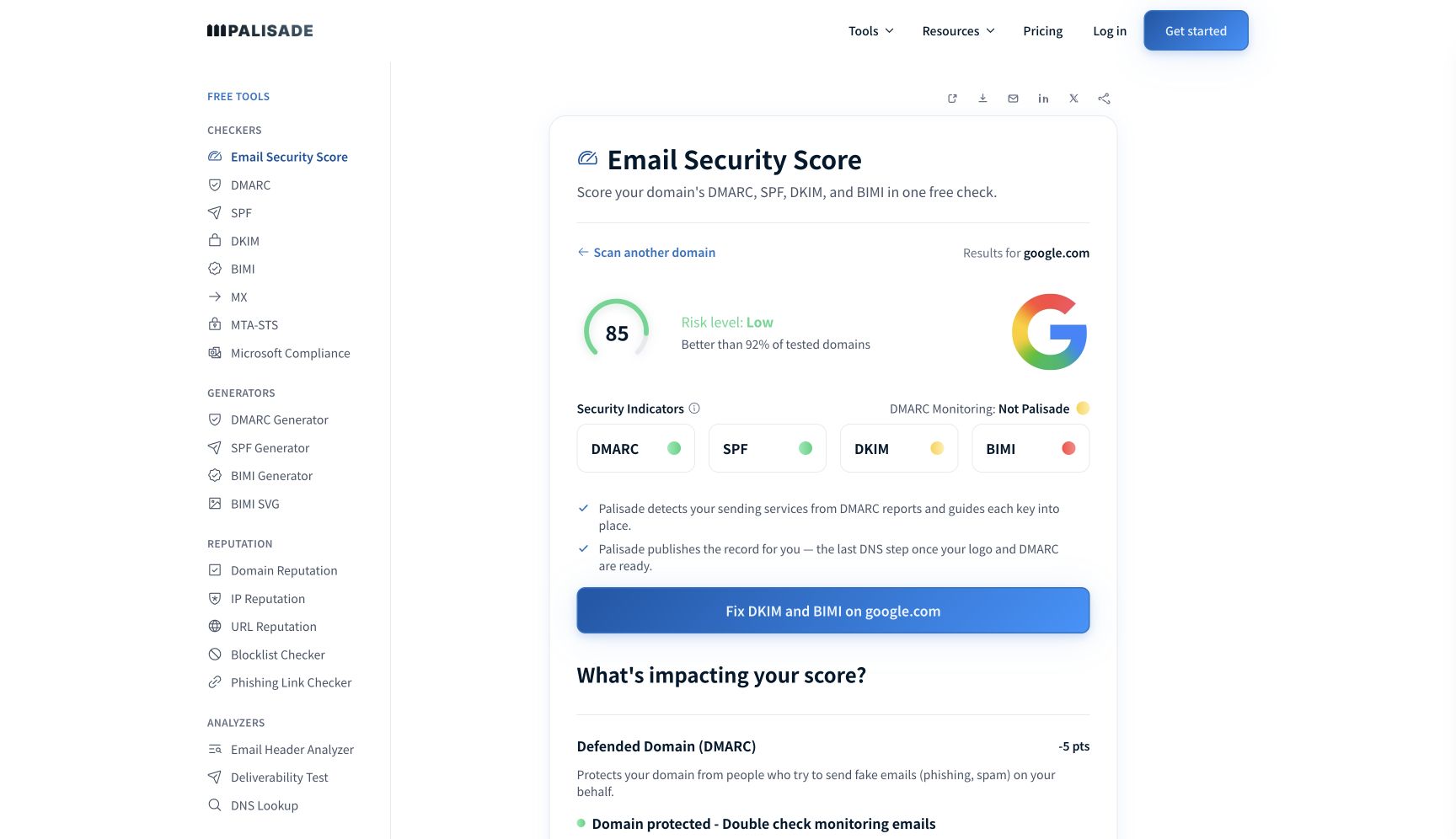
Source: Open the full-size capture or run the current Palisade Email Security Score for google.com. Captured July 27, 2026 with public domain data only.
3. Run the focused public checks
Use the SPF checker for the actual MAIL FROM domain. Use the DKIM checker with the signing domain and selector from a provider or message header. Use the DMARC checker for the visible From domain.
Record raw values, CNAME targets, lookup errors, and timestamps. A DKIM domain can publish many selectors, and DNS does not provide a universal list. Checking default or selector1 by habit can miss the selector used by the live message.
4. Inspect a trusted receiver result
Send a new message through the production path to a mailbox where you can view full headers. Locate the receiver-added Authentication-Results field and record:
spf=pass smtp.mailfrom=returns.example.net
dkim=pass header.d=example.com header.s=transactional
dmarc=pass header.from=example.com
RFC 8601 defines this result field and its trust model. Ignore a result line inserted by an untrusted sender unless the receiving system explicitly preserves it inside a trusted boundary.
How to interpret the results
The domain score and focused checks are healthy
This establishes that the tested public controls are present and interpretable at check time. It does not prove that all applications use them. Compare at least one message from each material sending path.
SPF is present but the message fails
Confirm the domain reported in smtp.mailfrom and the connecting IP. The root domain's record may be irrelevant when the service uses a custom return-path subdomain. A forwarded message can also arrive from an IP the original sender did not authorize.
A DKIM key exists but dkim=fail
Match header.d and header.s with the exact public key. If DNS matches, inspect whether the sender uses the paired private key and whether routing changed signed content. A green selector lookup cannot prove private-key use.
SPF and DKIM pass but DMARC fails
At least one passing identifier must align with the visible From domain. Provider-owned SPF and DKIM domains can pass their protocols without aligning to the customer's From domain. A mixed authentication failure requires comparing the passing identities with the visible From domain.
DMARC passes but mail still bounces or lands in spam
Authentication is not a delivery guarantee. Recipient consent, reputation, content, rate, list hygiene, infrastructure, and receiver policy still matter. Preserve the SMTP response and mailbox evidence instead of weakening a working authentication setup.
How to act on the result
For a missing or malformed public record, obtain the current account-specific value from the sending provider or domain owner. Publish it at authoritative DNS and avoid copying values from an article, another tenant, or an unrelated domain.
For a sender-use problem, change the sending platform rather than DNS alone. Activate DKIM, configure an aligned custom return path, or move the From domain to a path the service supports. Keep the prior configuration and rollback procedure.
For an alignment problem, choose the mechanism the provider can support reliably. Aligned DKIM often survives ordinary forwarding better than SPF because forwarding changes the connecting IP, although content-changing intermediaries can break DKIM. Verify the actual route.
For an unknown sending source, do not authorize it merely to make the dashboard green. Identify the business owner, application, data handled, expected volume, and offboarding path. If nobody owns it, contain or remove it.
The email authentication overview is the durable reference for the protocol model. Use the failure workflow when a real message supplies a specific failed result.
How to retest
Repeat the domain-wide score after authoritative DNS serves the intended records. Confirm that the focused checks return the exact SPF policy, DKIM selector, and DMARC record you approved.
Then send a new message from every changed path. Validate the trusted receiver result, not a forwarded screenshot of an unknown header. Confirm the identities and alignment, not only the words pass.
Finally, compare aggregate DMARC reporting across the next relevant windows. A single message validates one route. Aggregate data can reveal other sources and receiver populations, but it is still not a complete message log.
The honest completion rule is simple: public configuration, sender use, receiver result, and fleet evidence agree. If one layer disagrees, keep the item open and repair that layer rather than averaging it into a reassuring score.
When manual checks reveal a recurring source-classification or remediation workload, Palisade's DMARC Agent turns aggregate-report findings into source-specific SPF, DKIM, and alignment tickets with recommended actions. It cannot inspect private receiver decisions, recover a missing private key, or guarantee delivery. Start with Palisade when the remaining problem is continuous monitoring across sending paths.
Sources and further reading
Frequently asked questions
Keep going with AI
Ask AI how this applies to you
Take this guide to your assistant — each question opens pre-filled, with a link back to this page so it can read the details.
- Can one tool check SPF, DKIM, and DMARC?


- How does this apply to my domain?
- What should I do about it, step by step?

Written by
Samuel ChenardCEO & Co-Founder, Palisade
Samuel Chenard is the CEO and co-founder of Palisade, AI-first DMARC software for IT teams and MSPs, from one domain to thousands.
More from Samuel →