DMARC check tool: verify the record and know its limits
 ChatGPT
 Claude
 Gemini
 Perplexity
 Grok
Grok
A DMARC check tool reads the TXT policy published at _dmarc. and reports what receivers can resolve now. Use it to find a missing record, duplicate policy, invalid tag, policy level, alignment mode, or report destination. Do not use a green DNS result as proof that legitimate mail passes DMARC or that p=reject is safe. Those decisions also need production-message results, sender ownership, and aggregate-report evidence.
Quick takeaways
- Submit the visible From domain, not a mailbox address or URL.
- Expect one DMARC policy record at the applicable policy domain.
- Read policy and reporting tags as separate operating decisions.
- Validate external report destinations when the tool flags authorization.
- Check real messages and aggregate reports before raising enforcement.
What this tool checks
The Palisade DMARC checker retrieves the public policy associated with a domain and presents the DNS-visible result. It can parse common tags such as p, sp, rua, adkim, aspf, and pct, and it can expose missing or malformed records.
RFC 9989 is the current standards-track DMARC core specification. It defines policy discovery, identifier alignment, and receiver processing. RFC 9990 separately defines aggregate reporting. Older articles often cite RFC 7489 for both; the 2026 standards update split those responsibilities.
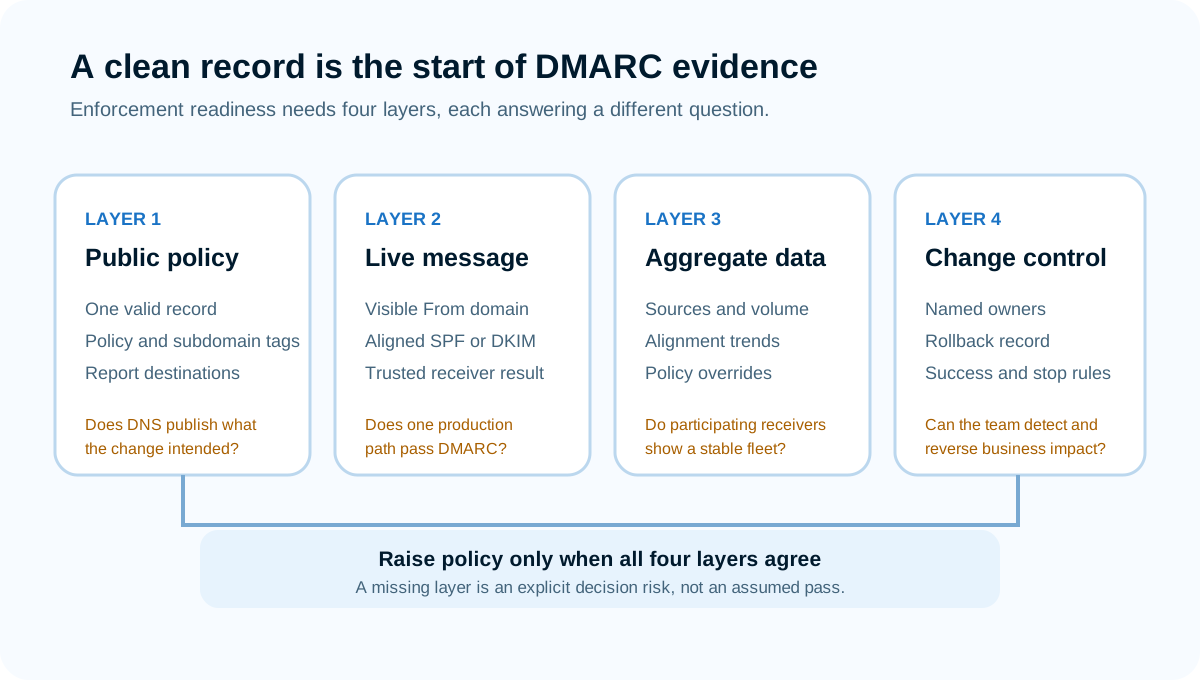
Source: Palisade protocol graphic based on RFC 9989 and RFC 9990.
The public lookup cannot see private mail, determine whether a sender is authorized by the business, calculate historical pass rates, or guarantee receiver disposition. The DMARC definition explains the protocol; this support guide focuses on the check-and-retest task.
How to run the check
1. Choose the domain from the visible From address
Take the domain to the right of @ in a production message's RFC5322.From field. Enter the domain only. Do not add _dmarc, https://, a mailbox name, or a path unless the tool explicitly requests a record owner.
If the message uses a subdomain, check that subdomain and note whether its policy is explicit or inherited. A root-domain result can hide an sp policy that applies differently to subdomains.
2. Save the raw record and lookup time
Run the checker and keep the returned TXT value, policy summary, warnings, and UTC timestamp. DNS answers can change, and caches can temporarily expose old and new values during a rollout.
If no result appears, confirm which provider is authoritative for the domain. Editing the registrar's DNS panel does nothing when the nameservers point elsewhere.
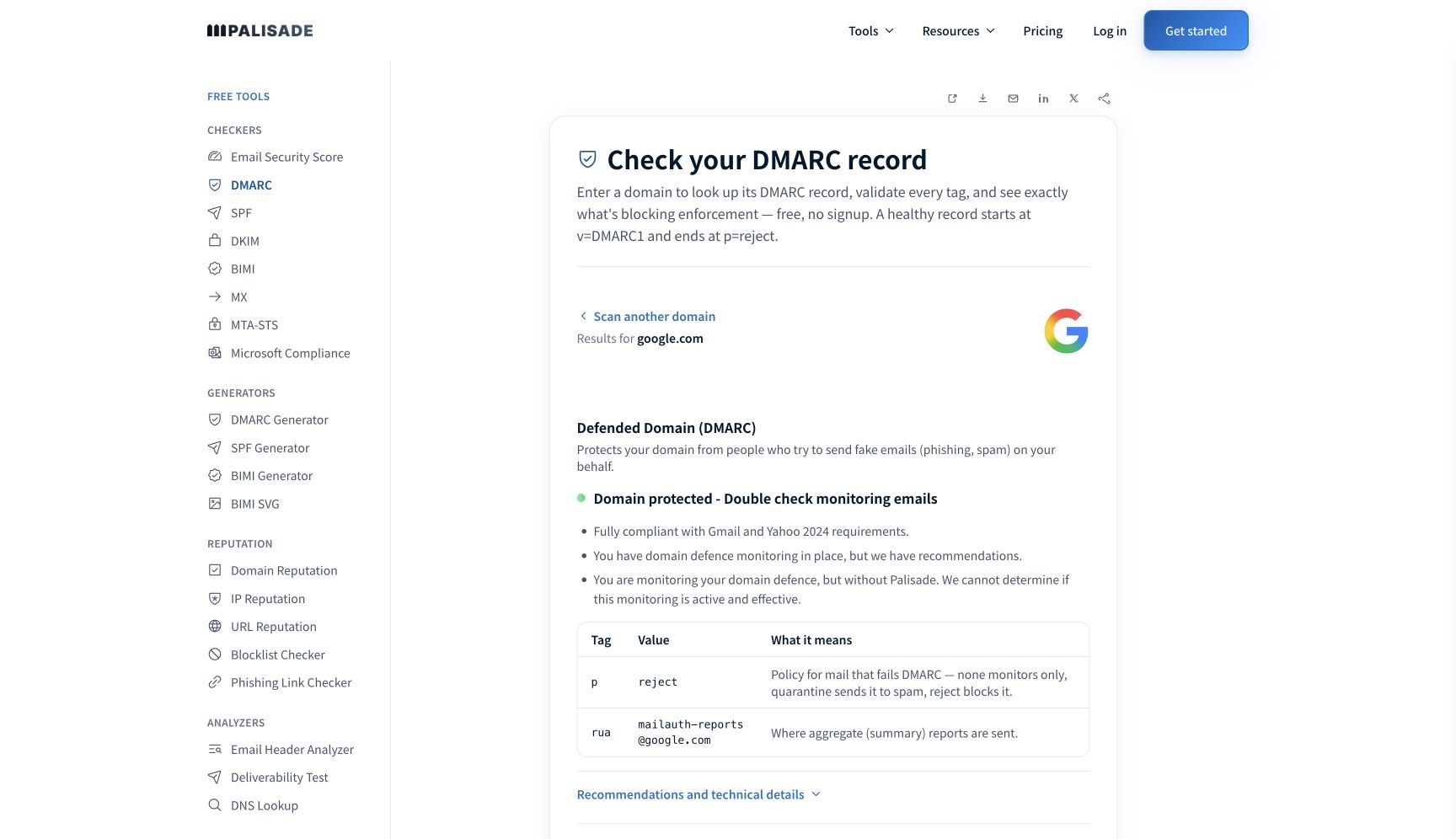
Source: Open the full-size capture or run the current Palisade DMARC result for google.com. Captured July 27, 2026 with public domain data only.
3. Read the policy tags in context
Start with v=DMARC1 and p. Then record sp, adkim, aspf, rua, pct, and any other supported tags. Do not assume a missing optional tag is an error; DMARC defines defaults.
Treat rua as an evidence pipeline, not as enforcement. It requests aggregate feedback from participating receivers. A policy can exist without rua, but the domain owner then loses a major source of operational visibility.
4. Compare the result with one real message
Inspect a trusted receiver's Authentication-Results. RFC 8601 defines this receiver-added field and its trust boundary. Record the visible From domain, SPF result and identity, DKIM result and signing domain, and DMARC result. A DNS check shows the policy. The message shows how one live path was evaluated.
How to interpret the results
The record is valid and uses p=none
p=none requests monitoring rather than quarantine or rejection based on DMARC. It is a normal rollout state, not proof that the domain is unprotected in every other way. Confirm that aggregate reports are arriving and that legitimate sources are being assigned to owners.
The record uses p=quarantine or p=reject
The published policy asks receivers for stronger treatment of messages that fail DMARC. Receivers still apply local handling under RFC 9989. Confirm that the policy shown by the tool matches the approved change record and that rollback criteria are documented.
The record is missing
Verify the submitted domain, authoritative nameservers, and intended owner name. A DMARC record belongs at _dmarc.. Create one record using an approved reporting destination and a rollout plan. Do not copy another organization's rua address.
More than one policy record appears
Do not choose the stricter or newer-looking record and ignore the other. DMARC policy discovery expects a valid policy, not competing records. Inventory the values, preserve required report destinations, and consolidate them into one approved record.
An external report destination is unauthorized
When rua points outside the policy domain, the destination normally needs a DNS authorization record for that relationship. RFC 9990 defines report-request discovery and destination verification. Fix the destination-side authorization or use a report address inside the policy domain. The external DMARC report authorization guide covers the record shape.
The record passes but messages fail DMARC
Stop editing the policy record. Identify whether aligned SPF or aligned DKIM failed on the message. A sender can have valid SPF and DKIM records yet use unaligned provider domains. Use the email authentication failure workflow to find the broken identity.
How to act on the result
For syntax or duplication problems, make the smallest DNS correction that produces one valid policy and preserves approved report destinations. Record the prior value and TTL so rollback is possible.
For a monitoring policy, build a sender inventory from aggregate data. Assign every high-volume source to a business and technical owner. Verify legitimate sources with delivered-message headers before changing authentication or policy.
For an enforcement policy with unexpected failures, repair the legitimate sender first. Give the service an aligned DKIM domain or an aligned custom MAIL FROM path. Do not authorize a source merely because it has high volume; compromised or unauthorized systems can also send at scale.
For an unused or parked domain, the operating goal differs from an active sending domain. Confirm that the domain truly sends no legitimate mail, publish appropriate authentication controls, monitor for unexpected use, and keep ownership documented.
Palisade's public checker is the first useful action when the evidence is a domain name. Ongoing policy work needs more. Aggregate reports, message headers, DNS change control, and sender ownership are what turn a record into a managed program.
How to retest
After a DNS change, wait for authoritative service and relevant caches to refresh, then run the same domain through the checker. Confirm the exact policy, reporting destinations, alignment modes, and absence of duplicates.
Send new messages through every changed production path. Verify at a trusted receiver that either SPF passes with an aligned identity or DKIM passes with an aligned signing domain, and that DMARC reports pass.
Review the next aggregate-report windows before raising policy. RFC 9990 reports summarize participating receivers and time periods; they are not a complete message log. Look for legitimate sources that disappeared, new unknown sources, alignment regressions, and unexpected policy overrides.
Use the SPF checker and the DKIM checker for the public records that support a failing path. These checks cannot determine whether the source is legitimate or whether the business accepts the risk of enforcement.
When the public record is correct but the team still needs sender ownership and recurring remediation, Palisade's DMARC Agent turns aggregate-report findings into source-specific authentication tickets and recommended actions. It cannot guarantee receiver disposition or classify a sender without the organization's business context. Start with Palisade after the checker has established the current public policy.
Sources and further reading
Frequently asked questions
Keep going with AI
Ask AI how this applies to you
Take this guide to your assistant — each question opens pre-filled, with a link back to this page so it can read the details.
- Does a valid DMARC record mean my domain is protected?


- How does this apply to my domain?
- What should I do about it, step by step?

Written by
Samuel ChenardCEO & Co-Founder, Palisade
Samuel Chenard is the CEO and co-founder of Palisade, AI-first DMARC software for IT teams and MSPs, from one domain to thousands.
More from Samuel →