Sample DKIM record
 ChatGPT
 Claude
 Gemini
 Perplexity
 Grok
Grok
A sample DKIM record is a DNS TXT record published at v=DKIM1 and p=. The selector and key value must come from your sending provider or mail system. Do not copy a sample key into production because it will not match your sender's private signing key.
At a glance
Quick takeaways
- A DKIM record is usually a TXT record at a selector-scoped
_domainkeyhostname. - The
ptag contains the public key that receivers use to verify a DKIM signature. - A selector lets one domain publish separate keys for different sending systems or key rotations.
- A DKIM DNS record does not contain the private key used to sign mail.
- A public DNS lookup can confirm publication, but it cannot prove that a production message was signed correctly.
- DKIM is one part of email authentication; DMARC also evaluates alignment with the visible From domain.
How a DKIM record works
DKIM defined in RFC 6376 uses a public-private key pair. A sending system signs selected parts of an email with its private key and puts the selector, signing domain, and signature data in the message's DKIM-Signature header. A receiving system uses the selector and signing domain to find the matching public key in DNS.
The record name follows this shape:
<selector>._domainkey.<signing-domain>For example, a signer using selector selector1 for yourdomain.com causes a receiver to look up:
selector1._domainkey.yourdomain.comThe selector is not a fixed DKIM word. It is chosen by the system that generates and manages the signing key. That is why one provider's selector, CNAME target, or public-key value is not safe to reuse for another provider or domain.
DKIM verification confirms whether the received message's signature matches the published public key and the signed content. It does not by itself establish DMARC alignment. For that distinction, see how DKIM differs from SPF.
When the sample changes
The basic DNS shape remains selector-scoped, but the provider-issued instructions determine the actual record type, hostname, and value.
A provider may ask you to publish:
- A TXT record containing the public key directly at
._domainkey.yourdomain.com - A CNAME record at that selector-scoped hostname that points to a provider-controlled DNS name.
- More than one selector during key rotation or when separate mail systems sign for the same domain.
v=DKIM1 as the version tag and p= as the public-key data tag. The standard also defines optional tags, including k= for key type, h= for acceptable hash algorithms, s= for service type, t= for flags, and n= for notes.
Use this decision rule when comparing instructions:
- If your provider gives a TXT value, publish that exact generated value at the exact generated hostname.
- If your provider gives a CNAME target, publish a CNAME. Do not convert its target into a TXT record.
- If the provider rotates a key or supplies multiple selectors, keep each required selector until the provider confirms retirement.
- If the public record is present but a delivered message still fails DKIM, inspect the signed message and provider status. DNS alone cannot show whether the application used the expected key.
Do not replace an existing DKIM record before confirming which system uses it. Removing a still-active selector can cause legitimate mail to fail DKIM verification.
For a provider-specific DNS task, use the relevant instructions, such as adding a DKIM record in GoDaddy DNS, rather than treating the fictional example below as deployable configuration.
Worked sample DKIM record
This is an illustrative-only TXT record. The hostname, public key, and note are examples. Do not publish these values.
Host: selector1._domainkey.yourdomain.com
Type: TXT
Value: v=DKIM1; k=rsa; p=MIIBIjANBgkqhkiG9w0BAQEFAAOCAQ8AMIIBCgKCAQEAexamplePublicKeyOnly; n=Illustrative DKIM key
The record has four useful parts:
selector1is the selector named in the email'sDKIM-Signatureheader._domainkeyis the DKIM DNS namespace defined by the protocol.v=DKIM1identifies the record format.p=contains the base64-encoded public key used for verification.
k=rsa tag identifies an RSA key. RFC 8301 updates DKIM's cryptographic requirements: signers must use rsa-sha256, and verifiers must support it. Your provider determines its supported key type, selector, and generated DNS value.
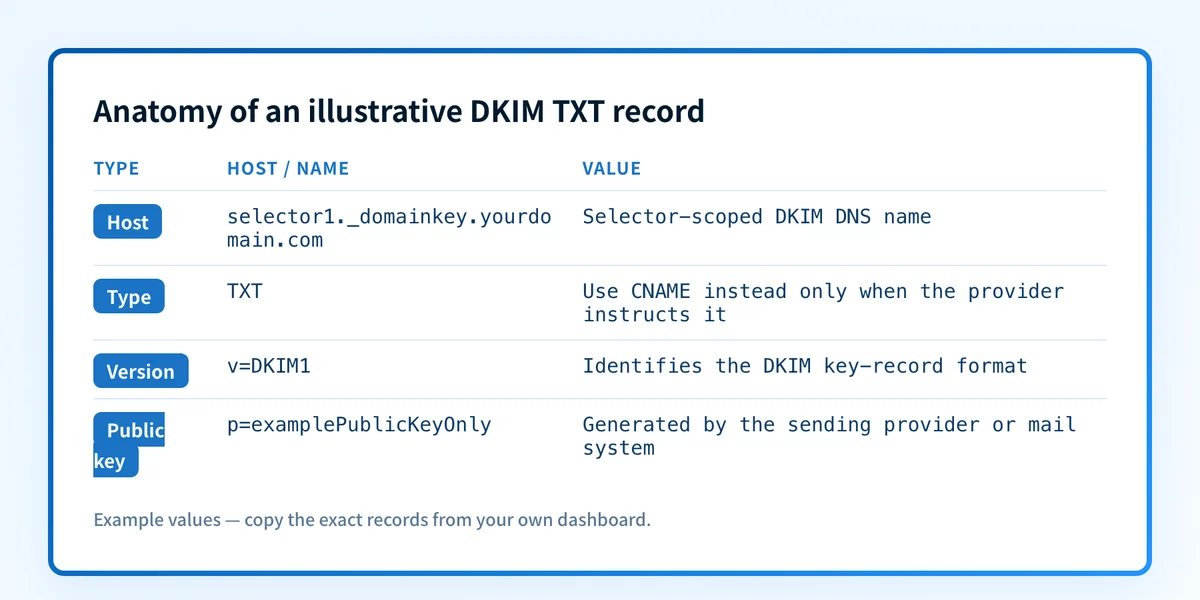
A record can be valid DNS and still fail the mail-flow test. The private key remains in the sending system, and the message must carry a matching DKIM signature. If the public key does not match that private key, verification fails. If the signing domain does not align with the visible From domain under the applicable DMARC policy, the message can also fail DMARC despite a DKIM pass. DKIM alignment failures need message-level evidence.
What to check next
Start with the evidence you have:
- If you have a provider-issued hostname and record value, compare them character for character with the DNS record you published. Confirm whether the provider requested TXT or CNAME.
- If you know the sending domain and selector, look up the public selector-scoped record.
- If you have a delivered test message, inspect its
DKIM-SignatureandAuthentication-Resultsheaders. RFC 6376 defines the signature fields, while RFC 8601 defines theAuthentication-Resultsheader field. - If the provider reports verification success, send a real message through the production path and inspect that delivered message. Then review DMARC aggregate reports once they accumulate.
Check the record that is actually published
After comparing the sample anatomy with your provider's instructions, inspect the public record for the domain and selector you control.
A public lookup cannot enable signing, access a private key, or prove a result for a message it did not inspect.
Evidence
Sources and further reading
Questions readers ask
Frequently asked questions

Written by
Samuel ChenardCEO & Co-Founder, Palisade
Samuel Chenard is the CEO and co-founder of Palisade, AI-first DMARC software for IT teams and MSPs, from one domain to thousands.
More from Samuel →