DMARC XML reader
 ChatGPT
 Claude
 Gemini
 Perplexity
 Grok
Grok
A DMARC XML reader parses one aggregate-report attachment into readable receiver evidence. Start by checking who generated the report and its date range, then read each record's source IP, message count, applied disposition, identifier alignment, and SPF or DKIM results. This tells you what a receiver observed, not whether a sender is authorized or whether every message stream is healthy. Use unknown sources and failures as leads to investigate before changing DNS or policy.
At a glance
Quick takeaways
- Aggregate reports are XML feedback about grouped mail streams, not copies of individual messages.
- A
recordcombines a source IP, count, DMARC evaluation, identifiers, and underlying authentication results. - Read
policy_evaluatedfor the DMARC outcome andauth_resultsfor the underlying SPF and DKIM results. - An unfamiliar source IP or a failed result needs ownership and message-level context before it becomes a remediation decision.
- A one-file reader helps with an attachment; recurring collection, correlation, and ownership work need a separate operating process.
What a DMARC XML reader shows
The current aggregate-report standard, RFC 9990, defines a feedback XML document with report_metadata, policy_published, and one or more record elements. A report covers one DMARC Policy Domain and one observed policy configuration. It summarizes grouped receiver observations rather than presenting individual delivered messages.
Within a record, row identifies the connecting source_ip, the number of messages in count, and the DMARC disposition and alignment outcome in policy_evaluated. identifiers supplies the visible header_from domain and, when present, the envelope_from domain. auth_results records the underlying DKIM and SPF results without interpreting them as DMARC alignment. RFC 9990's record definitions distinguish those two evidence layers.
That distinction matters. DMARC uses aligned SPF or DKIM results for the author domain, as defined by RFC 9989. A reader can therefore highlight a pass in an underlying result while the DMARC alignment result still needs attention. For a fuller explanation of the file structure and safe ingestion, use the DMARC aggregate report format guide.
When a single report is enough
Use a reader for the first pass on one attachment: confirm its reporting period, find the high-volume sources, and identify rows with failed alignment or an unexpected disposition. Treat the result as a concise evidence record, not a final verdict about intent. RFC 9990 notes that reports can expose source, policy, authentication, and count data, but that scope does not establish a business owner for a source or explain an individual delivery outcome.
Do not use one XML file to conclude that a new IP is malicious, that a legitimate vendor is correctly configured, or that a policy change is safe. Compare a suspected legitimate source with its owner and a message from the same path. The broader DMARC report interpretation guide covers the two report types and the investigation work that follows.
Read one report in evidence order
Start at metadata and move toward the authentication detail. This avoids treating an SPF or DKIM value as the whole DMARC result.
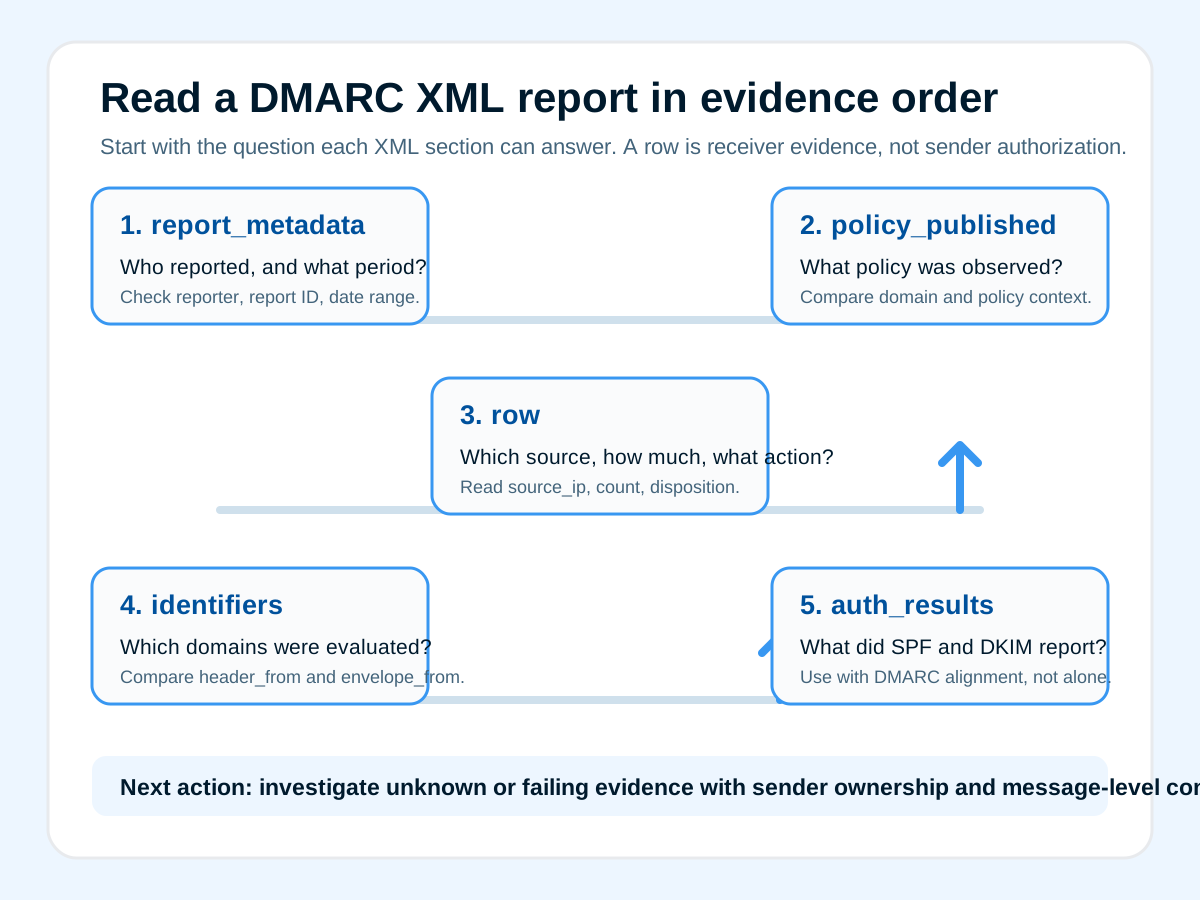
report_metadata  -> who reported, report ID, reporting period
policy_published -> policy domain and policy context observed
row              -> source IP, message count, disposition, DMARC alignment
identifiers      -> visible From domain and envelope domain, when present
auth_results     -> underlying DKIM and SPF results to investigate
1. Check report metadata
Confirm org_name, report_id, and the UTC date_range before comparing the report with another file. RFC 9990 defines the date range as the reporting period, not necessarily the first and last individual message observed. A reader should make that boundary visible so you do not compare mismatched intervals.
2. Read the policy context
Use policy_published to see the policy domain and settings the receiver observed. It is context for the report, not a substitute for checking today's DNS. If the current public record is the next question, the DMARC record checker is the closer action.
3. Prioritize rows by source and count
Review source_ip alongside count and policy_evaluated. A large count tells you where to investigate first. A low-volume row may still be important, but neither volume nor IP address alone proves whether the source was intended to send for the domain.
4. Compare identifiers with alignment results
Read header_from and envelope_from beside the dkim and spf values in policy_evaluated. This is where a reader turns a bare pass or fail into an alignment question. Do not infer sender ownership from an envelope domain alone.
5. Use underlying results as investigation detail
Review auth_results after the DMARC outcome. RFC 9990 describes this section as DKIM and SPF results that are not interpreted with respect to DMARC, so it helps explain a row but does not replace the DMARC alignment values. If reports are arriving continuously, compare the operating tradeoffs in an open-source DMARC analyzer or a hosted DMARC analyzer comparison.
Check the policy behind the report
The report tells you what a receiver observed during its reporting interval. When you need to inspect the currently published DMARC record, run the domain through Palisade's DMARC record checker. The public Palisade DMARC Record Checker is the cited public-record evidence source. Compare the record with the report's policy_published context before proposing a DNS or policy change.
A DNS lookup can read the public DMARC record, but it cannot parse the attachment, identify every sending service, or establish what happened to an individual delivered message. Keep sender ownership and message-level evidence in the investigation.
If these reports become recurring work, Palisade's DMARC Agent can turn aggregate-report data into prioritized sender and authentication remediation work. A human still reviews the evidence and approves DNS or policy changes. Start with Palisade when the ongoing sender-review workflow is the unresolved problem.
Evidence
Sources and further reading
Questions readers ask
Frequently asked questions

Written by
Samuel ChenardCEO & Co-Founder, Palisade
Samuel Chenard is the CEO and co-founder of Palisade, AI-first DMARC software for IT teams and MSPs, from one domain to thousands.
More from Samuel →