DMARC analysis tool: check a record and act on the result
 ChatGPT
 Claude
 Gemini
 Perplexity
 Grok
Grok
A DMARC analysis tool can check the DMARC policy that a domain publishes in public DNS and help you decide what to inspect next. Start with Palisade's DMARC checker, then compare its DNS result with a real delivered message and, once available, DMARC aggregate reports. A public record lookup can show the policy receivers can discover. It cannot prove how one production message authenticated or what a receiver decided to do with it.
At a glance
Quick takeaways
- A DMARC lookup queries the
_dmarcTXT record for the domain you enter. - A published DMARC record needs the
v=DMARC1version tag and a requested policy throughp=. - Multiple DMARC records at the same queried owner create an invalid discovery result.
- A valid DNS record does not prove that every production sender passes SPF or DKIM alignment.
Authentication-Resultsfrom a delivered message records receiver-side authentication evaluation for that message.- Aggregate reports add sending-source and alignment evidence that a one-time public lookup cannot provide.
What this tool checks
The Palisade DMARC checker accepts a domain and checks the publicly visible DNS evidence for its DMARC policy. Use the domain visible in the From: address, such as yourdomain.com, rather than an IP address, mail server hostname, or a DKIM selector.
DMARC discovery starts at _dmarc.. Under RFC 9989's DMARC record discovery rules, a receiver looks for a DMARC TXT record at that owner, then may evaluate the organizational domain when no record exists at the exact domain. The policy record tells receivers what the domain owner requests when DMARC does not pass.
A public lookup has a narrow evidence boundary. It cannot see:
- The service or application that sent a particular message.
- Whether that message carried a valid SPF or DKIM result.
- Whether an SPF or DKIM authenticated domain aligned with the visible
From:domain. - A mailbox provider's private reputation assessment or final inbox decision.
- DNS changes after the lookup runs.
How to run the check
1. Identify the visible From domain
Open a message that represents the production mail flow you are investigating. Record the domain after the @ in the visible From: address. If you are preparing a new domain, use the domain you intend recipients to see in that address.
Do not substitute a return-path domain or DKIM signing domain at this stage. Those can differ from the visible From domain and matter later when you test DMARC alignment.
2. Run the public DMARC lookup
Enter the visible From domain in Palisade's DMARC checker. Save the returned record details and the time of the check. This gives you a public-resolver view of the record a receiver may discover.
You can repeat the DNS portion independently with an example domain:
dig +short TXT _dmarc.yourdomain.comIf your DNS provider supports it, compare that response with its authoritative-zone view before editing a record. A public resolver can retain an earlier response until the record's TTL expires.
3. Read the record as a policy request
A DMARC record is a TXT value. The following is illustrative only. Do not publish this value without changing it for your own domain, reporting destination, and rollout decision.
v=DMARC1; p=none; rua=mailto:dmarc-reports@yourdomain.comThe p=none value requests monitoring treatment for messages that fail DMARC. p=quarantine and p=reject request stronger receiver handling, subject to the receiver's own implementation and local policy. RFC 9989 defines the record tags and policy evaluation rules.
How to interpret the results
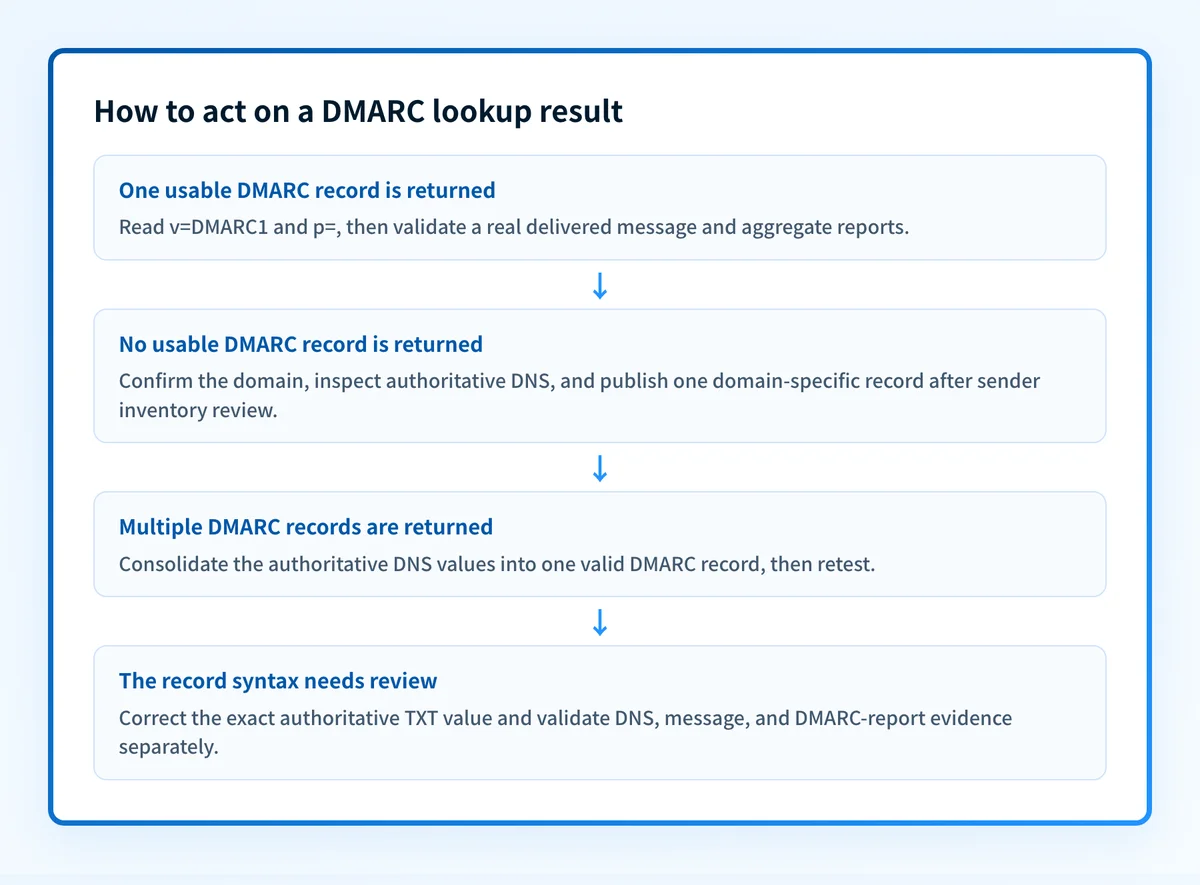
A DMARC record is present
A present record means public DNS returned a DMARC policy record for the queried domain or a policy the checker identified through DMARC discovery. Inspect the record one tag at a time, beginning with v=DMARC1 and p=.
A policy of p=none does not mean all mail passes. It asks receivers to monitor failures rather than request quarantine or rejection treatment. A policy of p=quarantine or p=reject also does not establish that every sender is correctly authenticated. It only changes the requested handling when DMARC evaluation fails.
Check any rua destination before relying on aggregate-report data. RFC 9990 defines DMARC aggregate reporting, including the report data format and report-generation model. If the reporting address uses another domain, authorization can be required before receivers send reports there. See the DMARC report address authorization guide before changing that destination.
No DMARC record is found
No record found means the lookup did not find a usable policy at the queried owner. First confirm the spelling of the visible From domain. Then query _dmarc. directly and check the DNS provider's authoritative zone.
If the exact domain is a subdomain, DMARC discovery can involve its organizational domain. Do not assume that an organizational-domain policy is the right long-term policy for every subdomain. A distinct subdomain can need its own policy when its sending sources or risk profile differ.
Publish one record only after you know who sends mail with the domain. Beginning at p=none can collect evidence while you identify legitimate sources, but it does not protect recipients from all unauthenticated use of the domain.
More than one DMARC record is returned
Multiple DMARC TXT records at the same DMARC owner are a configuration error. RFC 9989 requires a receiver to treat the record as unavailable when more than one DMARC record is found at the queried name.
Remove or consolidate the duplicate values in the authoritative DNS zone. Do not combine records by copying tags from separate values without checking the resulting syntax and reporting destinations. Keep one deliberate record at _dmarc.yourdomain.com, then wait for DNS propagation and query the same owner again.
Do not delete a record until you have identified which DNS zone is authoritative for the domain. Removing the wrong TXT value can break an active policy or report-routing setup.
The record needs a syntax or tag review
A TXT answer can exist but still fail DMARC processing if it does not follow the required record format. RFC 9989 requires the DMARC version tag and defines the tags receivers evaluate. Check the exact returned string for an incorrect version, an absent policy tag, malformed separators, or values that do not match the protocol's defined syntax.
Correct the authoritative record generated for your own domain. Do not reuse a reporting mailbox, authorization record, or record value from another organization. After the public response changes, retest the same domain and then validate a delivered message.
How to act on the result
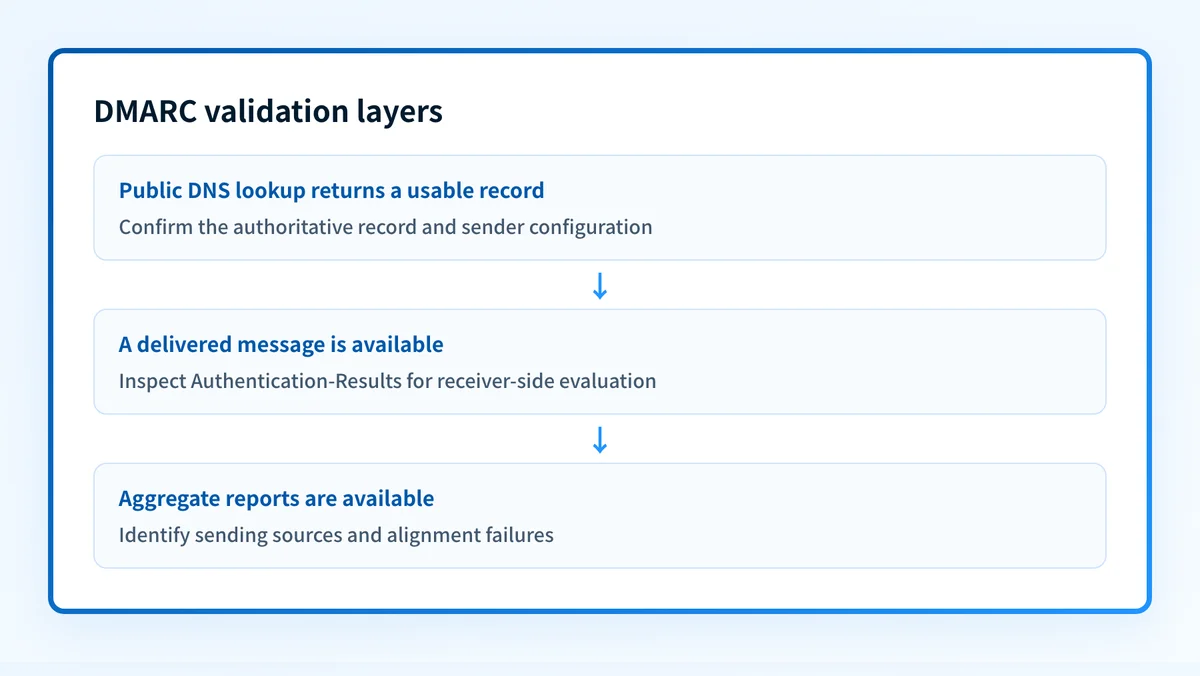
Start with the DNS result, but keep each validation layer separate:
- DNS: confirm the authoritative record and at least one public-resolver response agree.
- Sender: confirm each mail platform has its intended SPF and DKIM configuration.
- Message: send a new message through the same application, sender identity, gateway, and recipient path.
- DMARC: review aggregate reports after they accumulate to identify actual sending sources and alignment failures.
Authentication-Results header. RFC 8601 defines the Authentication-Results header field, including result methods and properties such as smtp.mailfrom. That header is evidence about the delivered message, not a promise that future messages will receive the same result.
If a record is missing, publish a valid policy only after confirming the sending inventory and report destination. If it is duplicated or malformed, repair the single authoritative TXT value first. If the record is valid but mail still fails, move to the message and aggregate-report layers. The DNS record is no longer the best evidence for that diagnosis.
Investigate this with your coding agent
Use this when the public lookup shows a missing, duplicate, or malformed DMARC record and the DNS configuration is maintained in an approved repository. Prepare the redacted lookup result, the intended policy, and the repository path that owns the DNS configuration.
Agent handoff
Copy the prepared prompt
Give this to a coding agent that can inspect the relevant repository or configuration source of truth.
Problem: The DMARC lookup for yourdomain.com shows a missing, duplicate, or malformed policy record.
Evidence: Redacted Palisade DMARC checker result, the queried domain yourdomain.com, the intended DMARC policy, and a redacted authoritative DNS response.
Repository scope: The approved infrastructure or DNS configuration repository that manages yourdomain.com.
Constraints: Inspect before editing. Do not apply changes until I approve the proposed diff. Do not expose or add private keys, tokens, customer data, unrelated DNS changes, or generated values from another tenant.
Requested output: Diagnosis, minimal proposed change, rollback, and unknowns.
Verification: Query _dmarc.yourdomain.com through the same public lookup path after the approved DNS deployment, then send a test message through the affected production path.
Stop if: Credentials, private data, production mutation, or missing evidence is required.
Human approval required: Review the proposed diff and verification plan before allowing changes. Do not paste secrets, private keys, API tokens, unredacted headers, or customer data.
How to retest
Run the same domain through the DMARC checker after the authoritative DNS change is live and public resolvers have had time to refresh. The expected DNS change is one usable DMARC policy record at the owner you corrected.
Then send a new message through the exact production path. Review its Authentication-Results for the receiver's DMARC evaluation and retain the raw headers with the test timestamp. Finally, review aggregate reports when they arrive. A passing public lookup followed by a failing delivered message points to sender configuration, alignment, or message-path evidence that DNS alone cannot classify.
Move from one record check to sender ownership
A valid DMARC record is only the starting point when multiple services send mail for the same domain. The unresolved work is identifying which sources appear in aggregate reports, which sources fail authentication or alignment, and which remediation task belongs to each owner.
Palisade is agent-first DMARC software that analyzes DMARC aggregate-report data, identifies sending sources and authentication or alignment issues, and creates prioritized remediation tickets. It can propose the next policy step when the evidence supports it, while a human reviews the evidence and applies the change.
Palisade does not autonomously change your DMARC policy, repair every sender, or prove delivery to every receiver. A public record check also cannot continuously monitor sender behavior or establish why a specific message was rejected.
Evidence
Sources and further reading
Questions readers ask
Frequently asked questions
Keep going with AI
Ask AI how this applies to you
Take this guide to your assistant — each question opens pre-filled, with a link back to this page so it can read the details.
- What does a DMARC analysis tool check?


- How does this apply to my domain?
- What should I do about it, step by step?

Written by
Samuel ChenardCEO & Co-Founder, Palisade
Samuel Chenard is the CEO and co-founder of Palisade, AI-first DMARC software for IT teams and MSPs, from one domain to thousands.
More from Samuel →