DKIM checker domain
 ChatGPT
 Claude
 Gemini
 Perplexity
 Grok
Grok
A DKIM checker domain lookup checks the public DNS records that publish DKIM public keys for a domain. Run Palisade's DKIM checker with the sending domain, inspect the selectors and key records it returns, then compare the result with a message sent through the production path. A public DNS result can show whether a key is published. It cannot prove that an unseen message was signed or that a receiver accepted it.
At a glance
Quick takeaways
- A domain-first DKIM check inspects public DNS records, not a sender's private key or mail flow.
- DKIM public keys are queried at
._domainkey. - The
s=andd=values in a realDKIM-Signatureheader identify the selector and signing domain to validate. - A returned key record does not prove that the sending application uses that key.
- A missing result may mean the checker did not discover the selector, so direct selector evidence matters.
- A delivered message and DMARC aggregate reports test different layers than a public DNS lookup.
What this tool checks
The Palisade DKIM checker accepts a domain and checks public DNS for DKIM selector records. The current tool presents a DKIM status, returned selector records, and technical details for the records it finds.
DKIM uses a selector to locate the public key that a verifier needs. Under RFC 6376, the verifier constructs the DNS name from the selector and signing domain, then retrieves the record through DNS. The selector is the s= value and the signing domain is the d= value in the DKIM-Signature header.
The checker can inspect only the public DNS layer. It cannot inspect a private key, see the signing configuration in an email service, confirm a message body or headers, or show a receiver's private delivery decision. A passing public lookup also does not prove continuous state, future signing, or inbox placement.
How to run the check
1. Identify the domain you need to check
Use the domain that appears after d= in a recent production message's DKIM-Signature header when you have one. That domain can differ from the visible From domain.
If you do not have a delivered message, use the sending domain configured in the email service. Treat the result as a public-record check until you collect message evidence.
2. Submit the domain to the DKIM checker
Open the DKIM checker, enter the domain, and select the action labelled "Check DKIM." Review the status and every selector record that the tool returns.
Selector discovery is useful for an initial domain check, but it is not an exhaustive DNS enumeration method. A domain owner can choose selectors, and a sender can use a selector that a discovery scan does not test.
3. Query the exact selector when message evidence exists
Use the selector from the message for a narrower public-DNS retest. This command uses illustrative values only. Do not publish or copy DKIM values from another account. Your sending service generates the real selector and public-key value.
dig +short TXT selector1._domainkey.yourdomain.comThe answer should contain the DKIM key record for that exact owner name. RFC 6376 defines the selector-based lookup relationship between s=, d=, and the _domainkey DNS name.
4. Keep the DNS result separate from the message result
Send a new message through the same application, configured sending domain, and recipient path. Inspect its raw headers for DKIM-Signature and receiver-added authentication results.
Authentication-Results fields are defined by RFC 8601. Use those fields as evidence from the receiving system that handled the message. A DNS result and a delivered-message result answer separate questions.
How to interpret the results
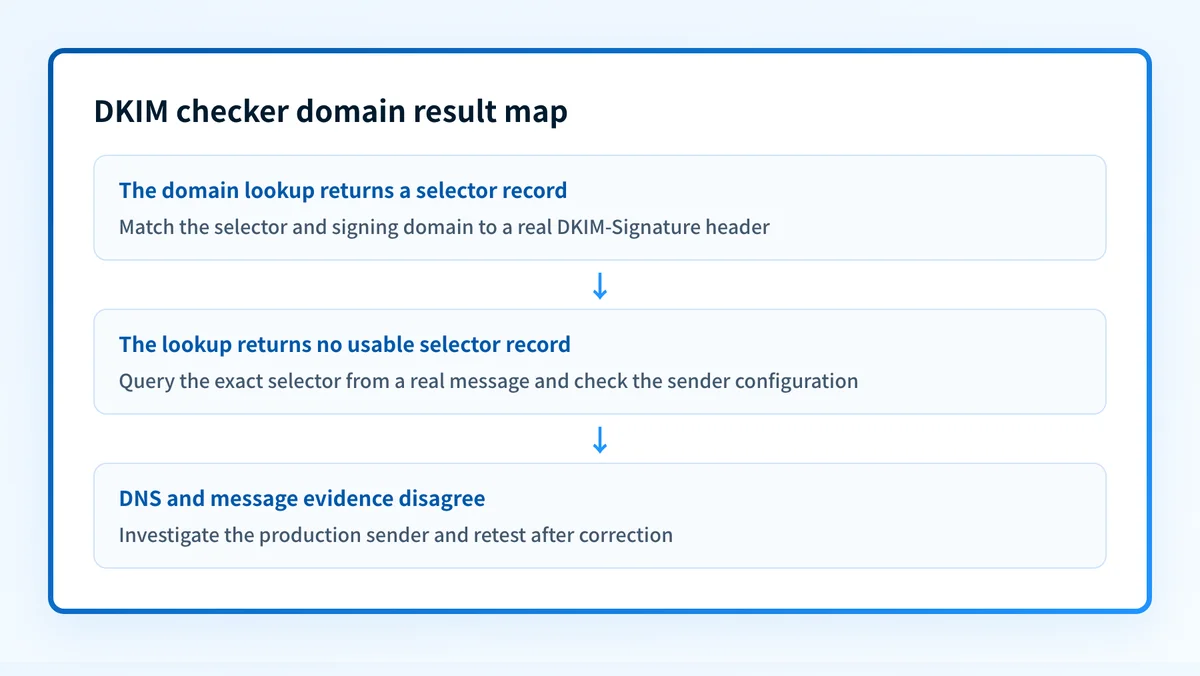
No selector record is returned
A no-record result means the checker did not return a usable DKIM selector record for its lookup. First, confirm that you entered the correct signing domain.
If a real message contains s= and d=, query the full selector owner directly. The tool may not discover every selector a domain uses. If the direct lookup also returns no record, return to the sender configuration and obtain the exact DNS record generated for that sender and domain.
For a focused diagnosis of this condition, see why a DKIM checker says no record found.
A selector record is returned with a usable public key
A returned public key shows that DNS can publish a key for that selector. It does not prove that the sender has the matching private key, that signing is enabled, or that the sender is using the same selector.
Match the returned selector to the s= value in a real message. Then match the returned domain to the d= value. If they match, inspect the delivered message's authentication result before treating DKIM as working on that production path.
Several selector records are returned
Several records can be normal. Different sending services, key rotations, or separate mail streams can use different selectors.
Do not treat one usable record as proof for every sender that uses the domain. Match each sender's message evidence to its own selector. The guide to managing multiple DKIM records explains why separate selectors need separate ownership and validation.
The public record exists, but the message still fails DKIM
This result points away from a simple missing-DNS-record diagnosis. Compare the exact d= and s= values in the failing message with the queried owner name. Then inspect the sender's current signing configuration in its provider interface.
A public record can remain in DNS after a sender changes selectors, disables signing, or signs with another domain. The DNS layer may be correct while the actual message path is not.
DKIM passes, but DMARC still fails
DKIM can pass without satisfying the DKIM branch of DMARC. DMARC evaluates alignment between the visible From domain and the authenticated domain. Compare the From domain with the d= domain in the message, then inspect the domain's DMARC policy and aggregate-report evidence.
How to act on the result
Start with the evidence that the result actually supports.
- If no record is returned and a direct query for the message selector also fails, copy the record generated by the sending service for the same domain and publish it at the exact owner name. Do not reuse a selector, CNAME target, or public key from a different tenant.
- If the public record is present but the message has no
DKIM-Signature, enable or correct DKIM signing in the sending service. DNS alone cannot enable signing. - If the message selector differs from the selector that passed the lookup, investigate the sender that produced the message. Check its configured domain, selector, and current verification status.
- If the receiver reports a DKIM failure, preserve the raw headers and compare the failed message with a newly sent message from the same path. Do not assume that a DNS change repaired a historical message.
- If DKIM passes but DMARC fails, investigate alignment and the visible From domain before changing DNS.
Do not delete an older selector immediately after a new selector appears to work. Messages already in transit can still carry the older signature. Follow the sending service's documented rotation process and validate a real message after the transition.
A provider's green verification indicator is vendor-layer evidence. It does not replace a public DNS lookup or a delivered-message check. After the record and provider status agree, send a new message through the production path and inspect its authentication results. Once aggregate reports accumulate, use them to identify sources that still need remediation.
How to retest
Repeat the same domain check after the authoritative DNS answer has changed. If a failed production message identified a selector, query that exact selector owner again rather than relying only on discovery.
Then send a new message from the same application and inspect the new message's DKIM-Signature and authentication result. Record the test time, sender, signing domain, and selector so the DNS result can be matched to the message result.
A successful retest has four applicable layers:
- Authoritative DNS and at least one public resolver return the expected selector record.
- The sending provider reports the expected signing or authentication status.
- A new message from the production path contains the expected
d=ands=values and receives the expected authentication result. - DMARC aggregate reports later show the relevant sending source and its authentication or alignment outcome.
Track the senders that a DNS lookup cannot identify
A public DKIM lookup can confirm a record for a domain, but it cannot inventory every production sender, identify later alignment failures, or show when a domain is ready for the next DMARC policy stage. Palisade is AI-first, agent-first DMARC software that analyzes DMARC aggregate-report data, identifies sending sources and authentication or alignment issues, and creates prioritized remediation tickets for human review.
Palisade can propose the next policy step from DMARC evidence, but a human reviews the evidence and applies any DNS or DMARC policy change. It does not repair every sender automatically or guarantee delivery.
Evidence
Sources and further reading
Questions readers ask
Frequently asked questions
Keep going with AI
Ask AI how this applies to you
Take this guide to your assistant — each question opens pre-filled, with a link back to this page so it can read the details.
- Can I check DKIM for a domain without a selector?


- How does this apply to my domain?
- What should I do about it, step by step?

Written by
Samuel ChenardCEO & Co-Founder, Palisade
Samuel Chenard is the CEO and co-founder of Palisade, AI-first DMARC software for IT teams and MSPs, from one domain to thousands.
More from Samuel →