Amazon phishing scam email
 ChatGPT
 Claude
 Gemini
 Perplexity
 Grok
Grok

An Amazon phishing scam email is a message that impersonates Amazon to get you to click a link, open an attachment, or disclose information. Treat a suspicious message as untrusted: do not use its links, attachments, reply address, or phone number. Instead, open Amazon through the app or by entering the official site yourself, check the claimed order or account issue there, and report the message through Amazon's current guidance.
At a glance
Quick takeaways
- A message can be suspicious without being conclusively proven fraudulent.
- Do not verify an Amazon claim by clicking a link or calling a number in the email.
- Check orders, account notices, and sign-in activity from Amazon's app or a browser window you open yourself.
- Report a suspected Amazon impersonation attempt using Amazon's official reporting instructions.
- If you entered a password, payment information, or a verification code, secure the affected account and contact the relevant payment provider.
- Sender authentication results alone do not establish that an individual email is safe.
How an Amazon phishing email works
Phishing is an impersonation attempt that uses a trusted name, urgent request, or plausible account issue to make the recipient act before checking the claim. An Amazon-branded message may refer to an order, refund, account suspension, unusual sign-in, payment problem, or request to update account details.
Amazon's guidance for reporting suspicious emails says that a suspicious message claiming to be from Amazon may be phishing and advises recipients not to open attachments or links. The safe distinction is between the message and the account: the message is untrusted evidence, while an independently opened Amazon session can show whether the claimed order or account issue exists.
A display name such as "Amazon" does not establish who sent the message. Neither does a familiar-looking logo, an order number, or a sender address that resembles an Amazon address. For broader signs that apply across impersonation attempts, see how to spot fake emails and protect yourself from scams.
When the answer changes
The safe first action does not change because an email looks convincing. It changes after you determine what, if anything, you did with the message.
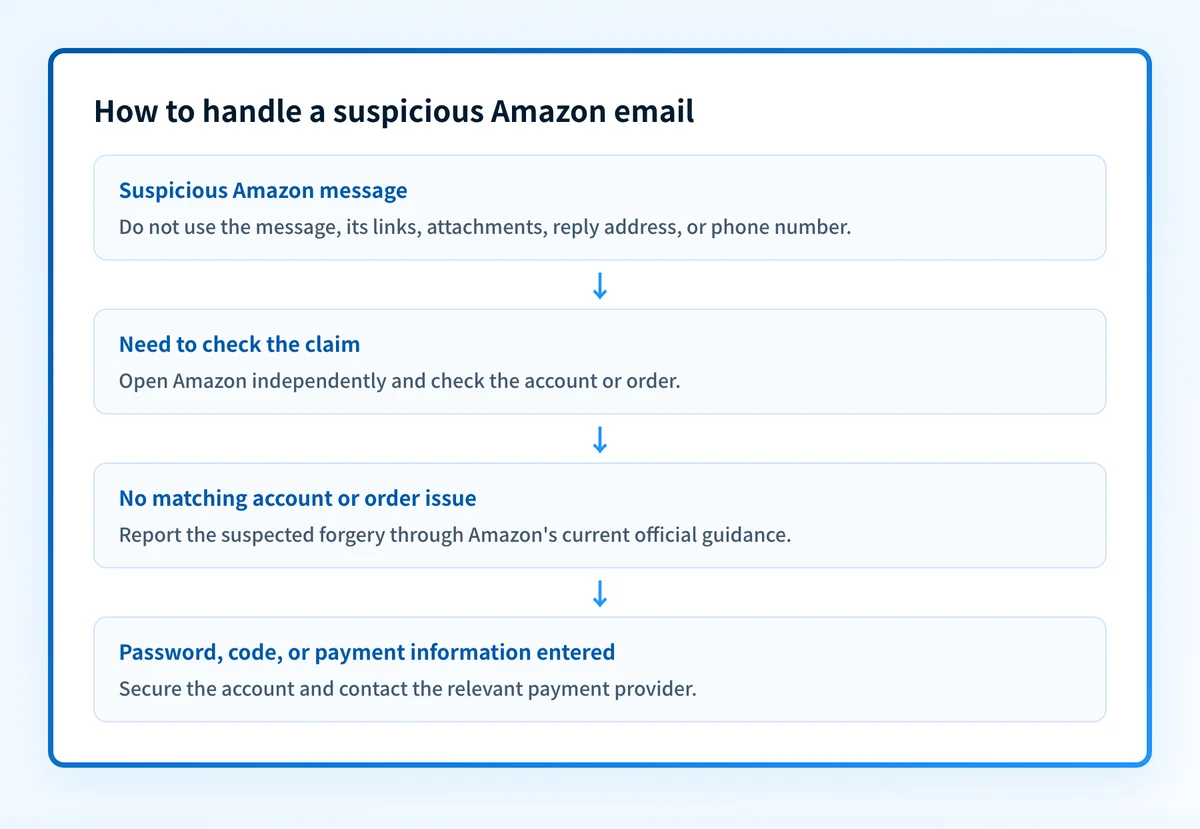
Use this decision rule:
- If you only received or read the message, do not click, reply, call the listed number, or open an attachment. Verify the claimed issue independently.
- If Amazon shows no matching order, notice, or account event, treat the email as a suspected forgery and report it.
- If Amazon shows a real account issue, continue only in the independently opened app or site. Do not return to the email's links or contact details.
- If you entered an Amazon password, a one-time verification code, or payment information, begin account and payment recovery. The message may still need reporting, but protecting the affected account comes first.
Amazon Pay has separate, stated guidance for its own service. Its Amazon Pay security help describes examples involving requests for credentials or payment information. Apply that page only to Amazon Pay matters, rather than treating it as a rule for every Amazon service or country.
Worked example: choose the verification path
Suppose an email says that an Amazon order cannot ship until you update your payment method. The message includes a button labelled "Update payment."
The email claims: "Update payment to avoid cancellation." The safe response, in order:
- Step 1. Do not select the email button.
- Step 2. Open the Amazon app or enter Amazon's official site in a new browser window.
- Step 3. Sign in only through that independently opened destination.
- Step 4. Check Your Orders and account notifications for the claimed issue.
- Step 5. If no matching issue appears, preserve and report the suspected email.
- Step 6. If information was entered through the email, change the affected password and follow account or payment recovery instructions.
Technical email checks have limits in this situation. SPF, DKIM, and DMARC can describe whether a sender authenticated a domain, but they do not establish that a private message is harmless or that the displayed request is legitimate. A compromised or abused authenticated sender can still send harmful content. See why phishing emails can pass SPF and DKIM for that distinction.
What to do next with the evidence you have
Start with the least risky action that matches your evidence.
- If you have only the suspicious email, leave it unopened beyond what is necessary to identify the claim. Open Amazon independently and compare the claim with your real account.
- If the message contains a link, attachment, phone number, or reply instruction, do not use that item to verify the claim. Amazon's official guidance is the appropriate reporting route for suspicious Amazon-branded correspondence.
- If you clicked but did not enter information, close the page and review the account activity and devices relevant to the account. Follow your organization's security process if this happened on a work device.
- If you entered information, change the affected password from an independently opened site and contact the payment provider when payment details were involved. For the broader recovery branch after a click, use your incident-response process.
- If you support employees who receive these messages, place the event in the wider context of email security. An organization-level email-security program can reduce exposure, but it does not authenticate a single private Amazon message after it arrives.
Evidence
Sources and further reading
Questions readers ask
Frequently asked questions

Written by
Samuel ChenardCEO & Co-Founder, Palisade
Samuel Chenard is the CEO and co-founder of Palisade, AI-first DMARC software for IT teams and MSPs, from one domain to thousands.
More from Samuel →