Bounce-back email: how to read the error and fix the cause
 ChatGPT
 Claude
 Gemini
 Perplexity
 Grok
Grok
An email bounces back when the receiving mail system cannot or will not accept it. The bounce notice is the evidence to follow: its SMTP reply class, enhanced status code, remote server, and diagnostic text point to the narrowest repair. A full mailbox, invalid recipient, missing MX record, message-size limit, or receiver policy block need different fixes. Preserve the original notice, repair only the confirmed branch, then resend through the same path.
At a glance
Quick takeaways
- A bounce notice can describe a temporary delivery failure or a permanent rejection.
- The original delivery-status notification contains stronger evidence than a generic deliverability check.
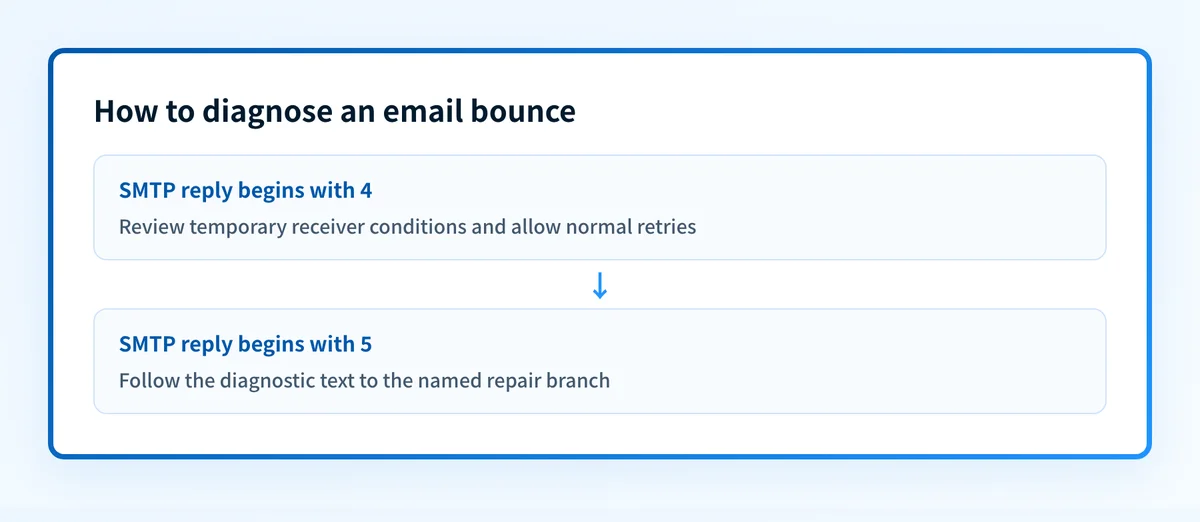
- SMTP replies beginning with
4are temporary conditions, while replies beginning with5are permanent failures for that delivery attempt. - An enhanced status code such as
5.1.1adds category detail but does not replace the receiver's diagnostic text. - A public DNS check is useful only when the bounce identifies a public DNS or authentication configuration issue.
- Retest with a new message through the same application, sender domain, route, and recipient path.
What does the failure mean?
A bounce is a delivery-status notification generated after an SMTP delivery attempt fails. RFC 5321 defines reply classes: 4xx replies indicate a transient negative completion reply, while 5xx replies indicate a permanent negative completion reply. The receiver's text still matters because the numeric class alone does not identify the cause.
A delivery-status notification commonly includes fields described by RFC 3464, such as the recipient, action, status, remote MTA, and diagnostic code:
Final-Recipient: rfc822; recipient@yourdomain.com
Action: failed
Status: 5.1.1
Remote-MTA: dns; mx.recipient.example
Diagnostic-Code: smtp; <receiver-provided diagnostic text>
The code shape above is illustrative. Keep the actual notice unchanged in the incident record. The Diagnostic-Code field can contain the receiver's SMTP response, which is usually the best starting point for diagnosis.
Enhanced status codes are registered by IANA. For example, the second digit identifies a subject area such as address status (x.1.x), mailbox status (x.2.x), mail-system status (x.3.x), or message-content status (x.6.x). The code can narrow the branch, but it does not prove a specific configuration defect without the rest of the delivery evidence.
What usually causes it?
The recipient address is invalid or unavailable
An address-status reply, often in the 5.1.x family, can indicate that the receiving server cannot deliver to the specified recipient. Google lists incorrect email addresses and recipient-side conditions among common bounce causes in its guidance for fixing bounced or rejected email.
Verify the address against the recipient's authoritative contact record or ask the recipient to confirm it. Do not treat a public DNS result as proof that an individual mailbox exists.
The recipient mailbox or server has a temporary problem
A 4xx reply can indicate a temporary condition such as a full mailbox, unavailable server, or temporary policy limit. RFC 5321 treats this reply class as transient, so the sender may retry according to its delivery policy.
The narrow repair is usually to allow normal retries and remove only the relevant sending pressure if the receiver identifies a rate or volume condition. Do not repeatedly resend manually without reading the diagnostic text. That can extend a provider's temporary restriction.
The receiving domain has a routing problem
A bounce can occur when the recipient domain has no usable MX route, or when a mail exchanger cannot be reached. This is a receiving-domain routing issue unless the notice identifies your own sender-domain configuration.
Use the MX-record troubleshooting guide when the response specifically names a missing MX record or failed domain routing. A public MX lookup can show published DNS, but it cannot prove the receiver's live server health or private routing policy.
The message exceeds a receiver limit
Google lists message size as a possible cause of bounced or rejected mail. The relevant limit is receiver-specific, and the bounce text should identify the rejected message or size condition when that is the cause.
Remove or reduce the confirmed oversized attachment or content. If the message went through a service that changes attachments or adds content, retest after that same service processes the revised message.
The receiver rejected the message under a policy
A receiver can reject a message for its own policy reasons. Google includes provider blocks and recipient settings among the causes it asks administrators to investigate. A 5.7.x enhanced status code often places the issue in the security or policy subject area, but the exact reason remains receiver-specific.
Check the full SMTP response, then use the named receiver's sender guidance if it provides one. This is not evidence that a DMARC, SPF, DKIM, reputation, or content problem caused the rejection unless the receiver says so.
How do I diagnose the failure?
1. Preserve the original delivery-status notification
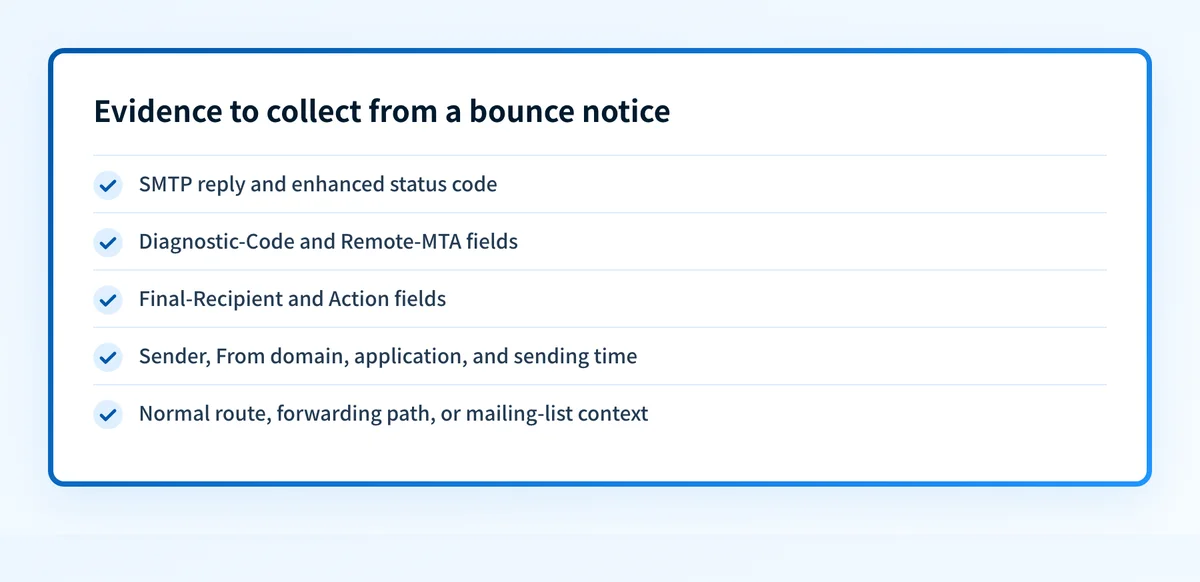
Save the complete notice and the original message details before forwarding or editing it. Record:
- The SMTP reply and enhanced status code.
- The
Diagnostic-Code,Remote-MTA,Final-Recipient, andActionfields. - The sender address, visible From domain, sending application, and sending time.
- Whether the message used the normal production route, a forwarding path, or a mailing list.
2. Separate a temporary reply from a permanent rejection
A 4xx reply means the receiver reported a temporary negative condition for that attempt. Review retry behavior, receiver guidance, and any evidence of a short-lived mailbox or server condition.
A 5xx reply means the receiver did not accept the message and normal retries will not repair the named condition. The guide to 550 errors explains why a 550 response needs the rest of its diagnostic text before you choose a repair.
Do not lower a DMARC policy to make a bounce disappear. DMARC policy changes requested receiver handling for unauthenticated mail. They do not correct an invalid recipient, mailbox condition, message-size limit, or unpublished receiver policy.
3. Follow the diagnostic text to one evidence branch
Use the receiver's own wording to select the next check:
- Address or recipient wording: confirm the destination address with the recipient.
- Mailbox or temporary-server wording: allow retries and check the recipient's stated condition.
- MX or routing wording: inspect the recipient domain's published routing and follow the bounce-message diagnosis guide.
- Size wording: compare the actual transmitted message and attachments with the receiver's stated limit.
- Authentication or policy wording: collect the receiver-added headers and use the receiver's published sender instructions.
4. Collect message evidence when authentication is named
When a receiver explicitly names authentication, preserve the receiver-added Authentication-Results header from the delivered or rejected-message evidence available to you. RFC 8601 defines this field and its authentication-method results.
The header can show what that receiving system evaluated. It does not reveal every private receiver rule, guarantee future delivery, or prove the behavior of another mailbox provider.
5. Check public DNS only for a DNS branch
If the bounce identifies a sender-domain authentication or public DNS issue, inspect the relevant record. For example, a sender-domain issue may warrant an email security score check after the DSN identifies that branch.
A public-domain check cannot validate a recipient mailbox, see the receiver's private policy, or prove why one message bounced. Compare its result with the original bounce notice and the same-path retest.
How do I fix it?
Correct the recipient address or recipient-side condition
For a confirmed address problem, correct the address from a trusted source or ask the recipient to provide the right destination. For a full mailbox or recipient setting, the recipient controls the repair.
This changes neither authentication nor DMARC enforcement. Do not keep retrying a permanent address rejection without new recipient evidence.
Restore or wait for the named delivery path
For a temporary server, connection, or rate condition, keep the sender's normal retry process intact and reduce traffic only when the receiver's response identifies a volume or policy limit.
If the condition persists beyond the receiver's documented retry window, escalate with the original response and timestamps. Avoid changing unrelated DNS or authentication records.
Repair the confirmed routing record
When the DSN names a missing or invalid MX route, repair the recipient domain's authoritative DNS if you operate that domain. Confirm the record at the authoritative provider and through a public resolver before retesting.
Illustrative only. Do not publish another organization's real MX target.
yourdomain.com.  IN  MX  10 mail.yourdomain.com.
A correct MX record changes routing availability. It does not prove that the destination mailbox exists or that the receiving server will accept every message.
Reduce the confirmed message size
Remove the attachment or content that triggered the stated limit, or deliver the file through an approved alternative channel. Retest the same message type after the change.
Do not assume a smaller rendered email is smaller on the SMTP path. MIME encoding and attachments affect transmitted size.
Repair the named authentication issue without weakening policy
If the receiver's evidence identifies SPF, DKIM, or DMARC, fix that specific configuration or sending-path problem. Check DNS, confirm the sending service's status, inspect a newly delivered message's headers, and then review DMARC aggregate reports once they accumulate.
A passing DNS check does not prove that the production application signs every message or uses the expected return path.
How do I validate the repair?
Send a new test through the same application, sender domain, outbound service, content type, and recipient provider that produced the bounce. Confirm that the receiver accepts the message or that the new delivery-status notification identifies a different, narrower condition.
Validate each relevant layer:
- DNS: confirm the repaired record at the authoritative DNS provider and through a public resolver.
- Vendor: confirm the sending service's current authentication or configuration status when that service was involved.
- Message: inspect a newly delivered message from the exact production route, including receiver-added authentication results where applicable.
- DMARC: review aggregate-report data after enough mail has flowed to see whether the same source authenticates and aligns as expected.
Evidence
Sources and further reading
Questions readers ask
Frequently asked questions

Written by
Samuel ChenardCEO & Co-Founder, Palisade
Samuel Chenard is the CEO and co-founder of Palisade, AI-first DMARC software for IT teams and MSPs, from one domain to thousands.
More from Samuel →