What should DMARC policy be set to?
 ChatGPT
 Claude
 Gemini
 Perplexity
 Grok
GrokIn brief
What should DMARC policy be set to for your domain? Start with p=none, then use p=quarantine or p=reject after remediation. Use evidence first.
Set a new DMARC policy to p=none while you identify legitimate sending sources and confirm they pass DMARC through aligned SPF or DKIM. Move to p=quarantine or p=reject only when the evidence shows important mail is aligned and remaining failures are understood. The right final policy is usually p=reject, but it is not safe to publish before that inventory and validation work is complete.
At a glance
Quick takeaways
p=nonerequests monitoring mode and does not ask receivers to quarantine or reject DMARC failures.p=quarantinerequests suspicious treatment for failing mail.p=rejectrequests that receivers reject failing mail.- A receiver makes its own final handling decision, even when a domain publishes
p=reject. - DMARC passes when SPF or DKIM passes with a domain aligned to the visible From domain.
- A policy change should follow evidence from the real sending paths that use the domain.
How the DMARC policy works
DMARC lets the owner of the visible From domain publish a requested handling policy for messages that fail DMARC validation. RFC 9989 defines DMARC as a mechanism that combines domain authentication, identifier alignment, a domain-owner policy, and reporting. See the DMARC learning guide for additional protocol context.
The policy is the p tag in the DNS record:
p=noneasks for no specific handling of failures. It is the monitoring policy.p=quarantineasks receivers to treat failures as suspicious.p=rejectasks receivers not to accept messages that fail DMARC.
The policy is a request, not a command to every mailbox provider. RFC 9989 states that mail receivers can use the domain owner's preference when making their own handling choices. A p=reject record therefore does not prove that every receiver will reject every failing message, and it does not guarantee inbox placement for messages that pass.
When the answer changes
The policy choice changes with the evidence you have about mail that uses the domain in its visible From address.
Use this decision rule:
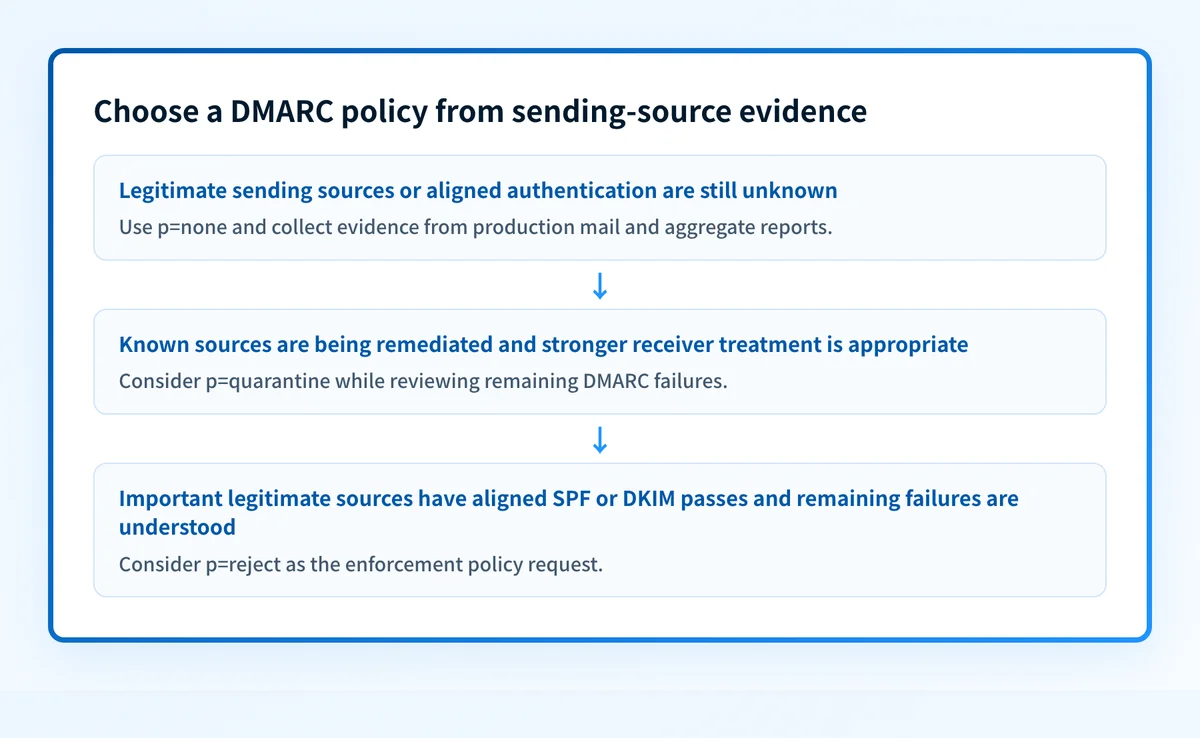
- Set
p=nonewhen you do not yet have a complete inventory of legitimate sending services, forwarding paths, applications, and business mail flows. - Consider
p=quarantinewhen you have investigated the DMARC failures in aggregate reports and want receivers to apply stronger treatment while you watch for legitimate mail that still fails. - Set
p=rejectwhen important legitimate sources have an aligned SPF or DKIM pass, remaining failures are explained or remediated, and the domain owner accepts the enforcement request for unauthenticated mail.
A staged policy change is an operational decision, not a DNS formatting exercise. Before a stronger policy, validate four separate layers:
- DNS: query the authoritative DNS service and a public resolver to confirm the intended DMARC record is published.
- Vendor: confirm each sending service has its current authentication configuration in place.
- Message: inspect a delivered message from each production path and confirm the relevant SPF or DKIM result aligns with the visible From domain.
- DMARC: review aggregate reports after enough mail has flowed to identify sources and observe failures.
Do not move a shared business domain to p=reject based only on a DNS record check. Mail from a legitimate but unaligned application can fail DMARC after the policy becomes stricter.
For a deeper discussion of timing and operational readiness, see Should You Make Your DMARC Policy Stricter Over Time?.
A worked DMARC policy decision
Assume yourdomain.com sends mail through its primary mailbox provider, a support platform, and an invoicing application. Aggregate-report analysis and delivered-message headers show that the mailbox provider and support platform have aligned DKIM passes. The invoicing application has an SPF pass, but its SPF domain does not align with yourdomain.com, and it has no aligned DKIM signature.
The domain should remain at p=none while the invoicing path is corrected or otherwise evaluated. Moving to p=quarantine or p=reject at that point can cause the invoicing mail to fail DMARC at receivers that apply the requested policy.
An illustrative monitoring record is:
_dmarc.yourdomain.com TXT "v=DMARC1; p=none; rua=mailto:dmarc-reports@yourdomain.com"Do not publish this example unchanged. Use the reporting address and record values approved for your domain.
In this record, v=DMARC1 identifies the record and p=none requests monitoring mode. The rua tag requests aggregate reports at the listed address. RFC 9989 describes the record format and the reporting mechanism, including the domain owner's role in collecting and analyzing reports.
After the invoicing sender has an aligned SPF or DKIM pass and the other known sources remain aligned, the domain owner can evaluate a stronger record:
_dmarc.yourdomain.com TXT "v=DMARC1; p=reject; rua=mailto:dmarc-reports@yourdomain.com"The second record requests rejection for DMARC failures. It does not repair the invoicing configuration, prove every future message will authenticate, or override a receiver's local policy.
Subdomains may need their own review. A domain can publish an sp tag for a subdomain policy, and a more specific DMARC policy record can affect the policy a receiver discovers. If a service uses a visible From address such as alerts.yourdomain.com, inspect that exact domain before assuming the organizational-domain policy covers it.
Check the evidence before changing policy
Start with the current public record. Use the Palisade DMARC checker to inspect the DMARC record published for the domain, then compare it with the intended DNS change. A public lookup can show the record available to DNS clients, but it cannot identify every production sender or prove why a particular receiver accepted, quarantined, or rejected a message. You can also run the DMARC checker before changing the record.
Next, collect evidence from the actual sending paths. For each important mail flow, retain a delivered test message and inspect its authentication results. Then use DMARC aggregate reports to compare the sources seen by receivers with the inventory your team expects.
If the domain is part of a broader email-security program, DMARC in cyber security explains the protocol's role without treating authentication as a replacement for receiver reputation, content checks, or local mailbox-provider policy. The DMARC security overview provides the same context.
Keep the policy decision under review
When a domain has multiple sending services or many domains, aggregate-report review can become the gap between a one-time record check and an enforcement decision. Palisade is automation-focused, agent-first DMARC software that analyzes DMARC aggregate-report data, identifies sending sources and authentication or alignment issues, and creates prioritized remediation tickets. It can propose the next policy step when the evidence indicates readiness, while a human reviews the evidence and applies the DNS change.
Palisade does not autonomously change your DMARC policy, guarantee delivery, or prove that every future message will authenticate.
Evidence
Sources and further reading
Questions readers ask
Frequently asked questions

Written by
Samuel ChenardCEO & Co-Founder, Palisade
Samuel Chenard is the CEO and co-founder of Palisade, AI-first DMARC software for IT teams and MSPs, from one domain to thousands.
More from Samuel →