TLS-RPT for Office 365: setup and verification
 ChatGPT
 Claude
 Gemini
 Perplexity
 Grok
GrokIn brief
TLS RPT Office 365 setup uses a DNS TXT record to receive Exchange Online TLS reports. Learn the record, limits, checks, and report verification.
TLS-RPT for Office 365 is configured in your domain's DNS, not in the Exchange admin center. Publish a TLS-RPT TXT record at _smtp._tls.yourdomain.com with a reporting URI, then inspect the record and the reports it receives. Microsoft documents that Exchange Online sends TLS-RPT reports in JSON format, while TLS enforcement in Exchange Online is a separate connector configuration.
At a glance
Quick takeaways
- TLS-RPT is an IETF Standards Track reporting mechanism defined by RFC 8460.
- A TLS-RPT record is a DNS TXT record under
_smtp._tls, withv=TLSRPTv1and at least oneruareporting URI. - Microsoft documents that Exchange Online sends TLS-RPT reports in JSON format.
- TLS-RPT does not force TLS for Office 365 mail flow or change an Exchange Online connector.
- Exchange Online uses opportunistic TLS by default for external mail and may send mail without encryption when the receiving organization does not support TLS.
- Microsoft has deprecated TLS 1.0 and TLS 1.1 in Office 365 and Office 365 GCC. Microsoft documents TLS 1.2 for connections between Exchange Online servers in its data centers.
Who is affected?
TLS-RPT applies to the administrator of a destination domain that wants feedback when sending mail systems encounter Transport Layer Security failures while delivering to that domain. The administrator publishes the record in DNS and operates, or designates, the reporting endpoint.
For an Office 365 tenant, this distinction matters. Microsoft's Exchange Online SMTP DANE documentation says Exchange Online sends TLS-RPT reports in JSON format. Exchange Online can therefore be a report sender when another domain publishes a TLS-RPT record.
The Office 365 administrator does not enable TLS-RPT with a tenant switch. Microsoft documents adding a TXT record in the domain's own DNS to receive reports. Microsoft does not document a tenant-side TLS-RPT dashboard, cmdlet, or Exchange admin center setting.
TLS-RPT is also separate from DKIM for Office 365. DKIM authenticates parts of an email message. TLS-RPT describes delivery attempts involving TLS policy mechanisms, including DANE and MTA-STS. Neither control enables the other.
What are the requirements?
RFC 8460, "SMTP TLS Reporting," is the controlling standard. It is an IETF Standards Track RFC published in September 2018, not a draft. It defines a DNS discovery record and a JSON report format for TLS policy failures.
The domain publishes a TLS-RPT DNS record
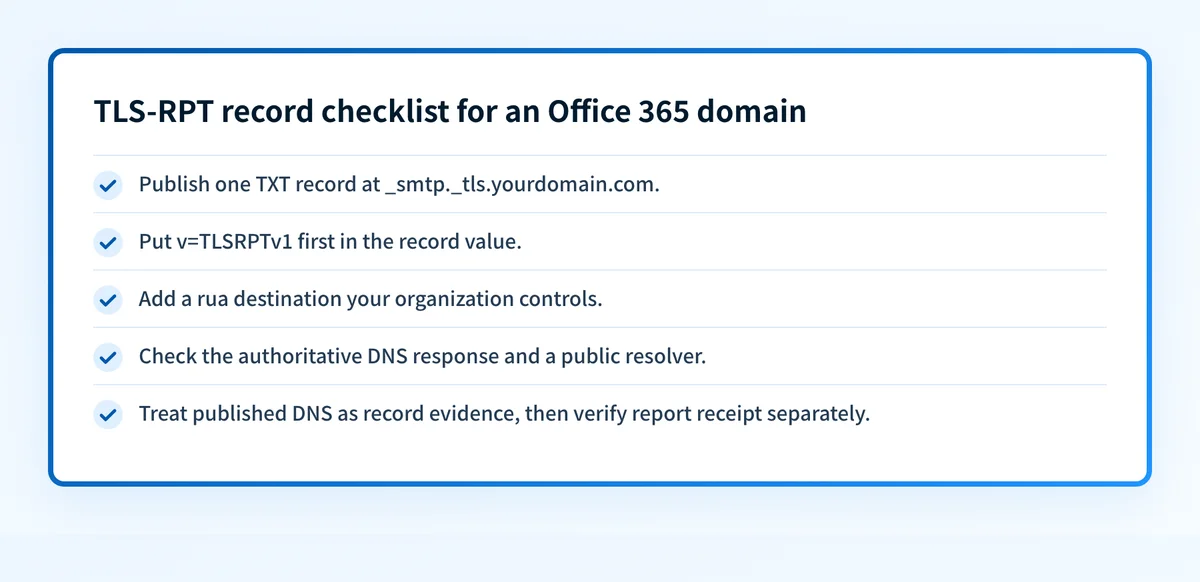
RFC 8460 section 3 requires a TLS-RPT record under the _smtp._tls branch for the policy domain. The record has a version tag and one or more rua tags that identify where reports should go.
_smtp._tls.yourdomain.com. IN TXT "v=TLSRPTv1; rua=mailto:tls-reports@yourdomain.com"The example is illustrative only. Use the reporting mailbox or HTTPS endpoint your organization controls. Do not copy another organization's URI or publish a destination that cannot safely process the reports.
RFC 8460 requires the v=TLSRPTv1 tag to appear first. It also requires at least one rua tag. A rua value can use mailto or https, subject to the standard's authorization rules for external report destinations.
Microsoft's documented example is its own published record for microsoft.com:
_smtp._tls.microsoft.com. IN TXT "v=TLSRPTv1;rua=https://tlsrpt.azurewebsites.net/report"That example shows Microsoft's configuration. It is not a record value for another domain.
For a deeper explanation of the version tag, see what v=TLSRPTv1 means in a TLS-RPT record.
The reporting URI accepts authorized reports
TLS-RPT report delivery has its own authorization boundary. RFC 8460 defines how a report receiver checks whether it is authorized to receive reports for a policy domain when the rua destination is outside that domain.
An HTTPS endpoint needs to accept the report format described in RFC 8460. A mailbox address needs a process that can receive and interpret the JSON attachments or messages that reporting senders produce. Publishing rua does not make a reporting destination operational by itself.
Do not treat a valid DNS record as proof that every sender will deliver reports. Report generation depends on a sender attempting delivery, encountering an applicable policy result, and implementing TLS-RPT.
TLS-RPT reports policy outcomes, not every TLS event
RFC 8460 defines result-type values for SMTP TLS policy outcomes. Microsoft reuses several of those values in its documented Exchange Online DANE non-delivery reports:
4/5.7.321 starttls-not-supported
4/5.7.322 certificate-expired
4/5.7.323 tlsa-invalid
4/5.7.324 dnssec-invalid
Microsoft documents an exception for DNSSEC failure handling. When a domain signals DNSSEC support but the check fails, Exchange Online does not generate 4/5.7.324 dnssec-invalid; it generates the generic DNS error 4/5.4.312 DNS query failed.
These codes are useful evidence when diagnosing delivery behavior, but they do not establish that a TLS-RPT record is present or that a report endpoint received a JSON report.
When does the requirement take effect?
RFC 8460 has been a Standards Track RFC since September 2018. It defines an optional protocol mechanism. The standard does not impose an Office 365 sender threshold, an Exchange Online enforcement date, or a requirement that every domain publish a TLS-RPT record.
Microsoft's documentation states that Exchange Online sends TLS-RPT reports in JSON format. It does not publish a separate TLS-RPT rollout date or an Office 365 deadline for domain owners to add the DNS record.
Do not confuse this with Microsoft's TLS protocol changes. Microsoft's TLS guidance for Exchange Online says TLS 1.0 and TLS 1.1 are deprecated in Office 365 and Office 365 GCC. That is not a TLS-RPT effective date.
Microsoft documents TLS 1.2 for Exchange Online server-to-server connections in its data centers. The cited guidance does not state a TLS 1.3 position, so do not infer one from the TLS-RPT configuration.
How do I implement the requirement?
1. Choose the domain that needs delivery-policy reports
Start with the domain receiving mail and identify who owns its authoritative DNS zone. TLS-RPT belongs under that domain's _smtp._tls name.
If the domain also uses MTA-STS or DANE, keep their records and policies separate. TLS-RPT reports on relevant policy outcomes. It does not publish the MTA-STS policy itself. See what MTA-STS is for that adjacent control.
2. Choose a report destination
Choose a mailto address or HTTPS endpoint that your team can monitor. Plan how reports will be retained, parsed, and restricted because they can contain delivery-policy details about your domain.
If the destination is outside the reporting domain, follow RFC 8460's external reporting authorization rules. Do not assume an external service can receive reports because its address appears in the rua value.
3. Publish the TXT record in authoritative DNS
Create one TXT record at _smtp._tls.yourdomain.com with v=TLSRPTv1 first and at least one rua value. Obtain the actual destination value from the mailbox or reporting service that will receive the data.
Do not remove existing MX, SPF, DKIM, DMARC, MTA-STS, or DANE records while adding TLS-RPT. TLS-RPT is an additional TXT record under a different owner name.
Allow the DNS change to propagate according to the zone's TTL. Then query the authoritative server and at least one public resolver to confirm that the expected TXT record is visible.
4. Keep forced TLS separate from TLS-RPT
Exchange Online uses opportunistic TLS by default for external partners. Microsoft states that it tries to negotiate the most secure mutually supported TLS version, but by default can send the message without encryption if the recipient organization does not support TLS.
If your requirement is to require TLS for a partner, Microsoft documents this as a forced TLS connector configuration. For full sent and received coverage, Microsoft says Exchange Online needs more than one connector that requires TLS: one for mail sent to user mailboxes and another for mail sent from user mailboxes.
A forced TLS connector is an Exchange Online mail-flow control. A TLS-RPT record is DNS-based reporting. Configure and test each one for its own purpose.
How do I validate compliance?
First, query _smtp._tls.yourdomain.com through the authoritative DNS server and a public resolver. Confirm the owner name, v=TLSRPTv1 tag, and intended rua value. A TXT record lookup shows the TXT response and labels a v=TLSRPTv1 string as TLS-RPT, but it does not explain the record's tags or prove report authorization.
Next, use the MTA-STS Checker to inspect the TLS-RPT record at the correct _smtp._tls owner name. Its result is a published-record check. A valid result does not validate the reporting URI scheme, prove that an external report destination is authorized, or confirm that Exchange Online has delivered a report.
Then validate the report receiver. Confirm that it accepts the expected RFC 8460 JSON data, retains enough detail for investigation, and protects the report data appropriately. When reports arrive, compare their policy domain, result types, and time range with known delivery activity.
Finally, validate actual mail behavior separately. For Exchange Online forced TLS, inspect connector status and test mail through the exact production path. For DANE or MTA-STS issues, retain the relevant Exchange Online NDR and compare its code with Microsoft's documented behavior. A DNS record alone cannot prove the production sending path, a receiver's policy decision, or future delivery.
Check the TLS-RPT record for your Office 365 domain
Use the MTA-STS Checker to inspect the _smtp._tls TXT record that tells Exchange Online and other capable senders where to send TLS-RPT data.
The checker can confirm the published record and parse its reporting URI. It cannot prove that Exchange Online delivered a JSON report, repair a TLS failure, enforce TLS for a partner, or guarantee future message delivery.
For ongoing email-authentication monitoring after you verify the record, create a Palisade account.
Evidence
Sources and further reading
Questions readers ask
Frequently asked questions
What is TLS-RPT?
TLS-RPT is the SMTP TLS Reporting protocol defined by RFC 8460. A domain publishes a DNS TXT record under _smtp._tls that identifies where capable senders can send reports about DANE and MTA-STS policy successes and failures.
What TLS version does Office 365 use?
Microsoft states that Exchange Online servers always encrypt connections to other Exchange Online servers in its data centers with TLS 1.2. Microsoft has deprecated TLS 1.0 and TLS 1.1 in Office 365 and Office 365 GCC. The cited Microsoft guidance does not state a TLS 1.3 position.
How do I set up TLS-RPT with Office 365?
Add a TXT record in your own domain's DNS at _smtp._tls.yourdomain.com with v=TLSRPTv1 and a rua reporting URI. Microsoft documents that Exchange Online sends TLS-RPT reports in JSON format. There is no documented Exchange admin center setting for publishing your TLS-RPT record.
How do I enable TLS on Office 365?
TLS is already enabled as opportunistic TLS by default for Exchange Online external mail flow. If you need to require TLS for a partner, Microsoft documents forced TLS through Exchange Online connectors. That connector configuration is separate from the TLS-RPT DNS record.
Does Exchange Online send TLS-RPT reports?
Yes. Microsoft's Exchange Online SMTP DANE documentation states that Exchange Online sends TLS-RPT reports in JSON format. A sender can report only when the destination domain publishes the applicable TLS-RPT record and the delivery attempt produces reportable policy information.
What do Exchange Online DANE bounce codes such as starttls-not-supported mean?
They identify documented DANE-related delivery failures. Microsoft lists starttls-not-supported, certificate-expired, tlsa-invalid, and dnssec-invalid, which align with RFC 8460 result-type vocabulary. Microsoft documents that a DNSSEC check failure can instead produce 4/5.4.312 DNS query failed.

Written by
Ian BussieresCTO & Co-Founder, Palisade
Ian Bussieres is the CTO and co-founder of Palisade, agentic DMARC software for IT teams and MSPs.
More from Ian →