SPF lookup test: run it and read the result
 ChatGPT
 Claude
 Gemini
 Perplexity
 Grok
Grok
An SPF lookup test checks a domain's published SPF record for two things: valid syntax and the number of DNS lookups the record triggers. Run the domain through Palisade's SPF checker, then read the result against RFC 7208, the standard that defines pass, fail, softfail, neutral, temperror, and permerror. The most common failure the test catches is exceeding the 10-DNS-lookup limit, which returns permerror no matter how clean the syntax looks.
At a glance
Quick takeaways
- Palisade's SPF checker looks up a domain's SPF record, validates its syntax, and counts DNS lookups. It is free and does not require a signup.
- RFC 7208 defines seven SPF results: none, neutral, pass, fail, softfail, temperror, and permerror.
- SPF implementations MUST cap DNS-querying mechanisms, include, a, mx, ptr, exists, and the redirect modifier, at 10 lookups total per evaluation. Going over returns permerror.
- The mx and ptr mechanisms each carry their own 10-address sub-limit, and implementations SHOULD cap void lookups at two.
- A domain publishing more than one matching SPF TXT record also produces permerror, independent of the lookup count.
- ip4, ip6, all, and the exp modifier cost zero lookups, which is why replacing include chains with static IP ranges lowers the count.
What this tool checks
The Palisade SPF checker looks up a domain's SPF record, validates the syntax, and counts the DNS lookups the record triggers. It is free, requires no signup, and its primary action is a "Check SPF" button. It answers one question well: is this domain's published SPF record structurally sound and under the DNS lookup limit right now.
It does not answer a different question: did a specific delivered message actually pass SPF. The checker reads public DNS at the moment you run it. It cannot see your outbound sending infrastructure, cannot see whether a mailbox provider evaluated a real message against this record, and cannot tell you what the record looked like an hour ago or what it will look like after the next marketing tool gets added to your stack.
How to run the check
1. Confirm the sending domain
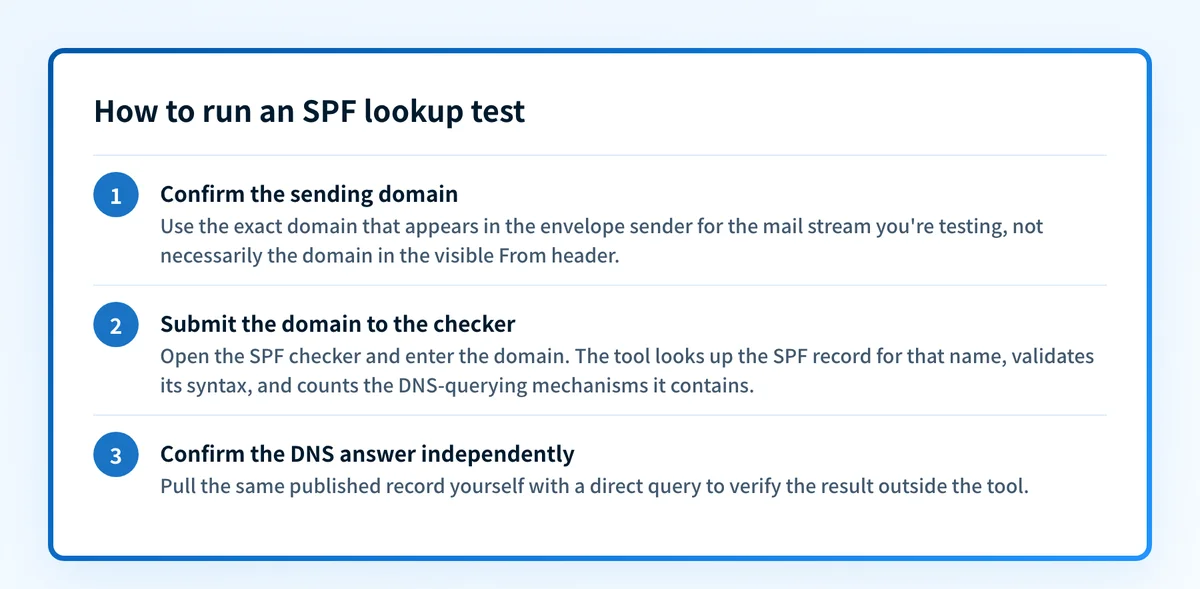
Use the exact domain that appears in the envelope sender for the mail stream you're testing, not necessarily the domain in the visible From header. If you're unsure how SPF ties to that address, what SPF checks covers the underlying mechanism before you run the test.
2. Submit the domain to the checker
Open the SPF checker and enter the domain. The tool looks up the SPF record for that name, validates its syntax, and counts the DNS-querying mechanisms it contains.
3. Confirm the DNS answer independently
You can pull the same published record yourself, outside the tool, with a direct query:
dig +short TXT yourdomain.comA valid SPF record is a TXT answer that starts with v=spf1. If more than one TXT answer starts with that exact string, RFC 7208 treats that as a fatal condition before any mechanism is even evaluated.
Reading the result
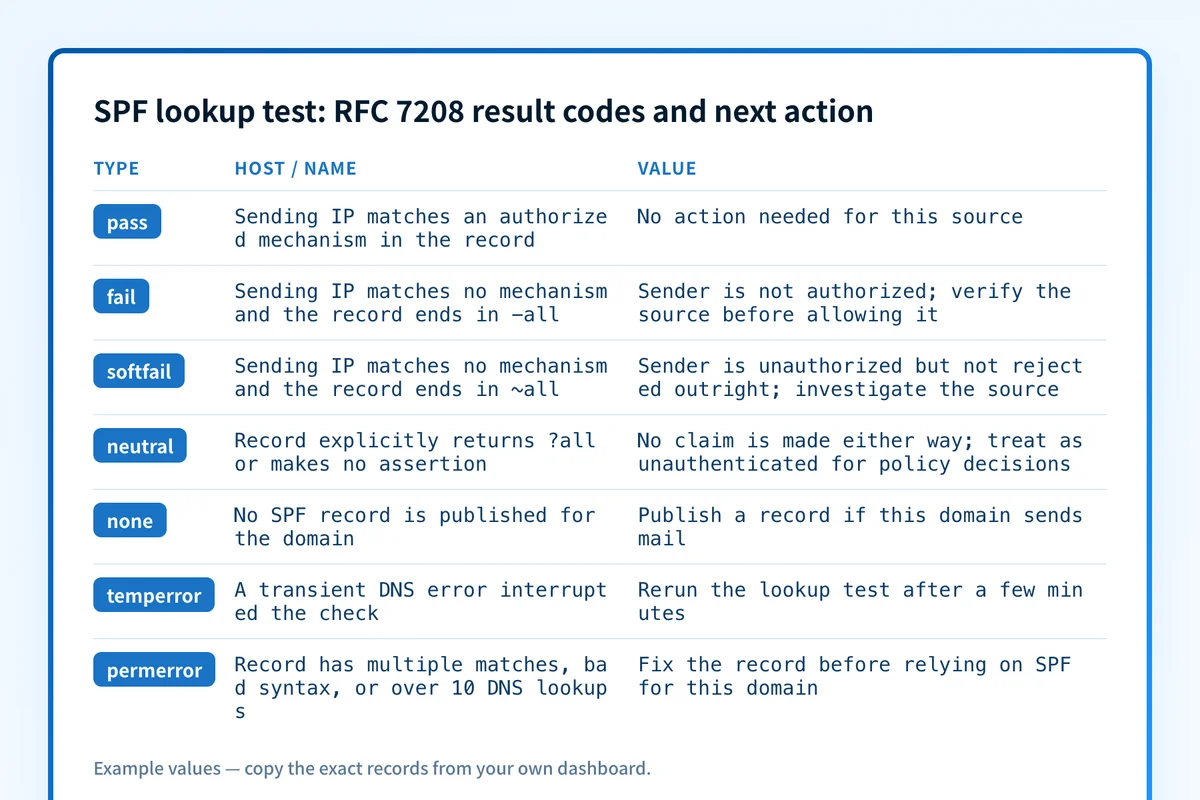
The table below is an interpretation guide built from the seven result codes RFC 7208 defines, mapped to the condition that produces each one and the action it calls for. It is not a list of on-screen labels; read the exact wording the checker shows against this mapping.
How to interpret the results
Lookup count is at or under the limit
RFC 7208 caps the DNS-querying mechanisms, include, a, mx, ptr, exists, and the redirect modifier, at 10 total per evaluation. If the checker reports a count at or under that cap, the record's mechanism chain will not trigger a lookup-count permerror on its own. ip4, ip6, all, and the exp modifier are excluded from the count entirely, which is why flattening a nested include chain into static IP blocks brings a domain back under the limit without removing any authorized sender.
Lookup count exceeds the limit
Going over the 10-term cap MUST return permerror, regardless of whether every individual mechanism is written correctly. Two sub-limits compound this: evaluating an mx mechanism must not query more than 10 address records, and a ptr mechanism is capped the same way. Implementations SHOULD also cap void lookups, DNS queries that return no usable answer, at two. Each nested include statement can silently add several lookups of its own, so a record that looks short in DNS can still be over the limit once every include is expanded. The SPF lookup limit glossary entry walks through how the count is actually tallied.
The record fails syntax validation
RFC 7208 requires the record to be published as a DNS TXT resource record only, and a domain MUST NOT publish more than one record that a check would select as a match. If the checker flags a syntax problem, the two most common causes are a malformed mechanism inside an otherwise valid record, or a second TXT answer that also starts with v=spf1. Either condition on its own produces permerror.
The lookup returns a DNS-level error
RFC 7208 separates two error states. Permerror means the domain's published record cannot be correctly interpreted at all, a structural problem in what's in DNS. Temperror means a transient DNS problem interrupted the check, a timeout or a resolver that didn't answer in time. A temperror is not evidence of a bad record. Treat it as a signal to run the check again.
This test checks DNS, not a delivered message
The checker reads the published SPF record. It does not evaluate a real message. When a mailbox provider receives mail, it records the actual SPF result for that delivery in the Authentication-Results header, defined in RFC 8601. A domain can show a clean lookup test and still have a production sender that isn't in the record at all, which would fail SPF on real mail without ever showing up as a DNS-level error. The lookup test and the delivered-message header answer different questions, and a passing lookup test is not proof that every sending source is covered.
How to act on the result
For a lookup count over the limit, the fix is to reduce the number of DNS-querying mechanisms without dropping an authorized sender. Common approaches are replacing an ESP's include statement with the static IP ranges it publishes, removing includes for services that no longer send mail on that domain, and consolidating redundant a or mx mechanisms. The SPF permerror fix guide walks through that consolidation in order.
For multiple matching records or a malformed mechanism, merge every authorized sender into a single TXT record that starts with exactly v=spf1 and ends with one qualifier, -all or ~all. Publishing two separate SPF-formatted TXT records for the same domain is invalid even if each one is individually well-formed.
Do not delete the old SPF record and publish a new one in the same change window without checking both first. If the new record is missing a sender that the old one authorized, you can move a passing sender straight to a fail before you've confirmed the replacement is complete.
For a temperror, rerun the check after a few minutes. If it repeats across multiple runs, the authoritative name server itself may be slow or unreachable, which is a DNS-provider issue rather than a record-content issue.
How to retest
After you publish a DNS change, rerun the same two checks you started with: the domain through the SPF checker, and the direct query against the authoritative record.
dig +short TXT yourdomain.comResolvers between you and the authoritative server can still serve a cached copy of the old record until its TTL expires, so an unchanged result immediately after publishing is not necessarily a failed fix. Expect the corrected record, and a lookup count back at or under 10, once that cache window passes.
Catch new senders before they push the record over the limit
A lookup test is a snapshot. It tells you the state of the record right now, not what happens the next time someone in your organization signs up for a marketing platform or a helpdesk tool that ships its own SPF include statement. Each new include can add several nested lookups you won't see by eye, and the domain can cross the 10-term limit without any single obvious change triggering it.
Palisade's DMARC Agent analyzes incoming aggregate report data to identify the sending sources actually using a domain, flags authentication and alignment issues tied to those sources, and creates prioritized remediation tickets so a new sender gets caught before it turns into a widespread SPF failure. A human still reviews the evidence and applies any change; the agent does not edit DNS or a receiver's policy on its own.
Signing up does not rewrite the published SPF record or guarantee that every future sender will pass alignment. It surfaces which sending sources need review based on aggregate report data your domain already receives.
Evidence
Sources and further reading
Questions readers ask
Frequently asked questions

Written by
Samuel ChenardCEO & Co-Founder, Palisade
Samuel Chenard is the CEO and co-founder of Palisade, AI-first DMARC software for IT teams and MSPs, from one domain to thousands.
More from Samuel →