Multi factor authentication for email
 ChatGPT
 Claude
 Gemini
 Perplexity
 Grok
Grok
Multi factor authentication for email is an account-protection measure for the account used to access email. It is often discussed alongside two-step verification. Microsoft lists “Use two-step verification with your Microsoft account” among its account-protection resources. This is separate from the domain-level controls that authenticate email messages, such as DKIM, SPF, and DMARC.
At a glance
Quick takeaways
- Multi factor authentication for email concerns access to an email account.
- Microsoft presents two-step verification as an account-protection resource.
- A provider's current support documentation is the right source for that provider's enrollment and recovery steps.
- An MFA setting does not describe whether outgoing email messages authenticate with DKIM, SPF, or DMARC.
- DKIM, SPF, and DMARC apply to email-message and domain authentication rather than mailbox sign-in.
- Account protection and domain authentication need separate checks.
How multi factor authentication for email works
Email accounts are used to read messages, send mail, change account settings, and sometimes administer a wider business email environment. A password is one part of an account sign-in process. Multi factor authentication adds a further verification step to that process when the provider requires it.
The exact name, available verification methods, enrollment path, and recovery process are provider-specific. Do not rely on instructions written for another provider or on an older screenshot. Use the current help documentation and account interface for the mailbox service that controls the account.
Microsoft's account-protection support resources include the item “Use two-step verification with your Microsoft account.” That establishes two-step verification as a Microsoft account-protection topic. It does not establish the current steps, supported methods, or recovery options for every Microsoft email product.
Multi factor authentication for email should also be kept separate from email authentication. Email authentication is the discipline of establishing information about a message and the domain it claims to use. Mailbox MFA is about access to the account itself.
When the answer changes
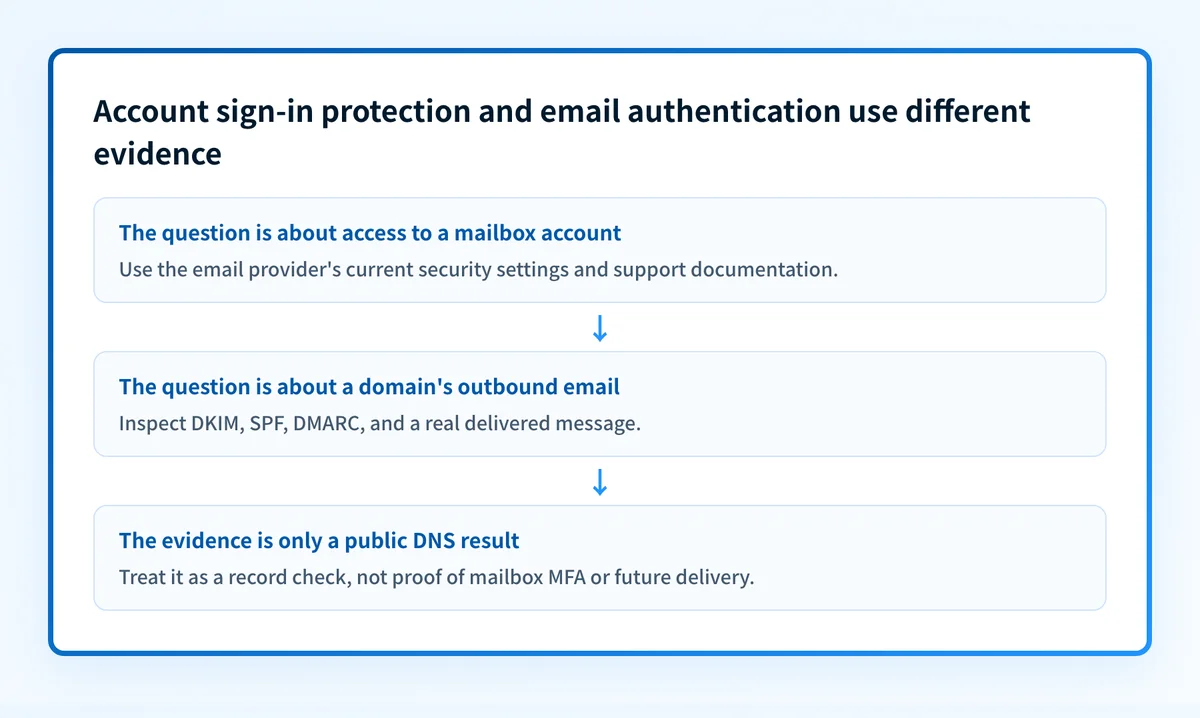
The right next action depends on the question you need to answer.
- If the question is “Can someone access this mailbox account?”, use the current documentation and settings for that mailbox provider. The provider controls the available sign-in and recovery options.
- If the question is “Does this domain sign outbound email with DKIM?”, inspect the domain and sending configuration. DKIM is a domain-level email-authentication control.
- If the question is “Why did an email client or SMTP service reject a login?”, the relevant evidence is the exact provider error, account status, and the sign-in path. Authentication failed email covers the distinction between mailbox and SMTP login failures.
- If the question is “Did this delivered message authenticate?”, inspect the message headers and the domain's authentication records. A sign-in setting cannot answer that question.
Do not treat a successful account sign-in as evidence that a message will pass DKIM, SPF, or DMARC. Do not treat a published DNS record as evidence that a user account has an additional sign-in verification requirement.
A worked decision rule
Use the evidence you already have before choosing a next step.
Question: I need to protect access to a mailbox account.
Evidence to use: The mailbox provider, the account's current settings, and the provider's current help documentation.
Next action: Find the provider's current account-protection or two-step-verification guidance.
Question: I need to know whether an email message authenticated.
Evidence to use: A delivered message's raw headers and the sending domain's DNS records.
Next action: Inspect message authentication results and the relevant domain records.
The first path is account administration. The second is email authentication.
For example, a user who asks where to find an MFA code needs the current provider-specific support path. The available evidence does not establish whether that provider presents a code, a prompt, another verification method, or a recovery option. A generic answer could send the user to an obsolete setting or an unsupported recovery process.
Similarly, a user who asks whether a business domain has email authentication needs domain and message evidence. Email authentication checker guidance explains why a record lookup is only one layer of validation. Public DNS can show what a domain publishes, but it cannot prove the exact production sending path, a receiver's private decision, or future message placement.
What to check next
Start with the evidence closest to the problem.
If you need to protect access to an email account, open the current security documentation for the provider that operates that account. Confirm the setting, the verification method, and the account-recovery process in that provider's own interface. Microsoft users can begin with Microsoft's account-protection resources.
If you need to assess domain-level email authentication, use the email authentication learning hub to identify the relevant protocol and evidence. Then inspect the domain's published records and a real delivered message from the production path.
If you are reviewing a domain's broader public email-security posture, use the Email security score tool with the domain name. A public check cannot prove that a mailbox account uses multi factor authentication, whether an individual user completed a sign-in challenge, or how a mailbox provider will handle a future message.
For Yahoo-specific account guidance, see 2 factor authentication Yahoo email: what to enable. Follow the provider's current instructions rather than applying a workflow from another mailbox service.
Separate account protection from email authentication
Use your mailbox provider's current security documentation when the unresolved task is account access. Use Palisade's email authentication learning hub when the unresolved task is verifying how a domain's messages authenticate.
That route helps with message and domain authentication concepts. It does not enable multi factor authentication for a mailbox account, reveal an MFA code, or replace the email provider's own account-security settings.
Evidence
Sources and further reading
- Microsoft Support account-protection resources
- Palisade email authentication learning hub
- Palisade DKIM learning hub
- Palisade Email security score tool
Questions readers ask
Frequently asked questions

Written by
Samuel ChenardCEO & Co-Founder, Palisade
Samuel Chenard is the CEO and co-founder of Palisade, AI-first DMARC software for IT teams and MSPs, from one domain to thousands.
More from Samuel →