DKIM DNS record example
 ChatGPT
 Claude
 Gemini
 Perplexity
 Grok
Grok
A DKIM DNS record usually publishes a public key at a selector-specific hostname such as selector1._domainkey.yourdomain.com. The record is commonly a TXT record whose value begins with v=DKIM1 and includes p= followed by the public key. Use the selector and value generated for your own sending account. An example shows the structure, but it is not safe to publish as a working record.
At a glance
Quick takeaways
- A DKIM DNS lookup uses the selector,
_domainkeynamespace, and signing domain to find a public key. - The usual DNS owner name is
._domainkey. v=DKIM1identifies a DKIM key record,k=identifies the key type, andp=carries the public key data.- A public DKIM record never contains the private key used to sign mail.
- Some sending services use a CNAME record that points to a provider-managed DKIM record instead of publishing the public key directly in TXT.
- A DNS answer confirms publication, not that a real message was signed with that selector or passed DKIM.
How a DKIM DNS record works
DKIM lets a receiving mail system retrieve a public key from DNS and use it to verify a signature attached to an email. The sending system keeps the matching private key. The public key belongs in DNS because receivers need it, while the private key must remain under the sender's control.
The DNS name and DNS value answer different questions. The name tells a receiver where to fetch a key. The tags describe the key found at that name.
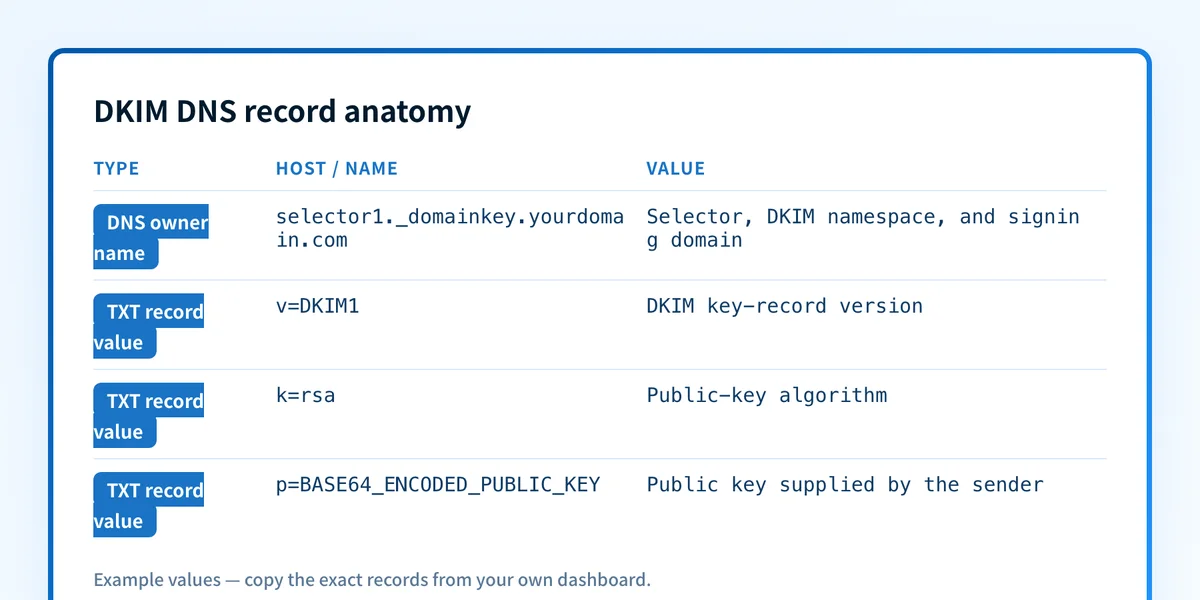
The selector identifies a particular DKIM key
The selector is the first label in the DKIM DNS name. A signer places the selector in its DKIM-Signature header, then a receiver combines it with the signing domain to construct the DNS query. RFC 6376 defines this query pattern as:
<selector>._domainkey.<signing-domain>For an illustrative sender using selector1 and yourdomain.com, the public-key record is queried at:
selector1._domainkey.yourdomain.comA selector lets one domain publish more than one DKIM key at the same time. That supports separate sending systems and key rotation without forcing all mail streams to use one key. For the broader signing and verification flow, see what DKIM is.
The record value carries the public-key information
RFC 6376 defines DKIM key records as tag-value lists. A typical direct TXT record has these visible fields:
v=DKIM1identifies the record as a DKIM key record.k=rsaidentifies RSA as the key type. RFC 6376 defines RSA as the default whenkis omitted.p=contains the Base64-encoded public key.
ed25519 keys. The actual algorithm and value must come from the sender that will sign mail.
Do not copy the p= value from an example, another tenant, or an old DNS record. Publish only the selector, record type, target, and key material issued for the exact sending service and domain.
When a DKIM record example changes
The structural example changes based on how the sending service manages DKIM.
A direct DKIM TXT record publishes the public key in your DNS zone. In that case, the owner name follows the selector pattern and the TXT value includes v=DKIM1 and p=.
A CNAME-based arrangement delegates the selector hostname to a provider-managed DNS name. The provider supplies the exact CNAME target. A CNAME target is account-specific, so it should never be guessed or copied from another organization. The record may still lead a receiver to DKIM public-key data, but the DNS record you publish is a CNAME rather than a direct TXT value.
Use this decision rule:
- If the sender's instruction says
TXT, publish the provided selector hostname and DKIM tag-value string as a TXT record. - If the sender's instruction says
CNAME, publish the provided selector hostname and exact CNAME target. - If you only have a delivered message, read its
d=signing domain ands=selector, then look up._domainkey. - If the selector or DNS value is missing, obtain it from the sending service before editing DNS.
Worked DKIM DNS record example
This is an illustrative direct TXT record shape only. It is not a deployable DKIM key and must not be copied into production DNS.
Record type: TXT
Host/name: selector1._domainkey.yourdomain.com
Value: v=DKIM1; k=rsa; p=BASE64_ENCODED_PUBLIC_KEY_FROM_YOUR_SENDER
Read the example in two parts:
selector1._domainkey.yourdomain.comis the DNS owner name.selector1is chosen by the signing service,_domainkeyis the DKIM namespace, andyourdomain.comis the domain named by the signature'sd=value.v=DKIM1; k=rsa; p=...is the key record value. Thep=field holds public-key material, not a password, API token, or private signing key.
p= value. A record that resolves publicly can still be unrelated to the mail stream you are investigating if its selector does not match the message header.
DNS propagation also does not show that the sender enabled DKIM signing. To verify a real path, inspect a delivered message's authentication results after the sender reports the domain as authenticated. The separate DKIM alignment guidance explains why a DKIM pass may still need a domain alignment check for DMARC.
Validate the example against a real sending path
Start with the evidence you have and keep the layers separate.
- With a provider DNS instruction, compare its supplied selector, DNS type, and value or CNAME target against the planned DNS change. Do not substitute example values.
- With a known domain and selector, query the selector-scoped DNS name. This confirms whether public DNS returns a record at the expected location.
- With a delivered message, inspect the DKIM-Signature header and
Authentication-Resultsheader. RFC 8601 defines the authentication-status header field that receivers use to report authentication results. A result for one message does not prove future messages will use the same path. - After the sender's verification status and a delivered-message result agree, monitor DMARC aggregate reports to identify production sources and authentication or alignment issues over time.
Check the published DKIM key
If you have the sending domain and selector from a provider instruction or delivered message, inspect the public DNS answer before changing anything. Compare the returned record with the account-specific instruction, including whether it is a TXT record or a CNAME.
A public lookup cannot enable signing, access a private key, or prove a result for a message it did not inspect.
Evidence
Sources and further reading
Questions readers ask
Frequently asked questions

Written by
Samuel ChenardCEO & Co-Founder, Palisade
Samuel Chenard is the CEO and co-founder of Palisade, AI-first DMARC software for IT teams and MSPs, from one domain to thousands.
More from Samuel →