SMTP vs POP3 vs IMAP: what each protocol does
 ChatGPT
 Claude
 Gemini
 Perplexity
 Grok
Grok
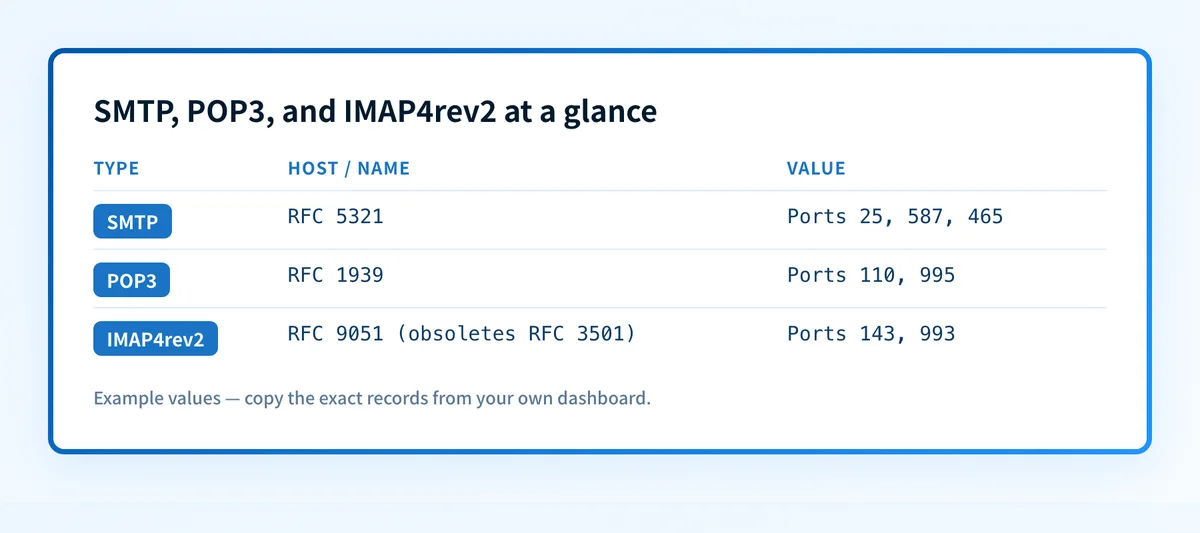
SMTP, POP3, and IMAP are three separate mail protocols with different jobs. SMTP (RFC 5321) sends and relays outbound mail between servers. POP3 (RFC 1939) downloads mail to a single device, usually removing it from the server. IMAP, now at IMAP4rev2 (RFC 9051), keeps mail on the server and synchronizes folders, flags, and messages across every connected device.
At a glance
Quick takeaways
- SMTP (RFC 5321) is the protocol that sends and relays mail between servers. It does not retrieve mail for a reader.
- POP3 (RFC 1939) downloads messages to one device and, by default, removes them from the server after retrieval.
- IMAP4rev2 (RFC 9051) obsoletes IMAP4rev1 (RFC 3501) and keeps mail state synchronized across every connected device.
- Standard ports separate plaintext and encrypted connections: SMTP uses 25, 587, and 465; POP3 uses 110 and 995; IMAP uses 143 and 993, per the IANA service name and port number registry.
- JMAP (RFC 8620 and RFC 8621) is a newer HTTP-based mail-access protocol, but it has not replaced IMAP as the standard mailbox providers expose to third-party clients.
- Choosing between POP3 and IMAP is a retrieval decision. SMTP runs underneath both, handling the separate job of sending mail.
Who is affected?
Anyone configuring a mail client against a mailbox runs into these three protocols, whether that's an IT team setting up Outlook or Thunderbird for a company domain, an MSP standardizing client settings across customer tenants, or an individual adding an account to a phone's mail app. A mail server administrator is affected differently: they decide which of these protocols the server exposes, on which ports, and with which authentication.
Webmail-only use is the main exception. Reading mail entirely inside a browser at a provider's own web interface does not require configuring POP3 or IMAP, because the browser talks to the provider's backend directly. Most providers still keep POP3 and IMAP available so third-party desktop and mobile clients can connect, which is the scenario where these settings matter. Protocol confusion here, such as pointing a client at the wrong port or the wrong protocol for the intended use case, is a common cause of the connection failures covered in delivery-error troubleshooting.
What are the requirements?
SMTP sends and relays mail
SMTP moves a message from a sending client or server to the next server in the delivery path, and ultimately to the recipient's mail server. RFC 5321 defines the base protocol. A separate document, RFC 6409, defines message submission on port 587 specifically for authenticated clients sending mail, as distinct from server-to-server relay on port 25. RFC 8314 recommends implicit TLS for submission, which is why port 465 exists as an authenticated, encrypted-from-the-start alternative to STARTTLS on 587.
SMTP has no concept of reading or organizing a mailbox. It hands a message off and is done. Retrieval and mailbox state are POP3's and IMAP's jobs.
POP3 downloads mail to one device
POP3 connects to a mailbox, retrieves messages, and by default deletes them from the server once the client confirms receipt, per RFC 1939. A client can configure "leave a copy on the server," but that is a client-side option layered on top of a protocol built around single-device download. POP3 has no native concept of folders or of syncing read state back to the server for other clients to see.
IMAP synchronizes across devices
IMAP keeps the message store on the server as the source of truth. A client connects, sees the same folders, flags (read, replied, deleted), and message bodies as any other client connected to the same account, per RFC 9051. IMAP4rev2 obsoletes the long-standing IMAP4rev1 (RFC 3501), consolidating extensions that had accumulated around the older specification into one current standard.
IMAP:  imap.example.com, port 993, implicit TLS
POP3:  pop.example.com, port 995, implicit TLS
SMTP submission: smtp.example.com, port 587 (STARTTLS) or port 465 (implicit TLS)
The hostnames above are illustrative only. Do not publish real mailbox hostnames from an account; the mailbox provider issues the actual server addresses in its own account or admin settings.
When does the requirement take effect?
These are stable, long-published standards rather than a rule with a single compliance deadline:
- RFC 1939 (POP3): published May 1996, Standards Track.
- RFC 3501 (IMAP4rev1): published March 2003.
- RFC 5321 (SMTP): published October 2008, obsoleting RFC 2821.
- RFC 8314 (implicit TLS for submission, IMAP, and POP): published January 2018.
- RFC 8620 and RFC 8621 (JMAP core and JMAP for mail): published July 2019.
- RFC 9051 (IMAP4rev2): published August 2021, obsoleting RFC 3501.
How do I implement the requirement?
1. Confirm which protocols the mailbox provider exposes
Check the provider's own account or admin settings before configuring a client. Not every provider enables POP3 or IMAP by default, and some require an explicit toggle per account.
2. Choose POP3 or IMAP based on device count
A single device that should hold its own offline copy of mail fits POP3. Any account checked from more than one device, or from both a phone and a desktop client, fits IMAP, since it keeps read state and folders consistent everywhere.
3. Point the client at the provider's real hostnames and encrypted ports
Use the provider's documented hostnames, not a guessed pattern like mail.domain.com. Prefer the implicit-TLS ports (995 for POP3, 993 for IMAP) over unencrypted 110 or 143 wherever the provider supports them, consistent with RFC 8314's recommendation to use TLS from connection start rather than an upgrade step.
4. Configure SMTP submission with authentication separately from retrieval
Outbound sending is a separate configuration from POP3 or IMAP retrieval. Set up authenticated submission on port 587 or 465 with the account's credentials; a client that can retrieve mail over IMAP does not automatically have working outbound SMTP configured. For the security posture of that submission path, including STARTTLS versus implicit TLS tradeoffs, see email transport security.
How do I validate compliance?
Test each protocol's connection directly rather than trusting that a client "looks connected." For SMTP submission with STARTTLS:
openssl s_client -starttls smtp -connect smtp.example.com:587For implicit-TLS IMAP or POP3:
openssl s_client -connect imap.example.com:993
openssl s_client -connect pop.example.com:995
These commands are illustrative; substitute the account's real hostnames. A successful TLS handshake confirms the port accepts an encrypted connection. It does not confirm the mail client itself is using that encrypted path; check the client's own account settings or connection log for that.
Because SMTP delivery depends on the sending domain's DNS records routing mail to the correct server in the first place, a DNS lookup of the domain's MX records is a useful companion check when a message isn't arriving at all. That check confirms the published routing record; it does not confirm the client authenticated correctly or that the message passed the receiving server's spam filtering.
Check the mail routing behind a delivery problem
When mail isn't arriving and the cause isn't obviously a wrong POP3 or IMAP setting, look up the sending domain's MX and related DNS records to confirm mail is routed to the correct server before troubleshooting the client further.
A DNS lookup shows the published routing record. It cannot show whether a specific message was accepted, deferred, or rejected by the receiving server; that evidence lives in the delivery bounce or the receiving server's own logs.
Evidence
Sources and further reading
- RFC 5321: Simple Mail Transfer Protocol
- RFC 1939: Post Office Protocol - Version 3
- RFC 9051: Internet Message Access Protocol (IMAP) - Version 4rev2
- RFC 8314: Cleartext Considered Obsolete: Use of Transport Layer Security (TLS) for Email Submission and Access
- RFC 8620: The JSON Meta Application Protocol (JMAP)
- IANA Service Name and Transport Protocol Port Number Registry
Questions readers ask
Frequently asked questions

Written by
Samuel ChenardCEO & Co-Founder, Palisade
Samuel Chenard is the CEO and co-founder of Palisade, AI-first DMARC software for IT teams and MSPs, from one domain to thousands.
More from Samuel →