Email deliverability testing tools: run the check and read the result
 ChatGPT
 Claude
 Gemini
 Perplexity
 Grok
Grok
Email deliverability testing tools query public DNS and blocklist databases to report whether a domain's SPF, DKIM, DMARC, and MX records are configured correctly, and whether the domain or its sending IPs appear on a spam blocklist. Palisade's email security score tool runs these checks in one pass. It can only report what public DNS and blocklist operators currently show; it cannot confirm that a specific message reached an inbox or that a receiver's private reputation score is clean.
At a glance
Quick takeaways
- Email deliverability testing tools check DNS-published authentication records (SPF, DKIM, DMARC), MX configuration, and blocklist status; they do not observe actual inbox placement.
- Palisade's email security score tool reads the same public DNS data any receiving mail server can query.
- A passing SPF record does not guarantee DKIM or DMARC also pass, and DMARC alignment depends on both.
- RFC 7208 limits SPF to 10 DNS lookups; exceeding that limit causes a permanent SPF failure regardless of the record's syntax.
- Blocklist status changes independently of DNS records, so a clean SPF, DKIM, and DMARC result and a blocklist listing are two separate problems.
- A one-time check confirms today's published record. It does not track new sending sources or DNS changes that happen later.
What this tool checks
These checks are the DNS half of the broader email deliverability picture; the other half is what happens after a message leaves your server. Palisade's email security score tool accepts a domain, checks its published SPF, DKIM, DMARC, and MX records, and cross-references the domain and its mail-sending IPs against blocklist data. The result breaks down by component, so you can see which one needs attention.
DKIM verification depends on a selector, the name published in front of _domainkey in the DNS record, because RFC 6376 defines the DKIM public key as a TXT record under
The tool's boundary matters as much as its result. It reads public DNS and blocklist data, the same evidence any receiving mail server could also read. It does not connect to your mail server, does not send a test message, and does not see the private reputation score a mailbox provider assigns your domain.
How to run the check
1. Gather the domain and any known DKIM selector
Write down the sending domain, and if you already have it, the DKIM selector your email service uses. If you don't know it, note the name of the sending service so you can look it up in its own settings afterward.
2. Run the domain through the checker
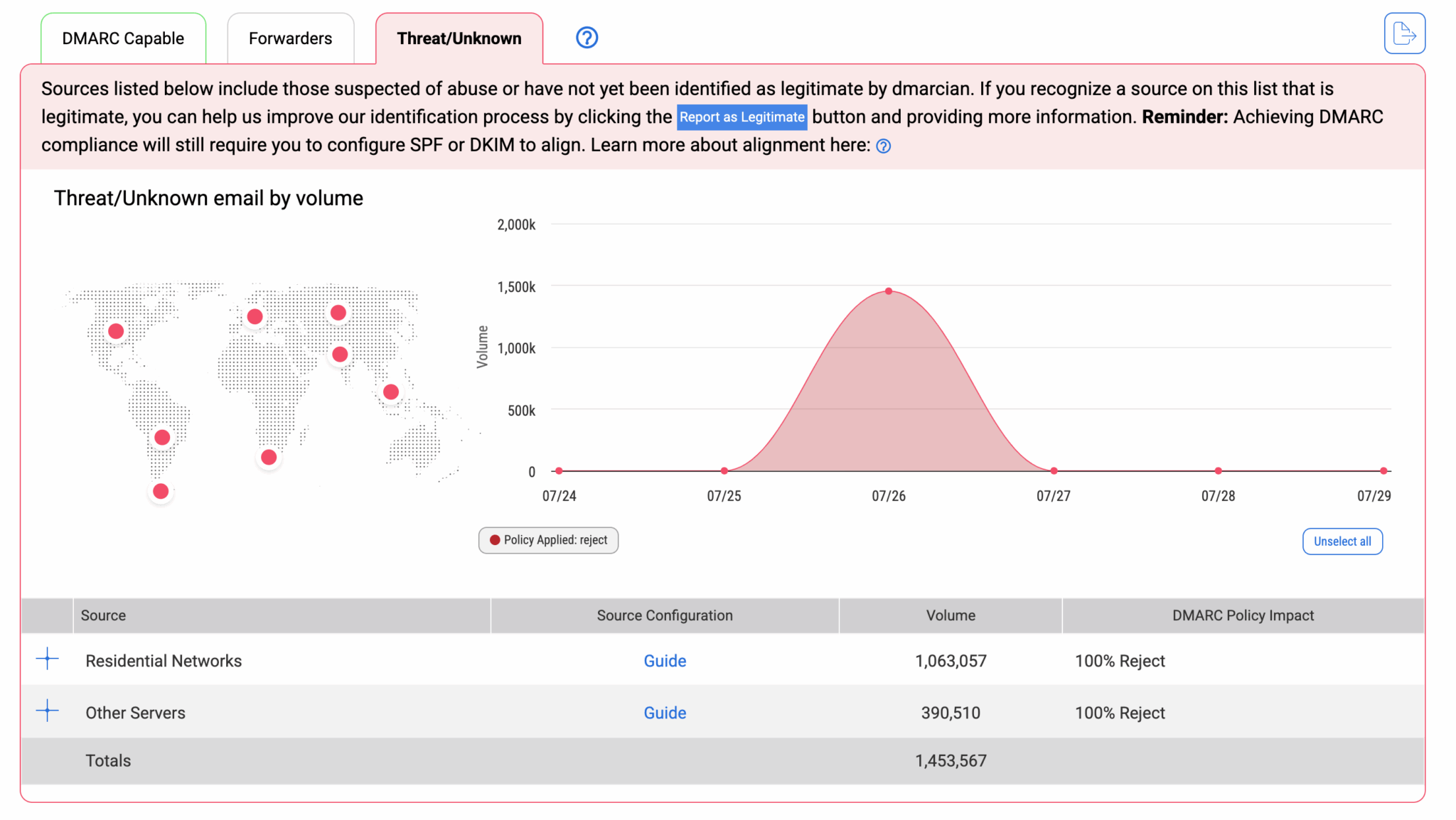
Open Palisade's email security score tool and enter the domain. It queries public DNS and blocklist data and returns a summary you can expand for the SPF, DKIM, DMARC, MX, and blocklist detail behind it.
3. Confirm the same records independently
Before changing anything, check the authoritative answer yourself. Querying a domain's own authoritative nameserver reflects a DNS change as soon as it has propagated there, while a checker using a public resolver can still return a cached answer until the record's time-to-live expires.
dig +short TXT yourdomain.com
dig +short TXT _dmarc.yourdomain.com
dig +short MX yourdomain.com
dig +short TXT <selector>._domainkey.yourdomain.com
Replace
How to interpret the results
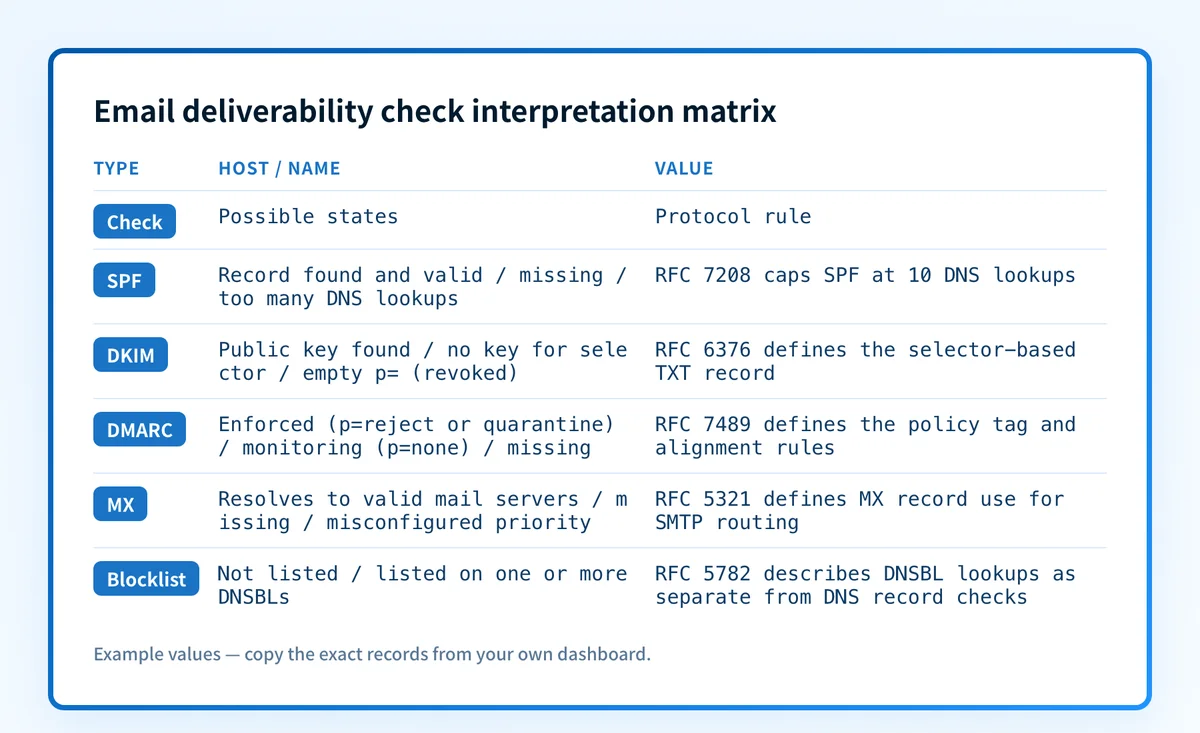
Every DNS-based check can only return a handful of true states for each component, regardless of which tool runs it.
The record is missing
No answer comes back for the DNS name the protocol expects. For SPF and DMARC, RFC 7208 and RFC 7489 both define a fixed location, the domain root for SPF and _dmarc. for DMARC, so a missing record here means nothing was ever published. For DKIM, a missing record more often means the selector used in the lookup is wrong than that DKIM was never set up, since the selector name is chosen by the sending service rather than fixed by the protocol.
The record exists but fails validation
A TXT record answers, but its syntax does not meet the protocol's requirements: an SPF record without a v=spf1 tag, a DMARC record without a p= policy tag, or a DKIM record whose p= public key value is empty, which RFC 6376 treats as a revoked key rather than a working one. Compare the published string against the exact record your sending service generated. One missing character breaks the whole record.
The record passes but SPF, DKIM, and DMARC still don't align
SPF and DKIM can each pass on their own domain while DMARC still fails, because DMARC requires the domain that passed SPF or DKIM to align with the visible From address, not just to pass in isolation. RFC 7489 defines this alignment requirement separately from the underlying SPF and DKIM results. A forwarded message, or a third-party sending service using its own SPF domain, is a common way to hit this state.
The domain or an IP is listed on a blocklist
Blocklist status is not stored in your domain's own DNS. RFC 5782 describes DNS blacklists as a separate, operator-run lookup service that a mail server queries against the sending IP, independent of whether SPF, DKIM, and DMARC are configured correctly. A clean authentication result and a blocklist listing are two different problems with two different fixes.
How to act on the result
Fix records in the order the evidence points to, not in an arbitrary order.
If SPF, DKIM, or DMARC is missing, get the exact record string from the sending service that owns it and publish that string unedited. Do not write a DMARC or SPF record from memory. If a record exists but fails validation, diff the published string against the one your sending service currently generates, since services rotate DKIM keys and change SPF includes without always notifying you. If SPF and DKIM pass but DMARC alignment still fails, check whether the failing source is a forwarder or a third-party sender using its own domain in the return path, and confirm whether that source belongs in your SPF record or should sign with its own DKIM key instead. If a blocklist listing appears, go to that specific blocklist operator's own delisting process. A DNS change does not remove a blocklist entry by itself.
For a second reading on the same domain, Palisade's walkthrough of running and interpreting an MxToolbox report covers a differently scoped checker that can help confirm a result before you change production DNS.
Investigate this with your coding agent
Use this when the check flags SPF, DKIM, or DMARC as missing or invalid and you want a repeatable diff between what's published and what should be published before touching DNS. Prepare the domain name and, if you have them, the DKIM selector and the exact record strings your sending service expects, with any account tokens or private key material redacted.
Agent handoff
Copy the prepared prompt
Give this to a coding agent that can inspect the relevant repository or configuration source of truth.
Problem: The email security score check flagged one or more of SPF, DKIM, or DMARC as missing or invalid for a specific sending domain.
Evidence: Domain name (example: yourdomain.com), the DKIM selector and public key string from the sending service with any private key material redacted, and the exact SPF and DMARC record strings the sending service or IT team expects to be published.
Repository scope: Read-only DNS queries against public resolvers and the domain's authoritative nameserver. No access to the DNS provider's control panel, credentials, or internal systems.
Constraints: Inspect before editing. Do not apply changes until I approve the proposed diff. Do not guess a DKIM selector that was not supplied. Do not store or transmit any data beyond the domain name and record strings provided.
Requested output: A diff between the currently published TXT records and the expected strings, a plain-language explanation of the mismatch, a minimal proposed DNS change, and a rollback note with the prior record value.
Verification: Re-run the same DNS queries against the domain's authoritative nameserver and a public resolver after the change, and confirm both return the expected record.
Stop if: The task needs DNS provider credentials, a private key, customer data, or a change applied to a production DNS zone without my explicit approval.
Human approval required: Review the proposed diff and verification plan before allowing changes. Do not paste secrets, private keys, API tokens, unredacted headers, or customer data.
How to retest
Re-run the same domain through the email security score tool after the DNS change has had time to propagate. If you queried the authoritative nameserver directly during the first check, query it again the same way. A resolver-based recheck can still return the old answer until the record's time-to-live expires, so don't read an unchanged result as a failed fix without checking the TTL first.
A clean recheck confirms the DNS layer only. Confirming the full picture also means checking a real delivered message's Authentication-Results header from the production sending path, and, once report data accumulates, reading the DMARC aggregate reports the domain already receives for sources the DNS check never saw. RFC 8601 defines the Authentication-Results header the receiving mail server adds, and it's the only evidence that shows what a receiver actually did with the message, not just what the record allows it to do.
For a broader read on the deliverability side of the same domain, Palisade's overview of what email deliverability covers and the Warmy email deliverability test walkthrough look at signals a DNS-only check does not.
Move from a one-time score to ongoing DMARC visibility
A clean result today confirms the records published right now. It does not track a new sending source that starts using your domain next month without being added to SPF, and it does not flag DNS drift that happens after this check. For an IT team or MSP responsible for more than a couple of domains, that gap is the actual ongoing problem.
Palisade's DMARC Agent reads the aggregate reports your domain already receives, identifies which sending source caused each authentication or alignment failure, and creates a prioritized remediation ticket instead of leaving someone to parse the raw XML by hand. It can also detect when a domain looks ready for a stricter DMARC policy and propose that next step, while a person reviews the evidence and applies the change. It does not change your DMARC policy on its own, delist an IP from a blocklist, or guarantee that a message reaches the inbox.
Evidence
Sources and further reading
- RFC 7208: Sender Policy Framework (SPF)
- RFC 6376: DomainKeys Identified Mail (DKIM) Signatures
- RFC 7489: Domain-based Message Authentication, Reporting, and Conformance (DMARC)
- RFC 8601: Message Header Field for Indicating Message Authentication Status
- RFC 5782: DNS Blacklists and Whitelists
- Palisade email security score tool
Questions readers ask
Frequently asked questions

Written by
Samuel ChenardCEO & Co-Founder, Palisade
Samuel Chenard is the CEO and co-founder of Palisade, AI-first DMARC software for IT teams and MSPs, from one domain to thousands.
More from Samuel →