DKIM lookup tool: check a public DKIM record
 ChatGPT
 Claude
 Gemini
 Perplexity
 Grok
Grok
A DKIM lookup checks whether a public DKIM key record can be found at the DNS name built from a selector and signing domain. Use the Palisade DKIM tool to inspect the public record, then compare that DNS evidence with a real delivered message. A published record alone does not prove that a production sender is signing mail correctly or that a receiver validated the signature.
At a glance
Quick takeaways
- A DKIM public key is published in DNS beneath
._domainkey. - The selector and signing domain come from the
s=andd=tags in a message'sDKIM-Signatureheader. - A DNS answer can show that a public record is visible, but it cannot show the sender's private key or outbound configuration.
- A delivered message and its receiver-added authentication result are required to check whether DKIM worked on that path.
- Each sender and selector needs its own diagnosis because one valid DKIM record does not validate another sender.
- DKIM remains part of modern email authentication, alongside SPF and DMARC.
What this tool checks
The Palisade DKIM tool is the appropriate starting point when you need to inspect public DKIM DNS evidence. A public lookup concerns the record that a receiving system retrieves when it verifies a DKIM signature.
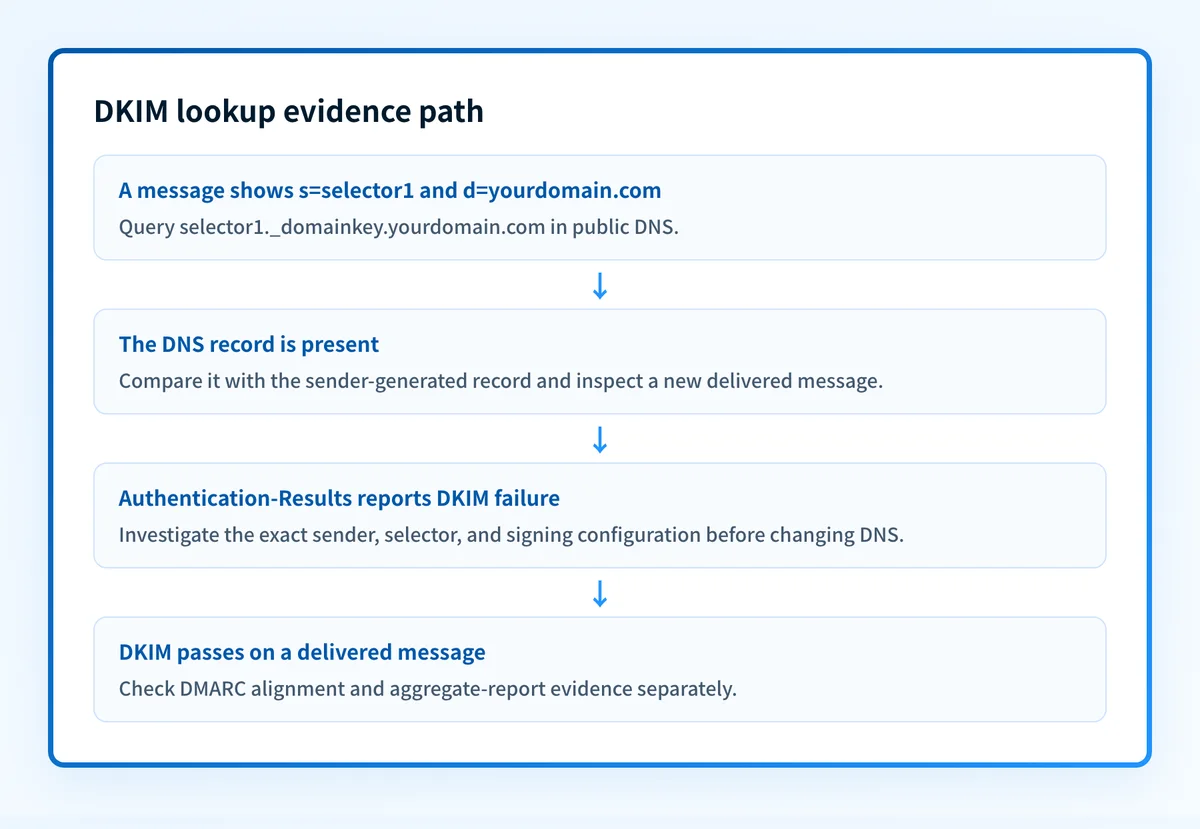
RFC 6376 defines the DKIM key-query name as a selector followed by ._domainkey and the signing domain. For example, a message signed with s=selector1 and d=yourdomain.com directs a verifier to this DNS owner:
selector1._domainkey.yourdomain.comThe lookup can help you establish whether public DNS answers for that owner. It cannot see the private key held by the sender, determine which selector a sender intends to use, inspect the message body that was signed, or reveal a receiver's private delivery decision. It also cannot prove the production sending path, continuous state, or why one receiver rejected one message.
For protocol background before investigating the record, see the DKIM learning hub.
How to run the check
1. Collect the exact selector and signing domain
Open the raw source of a message sent through the production application or sending service. Find the DKIM-Signature header and record its d= and s= values.
Do not use a selector from another account, brand, or DNS zone. The DNS owner is specific to the selector and signing domain in the message.
2. Run a public DKIM lookup
Open the Palisade DKIM tool and inspect the public DKIM DNS evidence for the domain or selector information available to you. Keep a copy of the result and the time of the lookup.
Independently query the exact DNS owner from the message. This separates a broad public check from a targeted lookup of the selector that actually appeared in mail.
dig +short TXT selector1._domainkey.yourdomain.comThe example uses illustrative values. Query the selector and signing domain from your own delivered message or sender configuration.
3. Check the authoritative DNS answer
A public resolver can return cached information. If a record was recently changed, query the authoritative DNS provider or authoritative name server as well. Compare the answer with at least one public resolver before treating a missing or changed result as a configuration conclusion.
Do not replace a DKIM TXT record with a value copied from another tenant or service. The sending service generates the selector and public-key value for its own configuration.
4. Preserve message evidence for the retest
Keep the original message's DKIM-Signature and Authentication-Results fields. RFC 8601 defines the Authentication-Results header field, which records an authentication service's evaluation of a message.
A DNS lookup and a message result answer different questions. Preserve both.
How to interpret the results
A public DKIM record is returned
A returned DNS record means a public answer exists at the queried owner. That is useful DNS evidence, but it is not a message-level DKIM pass.
Compare the exact queried owner with the s= and d= values from the delivered message. If they match, move to the receiver's Authentication-Results header to determine whether that receiver reported a DKIM result for that message.
No record is returned for the expected owner
First confirm the selector and signing domain. A wrong selector, wrong signing domain, DNS typo, stale zone, or unpublished sender-generated record can all produce a missing result.
Then check the authoritative DNS answer and the DNS provider's published zone. If the sender configuration generated a different selector, use the sender's current configuration value instead of guessing.
The returned record does not match the sender's generated value
Treat this as a configuration discrepancy until the responsible sender and DNS owner confirm the intended record. The sender's account-generated value and the DNS zone must refer to the same selector and signing domain.
Do not infer that a different valid-looking selector is an acceptable replacement. DKIM verification is tied to the selector named in the message signature.
The delivered message reports a DKIM failure
A valid public record does not rule out a message failure. Compare the message's d= and s= values with the exact record queried, then review the receiver-added Authentication-Results header.
RFC 8601 describes authentication results as the assessment of the authentication service that added the field. That result is evidence from the receiving path. It is not interchangeable with a public DNS result.
The delivered message reports a DKIM pass
A DKIM pass shows that the receiving authentication service evaluated the message's DKIM signature successfully for that message. It still does not establish DMARC alignment by itself. DMARC evaluates whether authenticated identifiers align with the visible From domain, so continue with DMARC evidence and aggregate reports where available.
For a broader definition of the protocol and its relationship to mail authentication, read what DKIM is.
How to act on the result
Start with the evidence that is closest to the failure.
- If the DNS owner is missing, identify the sender that produced the message, obtain its current account-generated DKIM record, and publish it at the exact owner in the authoritative DNS zone.
- If the DNS record is present but differs from the sender's generated value, stop before changing anything. Confirm the active sender, account, selector, and DNS zone owner.
- If DNS is correct but the message has no
DKIM-Signature, investigate the sender-side configuration. A public key cannot make an unsigned message pass DKIM. - If a message has a signature but the receiver reports failure, compare the exact
d=ands=values with DNS evidence and inspect the sender's documented signing status. - If DKIM passes but DMARC still fails, inspect identifier alignment and SPF results. DKIM is one authentication method, not a complete DMARC diagnosis.
Investigate this with your coding agent
Use this when the DKIM selector record is managed in a reader-owned, version-controlled DNS configuration. Prepare a redacted lookup result, the selector, and the signing domain. Do not include private keys, tokens, full message headers, or customer data.
Agent handoff
Copy the prepared prompt
Give this to a coding agent that can inspect the relevant repository or configuration source of truth.
Problem: A DKIM lookup for selector1._domainkey.yourdomain.com is missing, stale, or differs from the sender-generated public record.
Evidence: Redacted public lookup result, selector, signing domain, expected record shape, and the DNS zone or infrastructure-as-code path.
Repository scope: The reader-owned DNS zone configuration or infrastructure-as-code repository that publishes yourdomain.com records.
Constraints: Inspect before editing. Do not apply changes until I approve the proposed diff. Do not access or request private keys, tokens, unredacted message headers, or customer data. Do not change unrelated DNS records.
Requested output: Diagnosis, minimal proposed change, rollback, and unknowns.
Verification: Re-run the same public DKIM lookup for selector1._domainkey.yourdomain.com and compare it with a new delivered message from the same sending path.
Stop if: Credentials, private data, production mutation, the active selector, the DNS provider, or the authoritative configuration cannot be identified.
Human approval required: Review the proposed diff and verification plan before allowing changes. Do not paste secrets, private keys, API tokens, unredacted headers, or customer data.
How to retest
Run the same lookup again after the authoritative DNS answer changes. Query the exact selector from the message, not a similar selector found elsewhere in the zone.
Then send a new message through the same application, sender account, and recipient path. Review the new DKIM-Signature and Authentication-Results fields. Finally, use DMARC aggregate reports or Palisade monitoring after data accumulates to identify sources and authentication or alignment issues across the domain.
Check the public record, then investigate the sending path
Use the Palisade DKIM tool to inspect the public record after you have the selector or domain evidence. A passing public check does not prove that the sender is signing mail, repair a sender configuration, continuously monitor later DNS changes, or guarantee DMARC compliance or inbox placement.
For teams managing multiple senders or domains, Palisade is DMARC software that analyzes DMARC aggregate-report data, identifies authentication and alignment issues, and creates prioritized remediation tickets. It can propose the next policy step when evidence supports it, while a human reviews the evidence and applies the change.
Evidence
Sources and further reading
Questions readers ask
Frequently asked questions

Written by
Samuel ChenardCEO & Co-Founder, Palisade
Samuel Chenard is the CEO and co-founder of Palisade, AI-first DMARC software for IT teams and MSPs, from one domain to thousands.
More from Samuel →