Blacklist test domain
 ChatGPT
 Claude
 Gemini
 Perplexity
 Grok
Grok
To run a blacklist test for a domain, use the Palisade Blocklist Checker with the domain or, when you have it, the public sending IP address. Read each returned list status separately, then move from a confirmed listing to the named list operator's published process. A public lookup can show list evidence, but it cannot prove the production sending path, explain one rejected message, or guarantee inbox placement.
At a glance
Quick takeaways
- A domain result and an IP result answer different questions, so submit the resource identified by the delivery evidence.
- A
Listedresult is evidence from one returned blocklist, not a conclusion about every mailbox provider. - A
Not listedresult does not prove that mail will be accepted or placed in the inbox. Can't checkmeans the checker could not obtain a usable answer for that list during the lookup.- Confirmed public sending IP evidence is the prerequisite for an IP reputation check.
- A delivered message and its authentication results are needed to connect a list result to an actual sending path.
What this tool checks
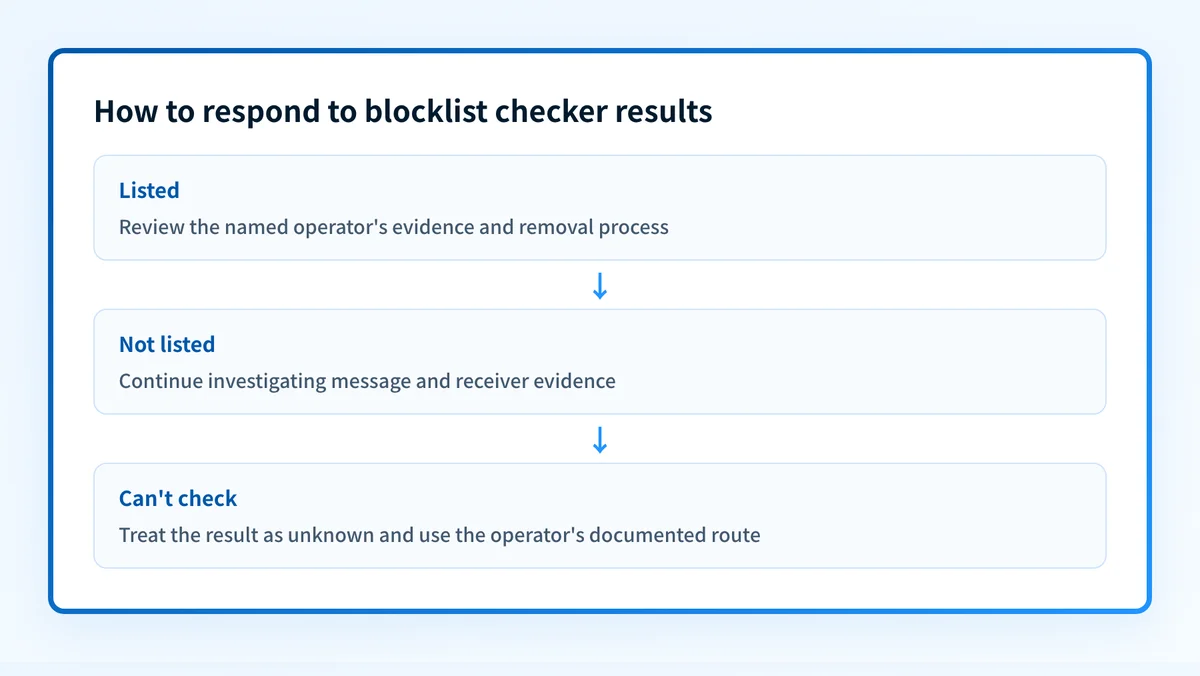
The Palisade Blocklist Checker accepts a sending IP address, such as 203.0.113.5, or a domain. It returns an individual status for each list it can query: Listed, Not listed, or Can't check. When a listing is returned, use the removal link for that specific operator rather than assuming one operator's process applies to every list.
A DNS-based blocklist commonly publishes its decision through a DNS query. RFC 5782 describes DNS blocklists as a DNS-based reputation mechanism, while each operator decides what it lists and how its data should be used. The checker reports publicly available lookup evidence. It does not identify the application that sent a message, inspect private receiver reputation, monitor changes over time, remove a listing, or establish why a recipient made a delivery decision.
Use the resource from the evidence you already have. If a bounce, mail log, or provider dashboard identifies a public source IP, check that IP. If the issue is a domain blocklist result, check the domain. Do not substitute a visible From domain for an unknown sending IP and treat the result as proof about the IP.
How to run the check
1. Identify the resource to test
Start with the most specific evidence available. A mail gateway log, delivery event, or provider notice may identify an IP address. A domain-focused blocklist notice may identify a domain instead. Record the exact resource, the time of the event, and the receiving service that reported it.
If the notice names Spamhaus DBL, verify that the reported resource is a domain. Spamhaus explains that its Domain Blocklist is intended for domain reputation checks. Do not apply a domain-list result to a different IP without separate evidence.
2. Confirm the public DNS answer when appropriate
For a domain, check that the domain has a public DNS answer before interpreting a domain lookup as a sending-path diagnosis. This does not test a blocklist listing. It is a repeatable check that helps rule out a spelling or DNS-resolution mistake.
dig +short A yourdomain.comFor an IP-based problem, keep the reported public IP exactly as it appears in the delivery evidence. Do not use a private address, a hostname, or an IP copied from another sender.
3. Submit the domain or IP address
Open the Palisade Blocklist Checker, enter one domain or one public sending IP address, then select Check blocklists. Preserve the result with the checked time and the exact target. A result applies to that submitted target at that point in time.
4. Keep the result tied to the reported event
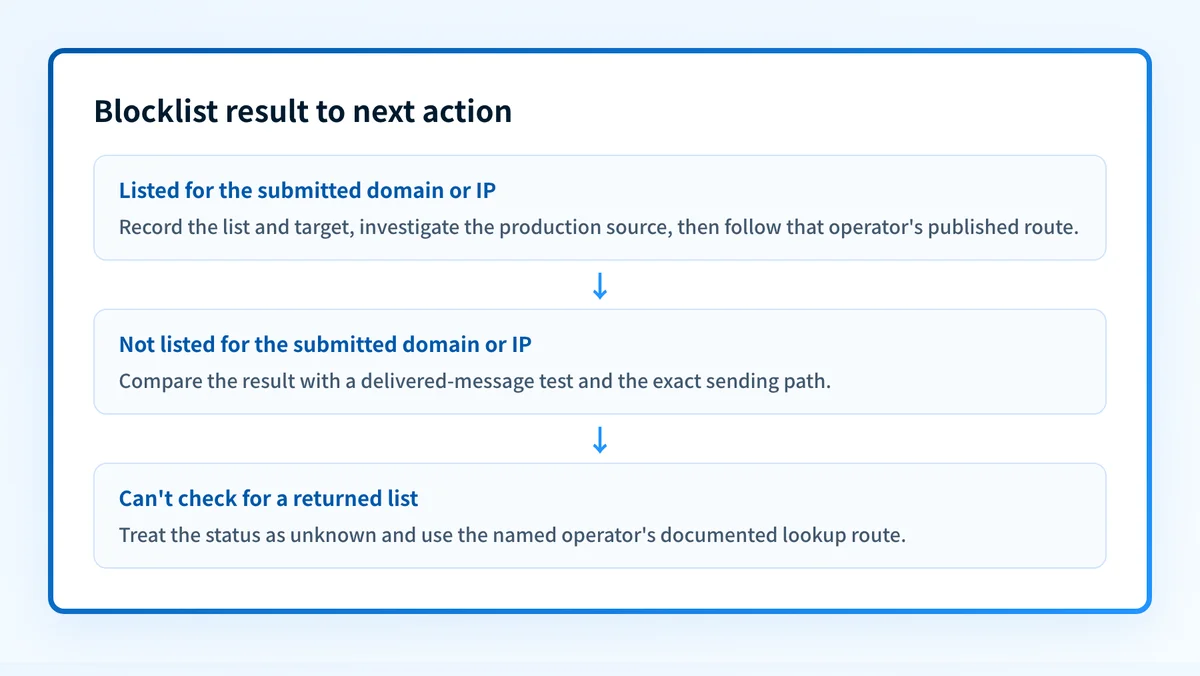
Compare the target you submitted with the target named in the delivery evidence. If you tested an IP but the failed message used a different outbound provider, the lookup does not explain that message. If you tested a domain but the problem report identified an IP, run the IP lookup separately after confirming that IP belongs to the relevant production path.
How to interpret the results
Listed
Listed means the checker received a positive result from that particular blocklist for the submitted domain or IP. Record the list name, target, and check time. Then open that operator's removal or information link and follow its documented requirements.
A listing is not a universal delivery verdict. Mailbox providers can use multiple signals, including their own private reputation data and message-level authentication results. A listed result also does not tell you which application, credential, campaign, or compromised system caused the operator's decision unless that operator documents the reason.
For a domain result associated with Spamhaus DBL, use Spamhaus DBL guidance for that named list. Do not assume its testing or remediation rules apply to another returned operator.
Not listed
Not listed means the checker did not receive a listing result for that target from that particular list at the time of the lookup. It is useful negative evidence, especially when a delivery notice named the same target and list.
It does not prove that the target has good reputation everywhere. It also does not prove that a message passed SPF, DKIM, or DMARC, that the message body met receiver requirements, or that a receiver will accept future mail. If delivery is still failing, inspect a real delivered message or the exact bounce and compare its sending IP, envelope domain, and visible From domain with the target you checked.
Can't check
Can't check means the checker could not obtain a usable result for that list during the query. The checker documents that some lists can be unavailable through shared resolver access. Treat this as unknown, not as Not listed.
Do not retry repeatedly in the hope that an unavailable result becomes a clean result. First confirm the target is correct. Then use the named operator's documentation if it provides an alternative lookup route. If the issue affects real production traffic, preserve the original delivery evidence and check the operator's published status or contact method.
How to act on the result
Work in evidence order. Begin with the exact returned list status, then connect it to the actual sending source.
For a confirmed listing, use the named operator's own explanation and removal path. Before requesting removal, inspect the source that sent the mail. Check for unexpected applications, forwarding paths, compromised credentials, sudden volume changes, or mail that does not match the intended business process. A delisting request without correcting the cause can lead to another listing.
Do not remove or change a DNS record because of a blocklist result unless the operator's evidence and your own sending-path evidence identify that record as part of the cause. Removing authentication records can break legitimate mail.
For a Not listed result where delivery still fails, move to message evidence. Use the email deliverability test when you need a delivered-message test. It can help evaluate a test message, but it does not establish continuous reputation or reproduce every recipient's private filtering decision.
For a Can't check result, document the unavailable list and use that operator's documented route. Do not record the target as clear until you have a usable answer.
When the confirmed problem is tied to a public outbound IP, use an IP reputation check as the next diagnostic. This is useful for examining public reputation signals around the same address. It does not delist the IP, prove why an individual message failed, or control a receiver's private reputation decision.
The broader email deliverability guide explains why authentication, sending behavior, and receiver-specific filtering remain separate from a single blocklist lookup.
Investigate this with your coding agent
Use this after the checker returns Listed for a known production sending IP or domain and you need to inspect configuration or logs without exposing customer data. Prepare the redacted result, the target, and a redacted delivery event.
Agent handoff
Copy the prepared prompt
Give this to a coding agent that can inspect the relevant repository or configuration source of truth.
Problem: A production sending IP or domain returned Listed in the Palisade Blocklist Checker and the sender path needs investigation.
Evidence: Redacted checker result with list name, target, checked time, and redacted mail-log or delivery-event details for the same production path.
Repository scope: The mail-sending service configuration, deployment configuration, and redacted operational logs that control the identified sender.
Constraints: Inspect before editing. Do not apply changes until I approve the proposed diff. Exclude secrets, private keys, tokens, unredacted headers, and customer data. Do not submit delisting requests or change DNS.
Requested output: Diagnosis, minimal proposed change, rollback, and unknowns.
Verification: Send a new controlled message through the same production path, inspect its delivery evidence, then retest the same IP or domain in the Palisade Blocklist Checker.
Stop if: Credentials, private data, production mutation, or missing evidence is required.
Human approval required: Review the proposed diff and verification plan before allowing changes. Do not paste secrets, private keys, API tokens, unredacted headers, or customer data.
How to retest
Retest the same domain or public IP in the Palisade Blocklist Checker after the underlying cause is addressed and after the relevant list operator confirms or publishes a changed result. Compare the new result to the original result by target, list, and time.
Then send a new controlled message through the same production application, outbound IP, and recipient path that produced the original evidence. Inspect the delivered message or provider result separately. A cleared list entry and a successful message test are different observations.
If an IP was listed and now returns Not listed, confirm that the application still uses that same IP. Changes in provider routing can make a retest look successful while the original source remains unchanged.
Check the reputation signals for a confirmed sending IP
If the blocklist result identified a confirmed public sending IP, inspect that same address with the Palisade IP reputation checker. Compare the result with your delivery evidence before escalating or changing sender configuration.
A public reputation lookup does not prove why one recipient rejected a message, remove a listing, monitor future changes, or guarantee delivery.
Evidence
Sources and further reading
Questions readers ask
Frequently asked questions

Written by
Samuel ChenardCEO & Co-Founder, Palisade
Samuel Chenard is the CEO and co-founder of Palisade, AI-first DMARC software for IT teams and MSPs, from one domain to thousands.
More from Samuel →