What are Microsoft's new email authentication rules?
 ChatGPT
 Claude
 Gemini
 Perplexity
 Grok
GrokIn brief
Microsoft announced it will enforce the same email authentication standards that Google and Yahoo already require.

Microsoft has brought its consumer mailboxes in line with the rest of the industry. Since May 5, 2025, anyone sending more than 5,000 messages a day to Outlook.com, Hotmail.com, or Live.com must authenticate that mail with SPF, DKIM, and DMARC. This is the same email authentication bar that Google and Yahoo began enforcing for bulk senders in February 2024, so Microsoft is closing a gap rather than inventing a new standard.
If your team is deciding whether to run this work itself or use outside help, see how to choose an email authentication service before assigning sender inventory, report review, and policy approval.
Who the rules apply to
The 5,000-messages-per-day threshold is measured across Microsoft’s consumer domains, Outlook.com, Hotmail.com, and Live.com, not across your entire recipient list. A newsletter, a billing system, and a helpdesk that together push more than 5,000 messages a day to those mailboxes all count toward the same limit. Lower-volume senders are not carved out in practice: Microsoft evaluates the same authentication signals for everyone, and unauthenticated mail from any source is more likely to be filtered.
What Microsoft now requires
- SPF must pass. Publish an SPF record that lists every service authorized to send for your domain, and keep it under SPF’s ten-DNS-lookup limit so it does not silently break.
- DKIM must pass. Sign outbound mail with DKIM (a 1024-bit key is the floor, and 2048-bit is recommended) so receivers can verify the message was not altered in transit.
- DMARC must be published at a minimum of
p=none, and each message must align: the SPF- or DKIM-authenticated domain has to match the domain in the visible From address. A monitor-only record satisfies the letter of the rule, but onlyp=quarantineorp=rejectactually stops someone spoofing your domain.
What happens to non-compliant mail
At enforcement, high-volume mail that fails these checks is routed to the Junk folder rather than the inbox. Microsoft has been explicit that this is a grace period: once senders have had time to fix their configuration, failing mail will be rejected outright with the SMTP error 550 5.7.15 Access denied. A hard bounce is far more costly than a spam placement. The message never reaches the recipient, and repeated rejections erode your domain’s standing with Microsoft.
Why it matters
These standards exist to stop phishing, spoofing, and fraudulent mail that damages both brands and recipients. For a legitimate sender the upside is direct: authenticated mail is trusted, reaches the inbox more reliably, and carries your brand’s reputation instead of an attacker’s. Ignoring the rules risks the opposite: junking today, hard bounces tomorrow, and a domain that anyone can impersonate in the meantime.
Steps to get ready
- Audit your DNS for correct SPF, DKIM, and DMARC entries, and inventory every service that sends as your domain.
- Check your posture with Palisade’s free Email Security Score to see which layer is missing or misaligned.
- Validate DKIM signatures with the DKIM checker and confirm your SPF record resolves within the lookup limit.
- Publish DMARC at
p=none, read the aggregate reports, and ramp towardp=quarantinethen full enforcement atp=rejectas your senders pass. Our guide to simplifying the journey to DMARC enforcement walks through each stage. - Once you reach enforcement, add BIMI so your logo appears next to authenticated mail.
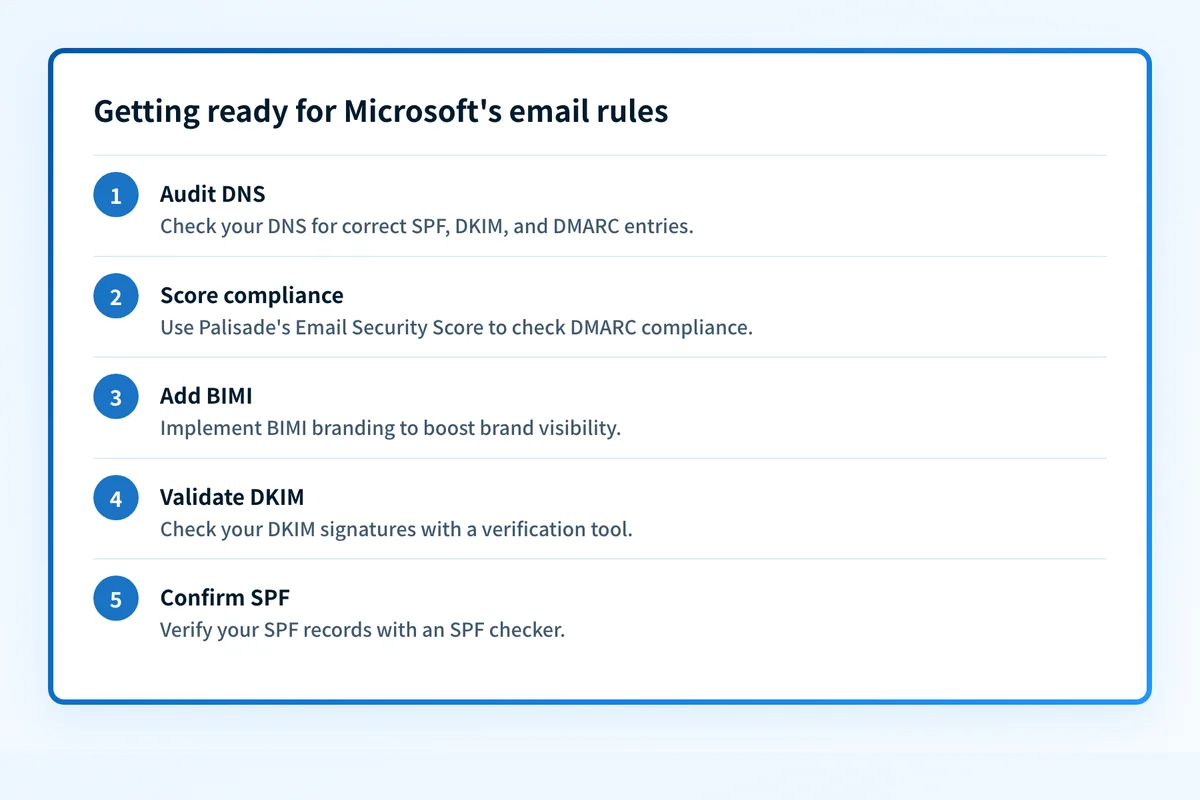 Steps senders can take now that Microsoft's enforcement is live.
At a glance
Quick takeaways
- Microsoft enforces SPF, DKIM, and DMARC for senders of more than 5,000 messages a day to Outlook.com, Hotmail.com, and Live.com.
- Enforcement began May 5, 2025.
- DMARC must be at least
p=noneand aligned with SPF or DKIM. - Non-compliant mail is junked now and will be rejected with
550 5.7.15 Access deniedafter the grace period. - The rules mirror the Google and Yahoo bulk-sender requirements from February 2024.
Additional Resources
- Outlook’s new requirements for high-volume senders (Microsoft)
- Google email sender guidelines
- Google is making email sender requirements stricter
Questions readers ask
Frequently Asked Questions

Written by
Ian BussieresCTO & Co-Founder, Palisade
Ian Bussieres is the CTO and co-founder of Palisade, AI-first DMARC software for IT teams and MSPs.
More from Ian →