The ABCs of DNS PTR Records
 ChatGPT
 Claude
 Gemini
 Perplexity
 Grok
GrokIn brief
PTR records map your sending IP back to your hostname. Learn how reverse DNS and FCrDNS work, why Gmail and Outlook now enforce them, and how to set one up.

A DNS PTR record maps an IP address back to a hostname (it is the reverse of an A record) and receiving mail servers use it to verify that your sending IP is associated with a legitimate domain before accepting your email.
What is a PTR record?
DNS normally works in one direction: you look up a domain name and get an IP address. A PTR (Pointer) record works the other way. Given an IP address, a PTR record returns the canonical hostname associated with it. This is called a reverse DNS lookup, and PTR records are stored in a special zone of the DNS hierarchy, in-addr.arpa for IPv4.
The format looks like this: the IP address is written in reverse octet order and suffixed with .in-addr.arpa. So the PTR record for IP 203.0.113.25 lives at 25.113.0.203.in-addr.arpa and points to a hostname such as mail.yourdomain.com.
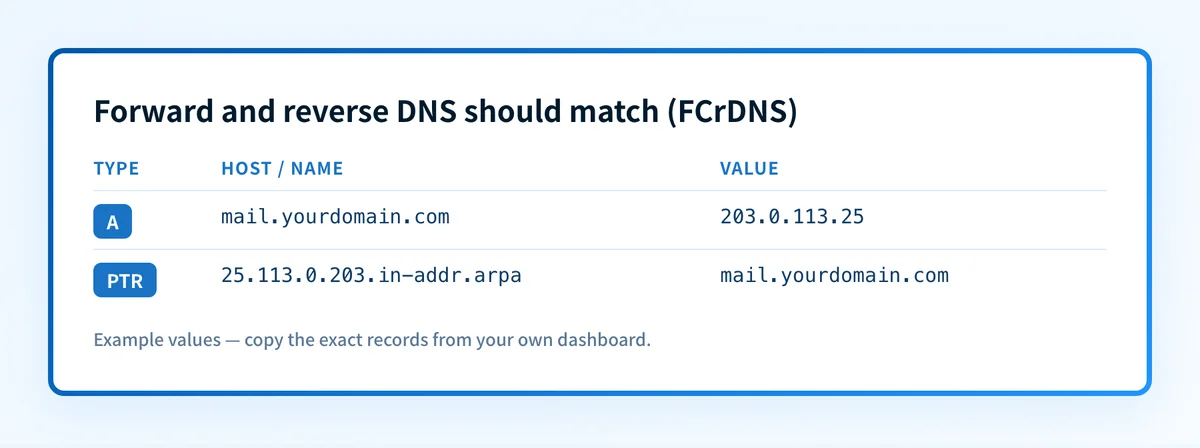 A record resolves the hostname to an IP; the PTR record resolves the same IP back to the hostname. Both sides must match for FCrDNS to pass.
What is FCrDNS and why does it matter?
A valid PTR record alone is not enough. Receiving mail servers perform what is called Forward-Confirmed Reverse DNS (FCrDNS): a two-step check that closes the loop.
- The receiving server takes the connecting IP address and looks up its PTR record to get a hostname.
- It then performs a forward DNS lookup on that hostname to verify it resolves back to the same IP.
FCrDNS is important because owning a domain name is easy; owning the IP block that the PTR record comes from is not. A matching PTR provides a meaningful signal that the sender controls both the IP and the domain.
Who can set a PTR record?
This is the most common point of confusion: you cannot set a PTR record in your own DNS control panel. PTR records live in the reverse DNS zone for the IP block, which is controlled by whoever owns that block: your hosting provider, VPS vendor, or ISP, not your domain registrar.
To set a PTR record, you need to ask the organization that assigned your IP address. Most cloud providers (AWS, GCP, Azure, DigitalOcean, Vultr, Linode) give you a self-service option in their control panel to set the reverse DNS hostname for each IP. Dedicated server hosts and ISPs typically require a support request.
The process in practice:
- Identify the public IP address your mail server sends from.
- Log in to your hosting provider's control panel (or open a ticket) and look for "Reverse DNS" or "PTR record" settings.
- Set the PTR hostname to match the
MAIL FROMhostname your server uses, for example,mail.yourdomain.com. - Verify the PTR with the IP reputation checker, or confirm that
dig -x 203.0.113.25returnsmail.yourdomain.com. - Verify FCrDNS: confirm that
dig A mail.yourdomain.comreturns203.0.113.25, or run the same A lookup in the DNS lookup tool.
Gmail, Outlook, and Yahoo now enforce PTR
As of 2025, the three major mailbox providers treat a missing or mismatched PTR record as a hard failure for bulk senders:
- Gmail (Google Workspace included): requires a valid PTR for all senders. Since November 2025, Gmail permanently rejects non-compliant mail with a 550 error rather than deferring it.
- Outlook.com / Hotmail / Live (Microsoft): announced enforcement in April 2025; began enforcing on May 5, 2025. Missing PTR causes rejection or routing to junk.
- Yahoo Mail: valid PTR has been a stated requirement for senders doing 5,000+ messages per day since the 2024 bulk sender policy update.
How PTR records interact with SPF and DKIM
PTR is not a replacement for SPF or DKIM. It is an independent layer of the authentication stack:
- SPF authorizes which IPs may send mail for your domain.
- DKIM signs the message body and headers so recipients can verify it was not tampered with.
- DMARC ties SPF and DKIM together and tells receivers what to do when they fail. Check your policy with the DMARC checker.
- PTR verifies that the sending IP is associated with a legitimate hostname. Receiving servers check it independently of SPF/DKIM, and some check it before evaluating SPF/DKIM at all.
Reducing spoofing and blacklist risk
Email spoofing is harder when your PTR and forward DNS agree. An attacker who controls a domain but not the IP block cannot set a PTR to match. The hosting provider or ISP would need to do that. This is why FCrDNS provides a stronger signal than just checking the sending domain.
A correct PTR also reduces your risk of appearing on blocklists. Many blocklist operators check for missing or generic PTRs (strings like static.1.2.3.4.example-isp.com) as a negative indicator, because spammers operating on rented IPs rarely have a properly configured reverse zone. Good domain reputation and a clean PTR reinforce each other.
For a broader view of how DNS underpins email deliverability, including how MX records, A records, and PTR records fit together, see our guide on how DNS fixes email deliverability.
Verifying your PTR record
Check the current PTR for any IP with a reverse DNS lookup. From the command line:
dig -x 203.0.113.25Or use the IP Reputation tool to run the same reverse lookup from a browser. You can also verify your MX records are pointing to the same hostname to make sure your DNS is internally consistent.
If the result comes back empty, or returns a generic hostname from your provider instead of your mail server's hostname, contact your hosting provider to set it correctly.
Check your full email authentication setup
PTR is one piece of the authentication stack. Run a free Email Security Score to see how PTR, SPF, DKIM, DMARC, and your MX record configuration are working together, and get a prioritized list of what to fix first.
Questions readers ask
Frequently asked questions
Does a PTR record work the same way for IPv6?
No: IPv6 uses a different zone. Instead of in-addr.arpa, IPv6 PTR records live in ip6.arpa. The IPv6 address is expanded to all 32 hex nibbles, reversed digit by digit (not octet by octet), and each nibble is separated by a dot. For example, 2001:db8::1 becomes 1.0.0.0.0.0.0.0.0.0.0.0.0.0.0.0.0.0.0.0.0.0.0.0.8.b.d.0.1.0.0.2.ip6.arpa. If you send over IPv6, each sending address needs its own PTR in ip6.arpa, Gmail and Outlook apply the same enforcement there.
Can an IP have more than one PTR record?
Technically the DNS allows it, but mail servers expect exactly one PTR per IP. Publishing multiple PTR records for the same IP causes unpredictable behavior, some receivers pick one arbitrarily, others fail FCrDNS entirely. The standard practice and the safe practice is one PTR per sending IP.
Who do I contact if my hosting provider does not offer PTR self-service?
Open a support ticket with your hosting provider or ISP and ask them to set the reverse DNS (PTR) for your IP to your mail server hostname. Provide both the IP address and the exact hostname you want. If your provider cannot or will not set a custom PTR (which is rare with reputable hosts) consider migrating to a provider that does; a missing PTR will increasingly block your mail as enforcement tightens.
Does PTR affect my IP Reputation?
Yes. A missing PTR is a direct negative signal used by many reputation systems and blocklist operators. A correct PTR that FCrDNS-validates is a positive signal. It establishes that the IP owner controls the sending hostname, which is a baseline expectation for legitimate sending infrastructure. Fixing a missing PTR is often the fastest single change to improve a newly allocated IP's reputation standing.

Written by
Dominic LandryDeliverability & DNS
Dominic Landry works on email deliverability and DNS configuration at Palisade, from SPF and DKIM records through to DMARC enforcement.
More from Dominic →