# Why does a Google DMARC report show DKIM fail?
> Interpret a Google DMARC aggregate report with DKIM fail, identify the sender, make a narrow repair, and validate the same path.
A DMARC aggregate report from `noreply-dmarc-support@google.com` with `dkim=fail` is evidence about a group of messages, not proof that your Google Workspace DKIM setup is broken. First identify the reported `source_ip`, `header_from`, DKIM `domain`, and `selector`. Then decide whether the source is authorized, whether another aligned identifier passed, and whether a fresh message from that same path reproduces the failure before changing DNS or policy.
## Quick takeaways
- The report sender identifies the reporting organization, while the report row identifies mail Google observed for your domain.
- A `policy_evaluated/dkim` result is a DMARC alignment result; `auth_results/dkim/result` is the reported DKIM verification result.
- An unknown source is an inventory or abuse investigation first, not a DKIM-record change.
- A legitimate source needs a cause-specific repair: signing configuration, a missing or wrong public key, or a message changed after signing.
- Do not weaken `p`, `adkim`, or `aspf` merely to make one row look better.
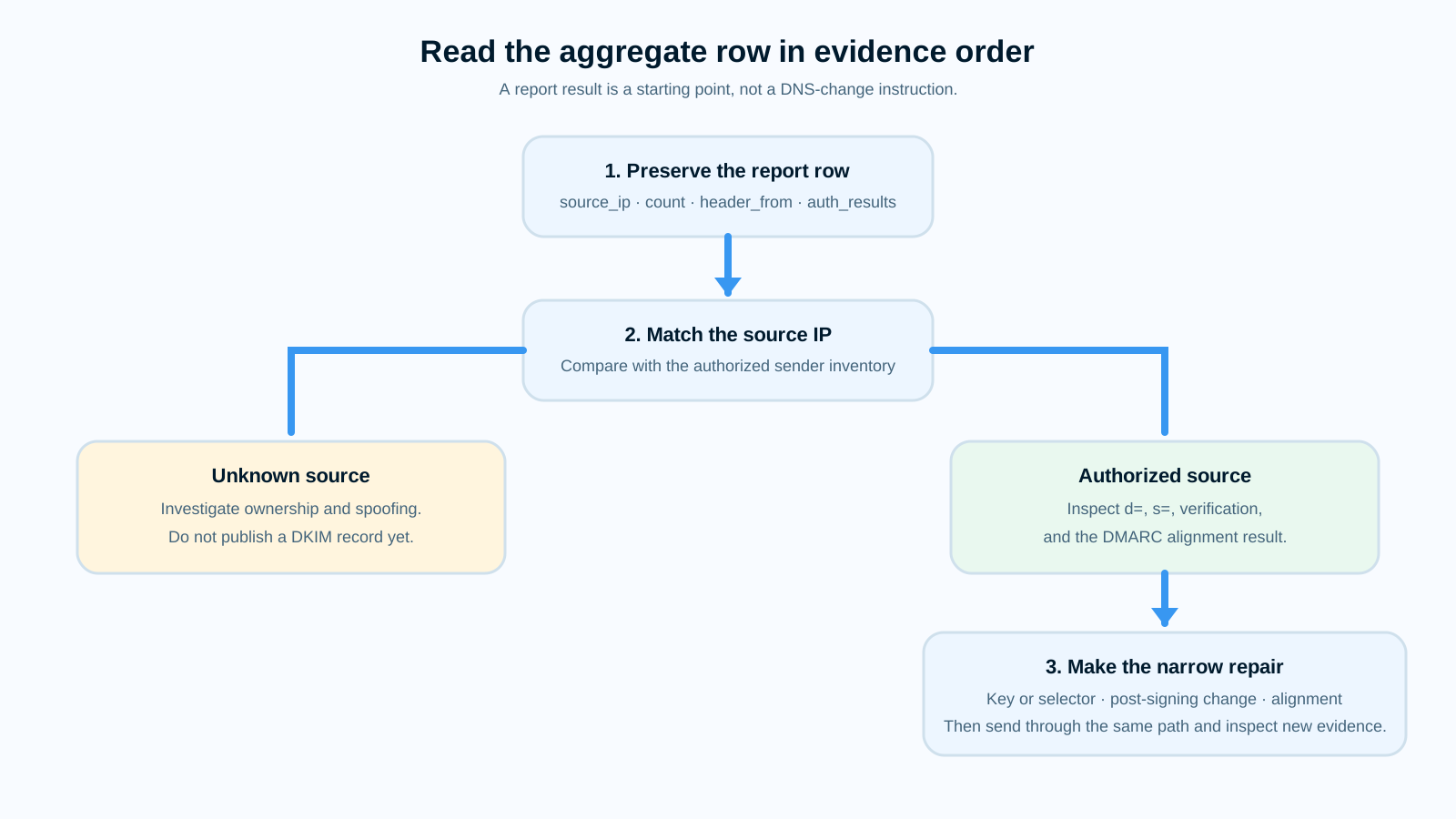
*Source: Original Palisade deterministic decision map based on the aggregate-report fields in [RFC 9990](https://www.rfc-editor.org/rfc/rfc9990.html). [Open the full-size diagram](/images/editorial/noreply-dmarc-support-google-com-dkim-fail/noreply-dmarc-support-google-com-dkim-fail-decision-map.svg).*
## What does the failure mean?
Google can send aggregate DMARC feedback to the `rua` address in your DMARC record. Under [RFC 9990](https://www.rfc-editor.org/rfc/rfc9990.html), that XML report groups messages by information including the connecting `source_ip`, `header_from`, policy result, and authentication results. It is an aggregate view of the report period, so use the count and date range to scope the investigation rather than treating it as a copy of one message.
The two DKIM fields answer different questions. `row/policy_evaluated/dkim` records the DKIM identifier-alignment outcome used for DMARC. `auth_results/dkim/result` records DKIM verification for the reported signing `domain` and `selector`. A row can therefore show DKIM verification failure, a valid-but-misaligned signature, or a DMARC pass through aligned SPF. Do not infer which one occurred from `dkim=fail` alone.
```xml
noreply-dmarc-support@google.com
086400
203.0.113.427
nonefailpass
example.com
example.commail1fail
```
## What usually causes it?
### The source is not in your authorized sender inventory
If `source_ip` does not match an approved mail system, do not assume it is a broken legitimate sender. Preserve the row, check the source with the service owner or your mail logs, and look for repeated volume. Aggregate reports are intended to give domain owners visibility into IP addresses sending on their behalf and their authentication outcomes, as [RFC 9990](https://www.rfc-editor.org/rfc/rfc9990.html) explains. The conclusion that an unmatched IP is unauthorized is an investigation inference, not a property the report can prove by itself.
### An authorized sender is not signing with the expected key
When the source is legitimate, compare the reported DKIM `domain` and `selector` with that sender's configuration. DKIM verification uses the public key retrieved from the selector record, and [RFC 6376](https://www.rfc-editor.org/rfc/rfc6376.html) defines the `d=` signing domain and `s=` selector as inputs to that lookup. A missing, retired, malformed, or wrong-key record can make the sender's signature fail.
### The message changed after it was signed
If a fresh message from the same service shows a verification failure, compare the message path and any downstream processing. DKIM signs selected headers and a hash of the canonicalized body; RFC 6376 specifies that the verifier recomputes the body hash. A footer, disclaimer, link rewrite, gateway, list, or forwarder can therefore break a previously valid signature. That causal mapping is an inference you confirm with the delivered message and `Received` headers.
### The signature verifies but does not align
If the message's verifier result is `dkim=pass` but the report's policy result for DKIM is `fail`, the signature may be valid without aligning to `header_from`. DMARC can still pass through aligned SPF. This is an alignment branch, not a verification repair; use the [DKIM alignment troubleshooting guide](/learning/why-does-my-dkim-signature-fail-alignment) after you confirm that distinction.
## How do I diagnose the failure?
### 1. Preserve one complete report row and its reporting period
Save the compressed XML safely, then record `report_metadata/email`, the date range, `source_ip`, `count`, `header_from`, `policy_evaluated`, and every DKIM result under `auth_results`. RFC 9990 defines `source_ip` as the connecting address and `count` as the number of messages to which that policy evaluation applied. Redact report IDs and any data your incident process treats as sensitive before sharing it.
### 2. Match the source to an approved sender before editing DNS
Compare the IP and `header_from` with your sending-service inventory, outbound logs, and any documented source ranges. If the source is not recognized, investigate ownership and spoofing exposure. If it is recognized, identify the system that applied the listed selector. For a broader cross-layer header method, see [email authentication failure troubleshooting](/learning/email-authentication-failure).
### 3. Separate verification from DMARC alignment
Read both DKIM locations in the XML. A failed `auth_results/dkim/result` calls for message and key evidence. A passing verification result with failed `policy_evaluated/dkim` calls for alignment evidence. RFC 9990 explicitly keeps these fields separate, so a policy relaxation is not a substitute for discovering which condition the row records.
### 4. Inspect a fresh message from the same sender path
Send a new test through the affected service and preserve the receiver-added `Authentication-Results`, `DKIM-Signature`, and `Received` headers. [RFC 8601](https://www.rfc-editor.org/rfc/rfc8601.html) defines `Authentication-Results` as a receiver-added field, so use it from the receiver you are investigating rather than a copied header from an untrusted hop. Capture `header.d`, `header.s`, and the verification reason if present.
## How do I fix it?
### Repair an authorized sender's selector or public key
Only after the source and selector are confirmed, publish or correct the public key at the exact selector name the sender uses. A public lookup is useful for this narrow check: run the [Palisade DKIM checker](/tools/dkim) with the reported signing domain and selector. It cannot identify an IP owner, reconstruct an old report, or prove that a historical message was modified.
### Move signing after the last content-changing hop
When fresh-message evidence shows post-signing modification, move DKIM signing after the footer, gateway, or rewrite that changes the message, or have the modifying system re-sign it. Do not add a body-length workaround or loosen DMARC policy as a substitute. If the verifier specifically says `body hash did not verify`, follow the focused [DKIM body-hash repair guide](/learning/dkim-fail-body-hash-did-not-verify).
### Contain an unknown source without changing the policy first
For an unknown source, verify ownership and stop unauthorized use through the responsible system or incident process. Keep the current policy decision separate from this technical investigation. Changing `p`, `adkim`, or `aspf` may alter reporting or enforcement, but it does not repair a source that cannot produce an aligned authentication result.
## How do I validate the repair?
Repeat the same sending path that produced the row. Confirm the fresh message has the intended `header.d` and `header.s`, the receiver's `Authentication-Results` shows the expected verification and alignment outcome, and the public selector record resolves. Then wait for a later aggregate-report period and compare the affected source's count and results. A passing public key lookup alone does not prove delivery behavior or that Google will report a particular outcome.
## Check the reported selector, then address recurring report gaps
If the report names an exact DKIM domain and selector, check whether its public key is currently published before changing it.
[Check a DKIM selector](/tools/dkim)
The lookup cannot identify the reporting IP owner, inspect a past message, or explain a receiver's historical verification result. Keep those decisions tied to the aggregate row and a fresh same-path message.
If later report windows keep identifying unknown sources or failing legitimate senders, the work becomes recurring source-specific investigation rather than another one-time selector check. Palisade's [DMARC Agent](https://docs.palisade.email/page-breakdowns/domain-overview/) analyzes DMARC aggregate-report data, identifies sending sources and authentication or alignment issues, creates prioritized remediation tickets, and detects when a domain appears ready for the next policy stage.
[Start with Palisade](https://app.palisade.email/signup?utm_source=palisade_learning&utm_medium=article&utm_campaign=dmarc_troubleshooting&utm_content=noreply-dmarc-support-google-com-dkim-fail)
Palisade does not autonomously change DNS or DMARC policy, repair every sender, prove every future message will authenticate, or control a receiver's delivery decision. Your team reviews the evidence and applies changes.
## Sources and further reading
- [RFC 9990: DMARC Aggregate Reporting](https://www.rfc-editor.org/rfc/rfc9990.html)
- [RFC 6376: DomainKeys Identified Mail](https://www.rfc-editor.org/rfc/rfc6376.html)
- [RFC 8601: Authentication-Results](https://www.rfc-editor.org/rfc/rfc8601.html)
- [Palisade Docs: Domain overview](https://docs.palisade.email/page-breakdowns/domain-overview/)
## Frequently asked questions
### Does a Google DMARC report prove that Google sent my mail?
No. It identifies Google as the report generator, while the row's `source_ip` identifies a connecting system Google observed. Match that source with your sender inventory before treating it as Google Workspace mail or changing its DKIM record.
### Can DKIM fail while DMARC passes?
Yes. DMARC can pass when aligned SPF passes even if the reported DKIM verification or DKIM alignment result fails. Inspect both `policy_evaluated` and `auth_results` to see which result the row contains.
### Should I change my DMARC policy after one failing row?
No. First identify the source and reproduce the relevant result on a fresh message. A policy change affects receiver instructions and reporting, but it does not fix a wrong key, a modified message, or an unauthorized sender.
### Why does the report show a selector I do not recognize?
The selector belongs to the DKIM signature the receiver evaluated for that reported sender path. If the source is authorized, identify the service that signed it. If it is not authorized, preserve the evidence and investigate the source before publishing any record.